Restaurant Data Export: How to Get Your Sales Data Into Excel (and What to Do With It)
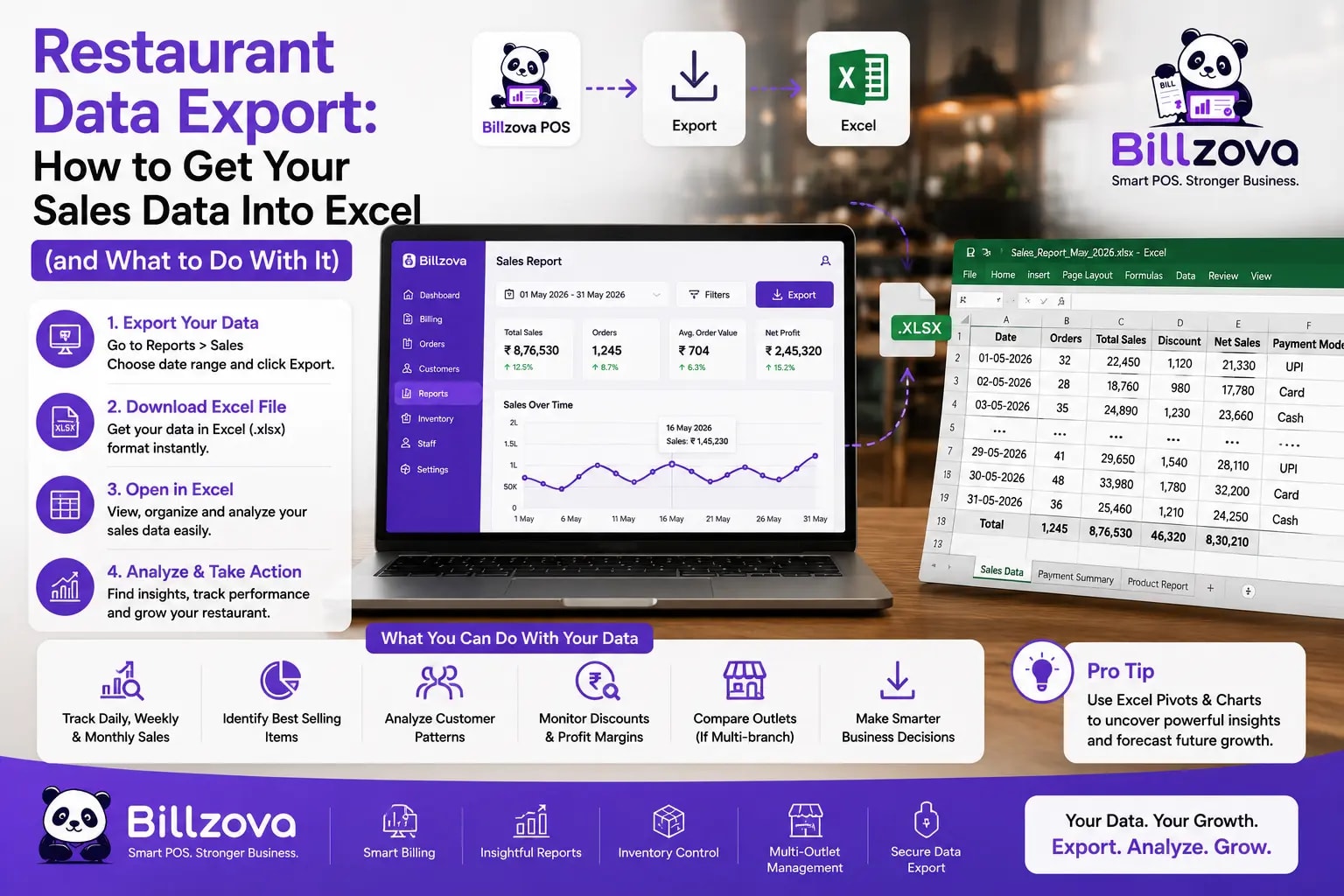
Most restaurant owners know their POS can export data to Excel. Fewer have actually thought through what to do with it beyond the one habitual reason — forwarding a file to the accountant once a month and not looking at it again until the next filing deadline. That's a real, legitimate use. It's also a small fraction of what a restaurant's own sales data can actually tell you, sitting unused between filing periods.
W. Edwards Deming
Statistician and management consultant
A restaurant generates a genuinely large amount of data every single day — every bill, every item sold, every payment method, every customer visit — almost all of which gets used once, for one purpose, and then forgotten. This guide is about the export itself (what should actually be exportable, and who should be able to do it) and, just as importantly, what to actually do with the data once it's in your hands.
What "Data Export" Actually Means at a Restaurant
Sales reports are the obvious candidate, but a restaurant's genuinely useful exportable data goes well beyond just revenue numbers. Treating export as "just the sales report" undersells what's actually available and useful.
| Data Type | What It Contains |
|---|---|
| Sales reports | Daily, weekly, monthly revenue, bill-wise and item-wise detail |
| GST summary | Rate-wise breakdown, CGST/SGST totals, exempt sales separated |
| Customer records | Visit count and spend per customer |
| Staff data | Attendance and shift history |
| Inventory | Stock levels and transaction history |
| Purchasing | Purchase orders and supplier bills |
| Expenses | Logged expenses with categories |
Each of these answers a genuinely different question, and treating export as a single, undifferentiated "get my data" button undersells how much of a restaurant's actual operating picture lives across these different data types — not just how much you sold, but where your inventory is going, which customers keep coming back, and how staffing costs compare to revenue over a given period.
The Most Common Reason Owners Export Data
Handing sales and GST data to an accountant is, realistically, the single most common reason most restaurant owners ever click an export button — and it's a legitimate, necessary use. A clean, correctly categorized export — GST rate-wise, CGST/SGST separated, formatted in a way that's straightforward to bring into standard accounting software — genuinely saves your CA real reconciliation time compared to raw, unsorted sales records they'd otherwise have to sort through themselves.
But treating this as the only reason to export data means a huge amount of genuinely useful information gets generated, exported once a month, handed off, and never actually looked at again by the person who could use it to make real operating decisions.
Using Exported Data for Decisions, Not Just Compliance
Checklist
- Item-wise sales export reveals which dishes are actually driving revenue, not just which feel popular from memory
- Payment-mode breakdown shows your real cash-versus-digital mix, useful for everything from till planning to spotting an unusual shift
- Customer visit and spend data identifies your genuine repeat customers, not just the ones you happen to recognize by face
- Staff attendance exported alongside sales shows whether staffing levels actually match your real demand patterns by shift
- Inventory transaction history reveals consumption patterns worth checking against your purchasing and menu pricing
None of this requires sophisticated analysis tools — a restaurant owner comfortable in Excel can answer real, specific questions from exported data that would otherwise stay invisible, buried inside a POS system's own reporting screens that weren't necessarily built for the specific cross-cutting question you actually want answered.
A Simple Weekly Habit Worth Building
The single highest-leverage change most owners could make isn't a new report or a new tool — it's simply setting aside 15 minutes once a week to actually look at exported data with a real question in mind, rather than exporting reactively only when something specific is needed.
Best Practice
- Pick one specific question each week — which item sold best, which day was slowest, which customer hasn't visited in a while — rather than trying to review everything at once
- Export just the data needed to answer that specific question, not the entire business's data every time
- Compare against the same period last week or last month, not just the raw number in isolation
- Write down anything genuinely surprising — a pattern worth investigating further is easy to forget by the next week if it isn't noted somewhere
- Revisit past weeks' questions occasionally to see whether anything you noticed actually changed after you acted on it
This habit costs almost nothing in actual time, and it's the difference between data that exists somewhere in your system and data that's actually informing real decisions. Most of the value in this guide isn't about the export mechanism itself — it's about building the habit of actually using what you're already generating.
Who Should Be Able to Export Data
Not every staff member needs export access, and treating it as a permission — the same way discount or void permissions work — rather than a blanket capability everyone has, matters for reasons beyond just tidiness. Your restaurant's full sales, customer, and financial data leaving the building as a downloadable file is worth controlling deliberately, the same underlying principle covered in our staff management guide — access should match what a given role actually needs, not default to everyone having everything.
A sensible default: owners and managers retain export access, since it's genuinely part of running the business; cashiers and kitchen staff typically don't need it, since it isn't part of their actual job. A real audit log of who exported what, and when, adds a further layer — not because export itself is inherently risky, but because knowing your own restaurant's data-handling history is a reasonable thing to actually have on record.
GST Exports Specifically: What Your CA Actually Needs
A genuinely useful GST export isn't just a raw sales dump — it should already be structured the way your CA needs it: taxable sales broken down by rate (5%, 12%, 18%), CGST and SGST totals calculated per period, exempt or non-GST sales clearly separated rather than mixed in, and invoice-wise detail available if an audit or reconciliation question comes up later.
This connects directly to the filing process covered in our GSTR-1 filing guide — a well-structured export, categorized consistently with how GSTR-1's own tables are organized, turns your CA's monthly reconciliation work from "sort through raw data first, then file" into "review already-correct data, then file." That's a meaningfully smaller task, every single filing period, for as long as the restaurant operates.
A Worked Example: What One Export Can Actually Reveal
Take an illustrative month's item-wise export, reviewed with a specific question in mind rather than just glanced at: which items sell well on weekdays but poorly on weekends, or vice versa? A restaurant that's never asked this question might be running an identical menu push and identical staffing pattern across both, when the underlying demand — visible clearly in the exported data, invisible from daily observation alone — is genuinely different.
Or take a customer-spend export, sorted by total spend over the period: the top 20 customers by spend are often a small fraction of total visits but a disproportionate share of revenue — a genuinely useful thing to know if you're thinking about a loyalty program, a personal outreach, or simply understanding who your most valuable relationships actually are, information that's sitting in exportable data most owners never actually sort and review this way.
Common Mistakes When Working With Exported Data
Exporting once and never establishing a habit. A single export, reviewed once, answers a single moment's question. The real value compounds when export and review become a regular habit — even monthly — rather than a one-off exercise done once and forgotten.
Only ever exporting for the accountant. As covered throughout this guide, compliance is one use among several — treating it as the only reason to export leaves genuinely useful operational insight unused, sitting in the same data you're already generating anyway.
Giving broad export access without a real reason. Export access that's granted to everyone by default, rather than deliberately to the roles that actually need it, is an unnecessary exposure of your restaurant's full data with no real corresponding benefit.
Not connecting exported data back to the reports it came from. Exported data is most useful when it's reviewed alongside the broader reporting habit covered in our sales reporting guide — a spreadsheet sitting disconnected from your regular reporting rhythm tends to get looked at once and abandoned.
Data Portability: Why "Can I Get My Data Out" Matters More Than Owners Realize
There's a broader point worth making explicitly, beyond any single use case: the ability to export your complete business data, at any time, without restriction or a support request, is a real form of protection for your own business. Data that's genuinely yours — not locked into one system with no clean way out — means switching software, working with a new accountant, or simply keeping your own independent backup are all things you can actually do, rather than being structurally dependent on one vendor's continued cooperation.
This matters more than it might seem at first. A restaurant's sales history, customer relationships, and inventory data represent real, accumulated business value — treating easy, complete export as a baseline expectation, not a premium feature to be grateful for, is a reasonable standard to hold any software you depend on to.
Inventory and Purchasing Exports: An Underused Combination
Sales data gets most of the attention, but inventory and purchasing exports, reviewed together, answer a genuinely different and often-overlooked question: is what you're buying actually matching what you're using? A supplier bill export compared against an inventory transaction export over the same period can reveal a gap — buying meaningfully more of an ingredient than your recorded usage would explain — that's worth investigating, whether the explanation turns out to be waste, portioning drift, or something else entirely.
This is a comparison most restaurants never actually make, simply because purchasing and inventory tend to live in separate mental categories rather than being reviewed side by side. Exported together, they're just two spreadsheets and a straightforward comparison — but almost nobody does it as a matter of routine, which is exactly why it tends to surface real, previously-invisible gaps when someone finally does.
Expense Data: The Export Most Owners Forget Exists
Sales, GST, and customer data get exported regularly by most owners who export anything at all. Expense data — rent, utilities, supplier payments, miscellaneous costs — tends to be tracked, if at all, in a completely separate system or habit, disconnected from the rest of the restaurant's exportable financial picture.
Bringing expense exports into the same regular review habit as sales data is what actually enables a real profitability picture, not just a revenue one — a month that looks strong on sales alone can look very different once expenses for that same period are reviewed alongside it. This is a genuinely underused export specifically because it's easy to forget it exists as part of the same system already generating your sales data.
Frequently Asked Questions
What file format does exported restaurant data typically come in?
Excel (.xlsx) is the most common and broadly useful format, since it's readily usable both for direct review and as an input into most accounting software's own import process.
Can I export data for a custom date range, not just standard monthly periods?
A properly built export feature should support any custom date range, since the period you actually need — a specific week, a specific event, a specific filing period — doesn't always align neatly with a calendar month.
Is there a cost or limit to how often I can export data?
This varies by provider — worth confirming directly, but a reasonable baseline expectation is that export should be unrestricted and included, not metered or charged per download.
Can I control which specific reports a staff member can export, not just export access as a whole?
In a properly built permission system, yes — granular control over which specific report types a given role can export is more useful than an all-or-nothing export toggle, since a manager might reasonably need sales exports but not full customer-data exports, for example.
Does exported data include historical information, or only recent activity?
A good export feature should let you reach back to any period your account has data for, not just recent activity — historical exports matter for year-over-year comparisons and long-term record-keeping.
Is customer data export a privacy concern I should think about?
Yes, worth taking seriously — customer data leaving your system as a file is exactly why export access should be restricted to roles that genuinely need it, and why an audit log of exports is a reasonable safeguard rather than an unnecessary formality.
Can exported data be re-imported if I need to restore or migrate it?
This depends on the specific systems involved on both ends — export and import aren't automatically symmetric, so confirm directly with whatever system you're migrating to or from rather than assuming a clean round-trip.
Should I export data before switching to a different POS system?
Yes, always — regardless of what a new system claims to migrate automatically, having your own complete export of sales, customer, and financial history as a backup before any migration is basic due diligence, not an optional extra step.
Is it worth exporting data even if I have no immediate use for it?
A monthly export, kept as your own independent record even without an immediate specific question in mind, is a reasonable habit — it costs almost nothing and means historical data is available later, whether for a future analysis, a dispute, or simply your own peace of mind.
Can I schedule exports to happen automatically, rather than triggering them manually each time?
This depends on the specific system — worth checking whether automatic, scheduled exports are supported if a fully manual process each time isn't sustainable for your own habit of actually reviewing the data regularly.
Does exporting large amounts of historical data slow down my POS during a busy shift?
A properly built export feature should run as a background or on-demand process that doesn't interfere with live billing — exporting a month's worth of history shouldn't measurably affect counter speed during active service.
What's the difference between a report viewed on-screen and the same data exported to Excel?
An on-screen report is built for quick review within the system's own interface. An export gives you the raw, structured data to manipulate, combine with other exports, or hand to someone outside the system entirely — genuinely different use cases even when the underlying numbers are identical.
The Bottom Line
Data export is easy to think of as a compliance checkbox — the thing you do once a month for your accountant and otherwise ignore. The restaurants that get more value from it treat the same export button as a genuine decision-making tool: which dishes actually perform, which customers actually matter most, whether staffing matches real demand — all sitting in data you're already generating, just rarely actually reviewed for anything beyond a filing deadline.
billzova's data export covers sales, GST, customers, staff, inventory, and expenses — one click, any date range, with export access controlled per role — included standard at ₹399/month, feeding the same reports you already review regularly. The data was always yours; the only real question is whether you're actually looking at it, or just forwarding it once a month and moving on.
Billzova Team
Restaurant POS & Billing Experts
We build Billzova — GST billing, KOT, offline mode, inventory and reports for Indian restaurants. This team writes from what we see helping real restaurants bill faster every day.
Run your restaurant on billzova
GST billing, KOT, offline mode, inventory & reports in one app. ₹399/month — first month free.