Restaurant Staff Management: Roles, Permissions, and Shift Scheduling Explained
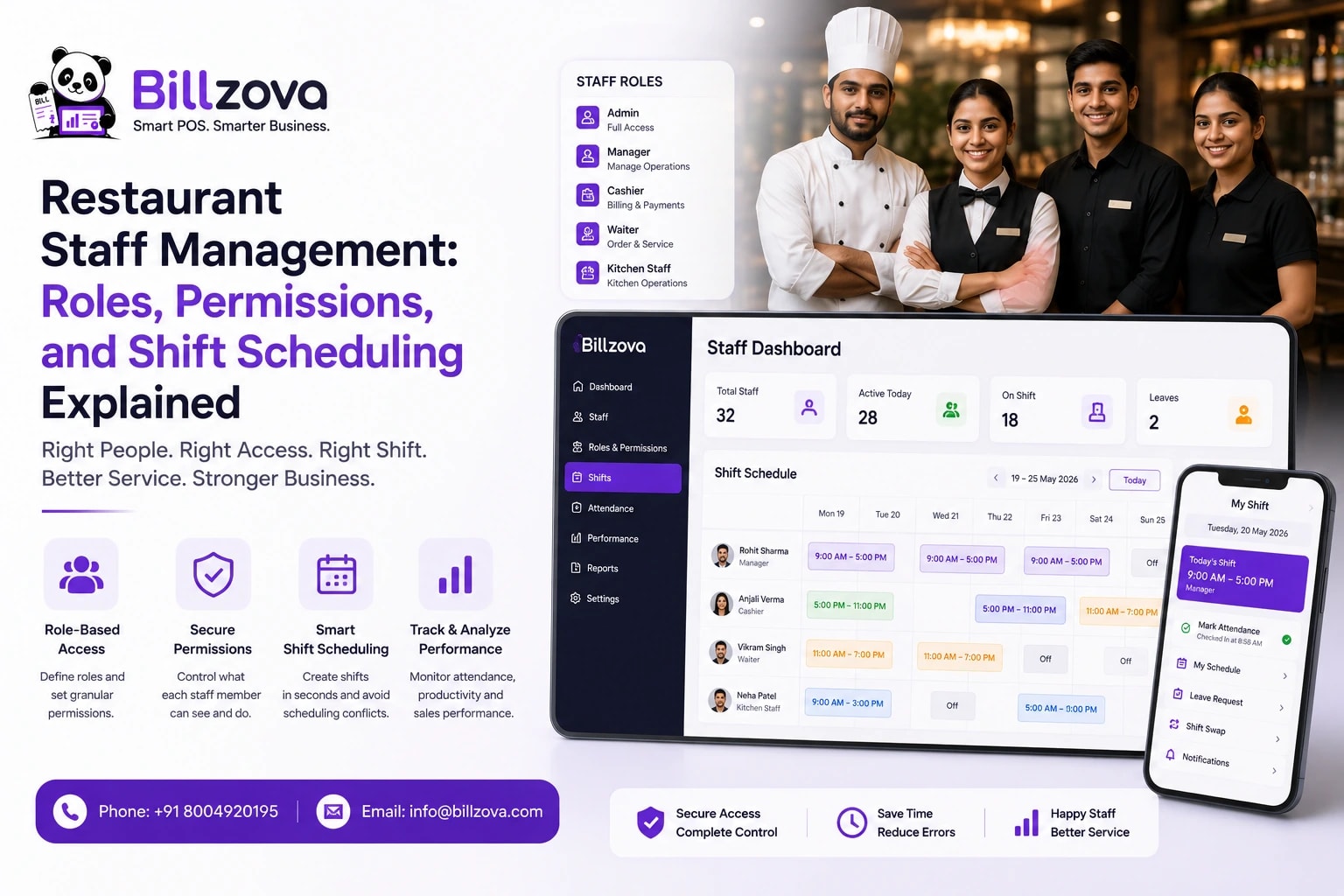
Walk into a lot of small restaurants and ask how staff log into the POS, and the honest answer is often: everyone uses the same login. One shared password, taped to the counter or simply memorized by the whole team, used by the cashier, the waiter covering a shift, and the manager filling in during a rush. It works, in the sense that everyone can get in and bill a customer. It also means that if anything goes wrong — a suspicious void, a discount applied that shouldn't have been, a report that doesn't add up — there is, structurally, no way to know who actually did it.
Bruce Schneier
Security technologist and author
Staff management, in the sense this guide means it, isn't really about locking things down out of suspicion. It's about building a process where every action at the counter is attributable to a specific person, where the actions that actually matter require the right level of authority, and where you have a real, searchable record of who worked when — not because you distrust your team, but because a restaurant that can't answer "who did this" when it matters is running on hope, not process. This guide walks through what that process actually looks like in practice, piece by piece.
Why "Everyone Uses the Same Login" Is a Bigger Problem Than It Looks
The obvious risk of a shared login is that anyone can do anything — apply a discount they shouldn't, void a bill without a real reason, see reports they have no business seeing. But the deeper, less obvious problem is what happens when something does go wrong: there's no way to narrow it down. A concerning pattern in your reports — an unusual number of voids, a spike in discounts on a particular shift — becomes a mystery instead of a lead, because the system has no record of which specific person was actually at the counter when it happened.
This connects directly to a topic worth taking seriously on its own: our guide on restaurant billing fraud warning signs covers exactly the kind of pattern that becomes visible once individual staff accountability exists — and stays permanently invisible without it. A shared login doesn't just create risk; it actively prevents you from ever being able to investigate that risk properly, even if you wanted to.
A Discrepancy, Investigated Two Ways
Picture the same problem — a month where discount totals look unusually high — investigated under both systems.
With a shared login: The owner notices discounts are up 40% versus last month. There's no way to narrow down who applied them, at what times, or why — the entire staff was operating under one indistinguishable account. The only real option is asking everyone directly, which tends to produce either a genuine explanation or an uncomfortable, unresolved standoff, with no data to settle it either way.
With individual logins: The same discrepancy shows up, but now it's immediately clear that 70% of the increase traces to two specific shifts, both worked by the same person. That's not an accusation on its own — plenty of innocent explanations exist, a new promotion, a genuine misunderstanding of policy — but it's a specific, answerable question instead of a restaurant-wide mystery. The conversation that follows is grounded in real numbers, not a guess about who to even ask.
0 vs 1
Roles vs Permissions: What's the Actual Difference
These two words get used almost interchangeably, but they mean genuinely different things, and understanding the distinction is what makes staff access control actually useful rather than just a login screen with extra steps.
A role is a named job function — cashier, waiter, kitchen staff, manager — that bundles together a sensible default set of what that person typically needs to do. A permission is one specific capability — apply a discount, void a bill, view sales reports — that can, in a well-built system, be granted or withheld individually, even outside the defaults a role normally implies.
| Role | Typical Access | Typically Restricted From |
|---|---|---|
| Cashier | Taking orders, billing, basic payment collection | Discounts, voids, reports, settings |
| Waiter | Taking orders, sending to kitchen | Billing/settlement, reports, settings |
| Kitchen staff | Viewing and updating order/KOT status | Billing, discounts, reports, settings |
| Manager | Most day-to-day operations, including discounts and voids | Deep account settings, sometimes owner-only financial views |
| Owner | Everything | Nothing — full access by definition |
The value of separating roles from individual permissions is flexibility without complexity. Most staff fit a standard role's defaults perfectly well — you don't want to configure every single cashier's access from scratch. But when a specific person genuinely needs one extra capability beyond their role's normal default, a good system lets you grant that one thing individually, rather than forcing a choice between "give them the whole manager role" or "they simply can't do this specific task."
Individual Logins — Why They Beat a Shared Password
A separate login for every staff member — their own email and password, rather than one shared password — solves the accountability problem directly. Owners and managers also confirm any new device with a one-time code sent on WhatsApp or email, so a leaked password alone isn't enough to get in. And every action stays traceable to the specific person logged in at the time it happened.
Checklist
- Each staff member gets their own login, never shared or written down for others to see
- Passwords can be changed easily if one is ever compromised or forgotten
- A staff member's login can be switched off instantly the moment they leave — their sessions end, no lingering access
- Sensitive actions like discounts and voids can be kept to managers only, through roles and per-staff permissions
- Every action taken is attributable to whoever was actually logged in when it happened
That third point deserves emphasis: disabling access immediately on staff exit is one of the most commonly overlooked security basics in small businesses generally, not just restaurants. A former employee who still has working access — because nobody thought to revoke it — is a real, avoidable risk that a shared-password system makes almost impossible to fully close, since you'd have to change the one password everyone still knows, disrupting everyone currently employed just to lock out one person who's already left.
What Should Require a Manager's Sign-Off
Not every action needs the same level of scrutiny — treating a routine order the same as a large discount or a bill void would create friction without adding any real protection where it doesn't matter. The actions worth gating behind a manager-level check specifically are the ones with real financial or reputational consequence if misused.
Discounts. A cashier able to apply any discount, at any size, without oversight is a common and specific gap — a small, "friendly" discount here and there rarely gets questioned individually, but it adds up quietly over time if nobody's watching the pattern.
Voids and refunds. These directly reverse revenue that was otherwise recorded, which makes them exactly the kind of action worth a second set of eyes — not because most voids are suspicious, but because the ones that are tend to look identical to routine ones without a real check in place.
Reports and financial visibility. Not every staff member needs to see the restaurant's full sales history or profit figures — restricting deeper financial reporting to management and ownership isn't about secrecy for its own sake, it's simply matching visibility to what each role actually needs to do its job.
Shift Tracking: Turning "Who Was Working" Into a Real Record
Every POS session, properly tracked, ties directly to the staff member who opened it — which means shift data isn't just a schedule, it's a real operational record. An opening cash balance recorded at shift start, and a closing Z-report tied to that same session, gives you a per-shift, per-staff-member reconciliation without any separate manual process layered on top of normal billing.
This matters for more than just security — it's genuinely useful for ordinary staffing decisions too. Sales per staff member per shift is a real, checkable number, not an impression, which makes conversations about performance, scheduling, or staffing levels grounded in something concrete rather than a manager's general sense of who seems busy.
Digital Attendance Without a Separate HR Tool
Attendance tracking doesn't need to be a separate system bolted onto your POS — clock-in and clock-out, recorded automatically through the same login and logout staff already use to work their shift, produces a real attendance log with zero extra effort from anyone. A date-range view makes spotting a late-arrival pattern or an unusual absence trend straightforward, and exporting that log for payroll processing turns a manual reconciliation task into a data export.
The practical benefit compounds specifically because it's the same login used for billing — there's no separate "clock in" step staff have to remember on top of their actual job, which is exactly the kind of friction that causes people to eventually stop bothering with a standalone attendance system.
Onboarding and Offboarding Staff Properly
Best Practice
- Assign a new staff member the role that actually matches their job, not a broader one "just in case"
- Create their own login immediately — never have them share an existing person's login, even temporarily
- Review whether any custom permissions beyond their role's default are genuinely needed, rather than granted by habit
- The moment someone leaves, switch off their login the same day — not "sometime this week"
- Periodically review who has manager-level access and confirm it's still an accurate, current list
That last point is worth doing more than once, at setup and then never again. Staff roles change — someone gets promoted, someone's responsibilities shift — and access that made sense a year ago doesn't always get revisited when circumstances change, quietly leaving broader permissions in place for someone whose actual current job no longer needs them. A simple, low-effort habit that catches most of this drift: whenever you do a broader staffing review — a seasonal schedule change, a round of promotions — treat a quick access review as part of the same conversation, rather than a separate task that's easy to forget entirely.
Custom Roles for Non-Standard Setups
Standard roles cover most restaurants well, but not every operation fits neatly into cashier, waiter, kitchen, and manager. A bar with a dedicated bartender role, a cloud kitchen with a packing-and-dispatch role distinct from cooking, or a cafe where the same person handles both counter billing and light kitchen work — these all benefit from a custom role built around what that specific job actually needs, rather than forcing a fit into a generic default that grants either too much or too little.
The value of custom roles isn't complexity for its own sake — it's precision. A role that matches reality closely means less manual permission-tweaking per individual staff member, since the role itself already reflects how that job genuinely works at your specific restaurant.
A practical way to decide whether a custom role is worth creating: if you find yourself individually adjusting the same one or two permissions for every person doing a particular job, that's a strong signal the job itself deserves its own role rather than continuing to patch a generic default the same way for each new hire who takes it on.
What Good Staff Access Control Actually Prevents
It's worth connecting this directly back to the bigger picture: proper role-based access and individual staff accountability isn't a separate initiative from loss prevention — it's the foundation underneath it. Every pattern covered in our guide to billing audit and unusual patterns — a specific staff member's deletion rate, unusual activity clustered around one person's shifts — depends entirely on being able to attribute actions to individuals in the first place. Without real per-staff logins, there's no staff-level pattern to even look for; everything blurs into one undifferentiated, anonymous stream of activity.
Put simply: staff management isn't the exciting half of restaurant security, but it's the structural half everything else depends on. A restaurant with excellent fraud-detection reporting sitting on top of a shared-login system is watching for a pattern it has no actual way to trace back to a person — all the analysis in the world is only as useful as the identity data underneath it, and that identity data starts with something as basic as everyone having their own login.
Staff Access Across Multiple Branches
Role-based access gets more important, not less, once a restaurant has more than one location. A single owner genuinely can't personally supervise every counter across multiple branches, which makes the same accountability principles covered in this guide — individual logins, sensible role defaults, manager-level checks on sensitive actions — the actual mechanism that lets a multi-location restaurant operate with confidence rather than constant, exhausting oversight. See our broader guide on multi-branch management for how staffing fits into running several locations from one account.
A useful principle for multi-branch setups specifically: think through whether a given manager genuinely needs visibility into every branch's figures, or only their own — role-based access isn't only about job function, it can also be about which physical location's data is actually relevant to a given person's real, day-to-day responsibilities.
Frequently Asked Questions
Do all staff need a role, or just managers?
Every staff member logging into the POS should have their own login and role — the accountability and shift-tracking benefits apply to a cashier or waiter exactly as much as to a manager, arguably more, since front-line staff generate the highest volume of day-to-day transactions.
What happens if a staff member forgets their password?
A manager or owner can reset it from the dashboard — there's no need to share another staff member's login as a workaround, which defeats the entire purpose of individual accountability.
Can a manager see what a specific cashier did during their shift?
Yes — since every action is tied to whoever was logged in when it happened, reviewing a specific staff member's activity for a given shift is a direct lookup, not a reconstruction project.
Is it worth setting up roles for a very small restaurant with only two or three staff?
Yes — the accountability and attendance benefits don't require a large team to matter. A two-person restaurant still benefits from knowing exactly which of those two people did what, especially since with fewer staff, each individual's actions carry proportionally more weight.
Can staff clock in from home, or does it require being at the restaurant?
Attendance tracking through POS login is tied to actually logging into the system to work — it's not a remote check-in mechanism, which is appropriate for a role that's inherently on-premise work like most restaurant floor and kitchen positions.
Does role-based access slow down service during a busy shift?
Not in practice — staff log in when their shift starts, not before every order. The only friction is that genuinely sensitive actions, like a discount or a void, are kept to a manager's own login, which is a deliberate, small speed bump specifically for the actions worth pausing on, not for routine order-taking.
What's the difference between switching off a staff login and deleting the account?
Disabling stops access immediately while preserving the historical record of everything that account did — useful since you still want that person's past shifts and sales history intact for your own records. Deleting removes the account entirely, which is a more permanent, less commonly necessary step.
Can I temporarily promote a cashier to manager-level access for one shift?
Individual permission grants exist specifically for this kind of situation — extending a specific extra capability to a specific person without reassigning their entire role, which is more precise than a temporary blanket promotion that grants more than the situation actually calls for.
Does shift tracking work the same way for staff who split time between roles?
Shift tracking ties to whoever is logged in during that session, regardless of role — a staff member who sometimes works as a cashier and sometimes helps in the kitchen would show accurate shift records for whichever role they were actually logged in under at the time.
Is attendance data useful for anything beyond payroll?
Yes — beyond payroll processing, a clear attendance pattern over time is useful context for scheduling decisions, and a sudden change in someone's attendance pattern is often worth a conversation on its own, independent of any payroll implication.
How many custom roles can a restaurant realistically set up?
There's no meaningful limit worth worrying about — the practical constraint isn't the system, it's keeping the number of roles small enough that they stay easy to understand and manage. A handful of well-thought-out roles usually serves a restaurant better than a dozen narrow ones nobody remembers the exact difference between.
The Bottom Line
A shared login feels simpler in the moment — one password, no setup, everyone can just get to work. The real cost shows up later, exactly when you need it least: a question you can't answer, a pattern you can't trace, a former employee whose access you never actually closed. Individual logins, sensible role defaults, and a manager check on the actions that actually matter aren't bureaucracy for its own sake — they're what makes "who did this" always have a real answer.
billzova's staff management includes role-based access, individual staff logins, automatic shift tracking, and digital attendance — all from one dashboard, included standard at ₹399/month, with your first month free. None of it requires a separate HR system or a steep setup process; it's built into the same login every staff member already uses to do their job.
Billzova Team
Restaurant POS & Billing Experts
We build Billzova — GST billing, KOT, offline mode, inventory and reports for Indian restaurants. This team writes from what we see helping real restaurants bill faster every day.
Run your restaurant on billzova
GST billing, KOT, offline mode, inventory & reports in one app. ₹399/month — first month free.