🍽️ Restaurant Websites with Online Ordering

Your own restaurant website
that sends every order straight into your POS.

A website built for your restaurant, showing your live menu and prices from Billzova. Customers order pickup or delivery, your POS rings, you get an email, staff accept — and not a rupee of commission goes to anyone. Websites from ₹7,999, GST included — Website offer on now.

💸₹11Per day (yearly)
📅₹399Per month
📡100%Offline ready
🎁Free1-month trial
billzova POS — Restaurant point of sale
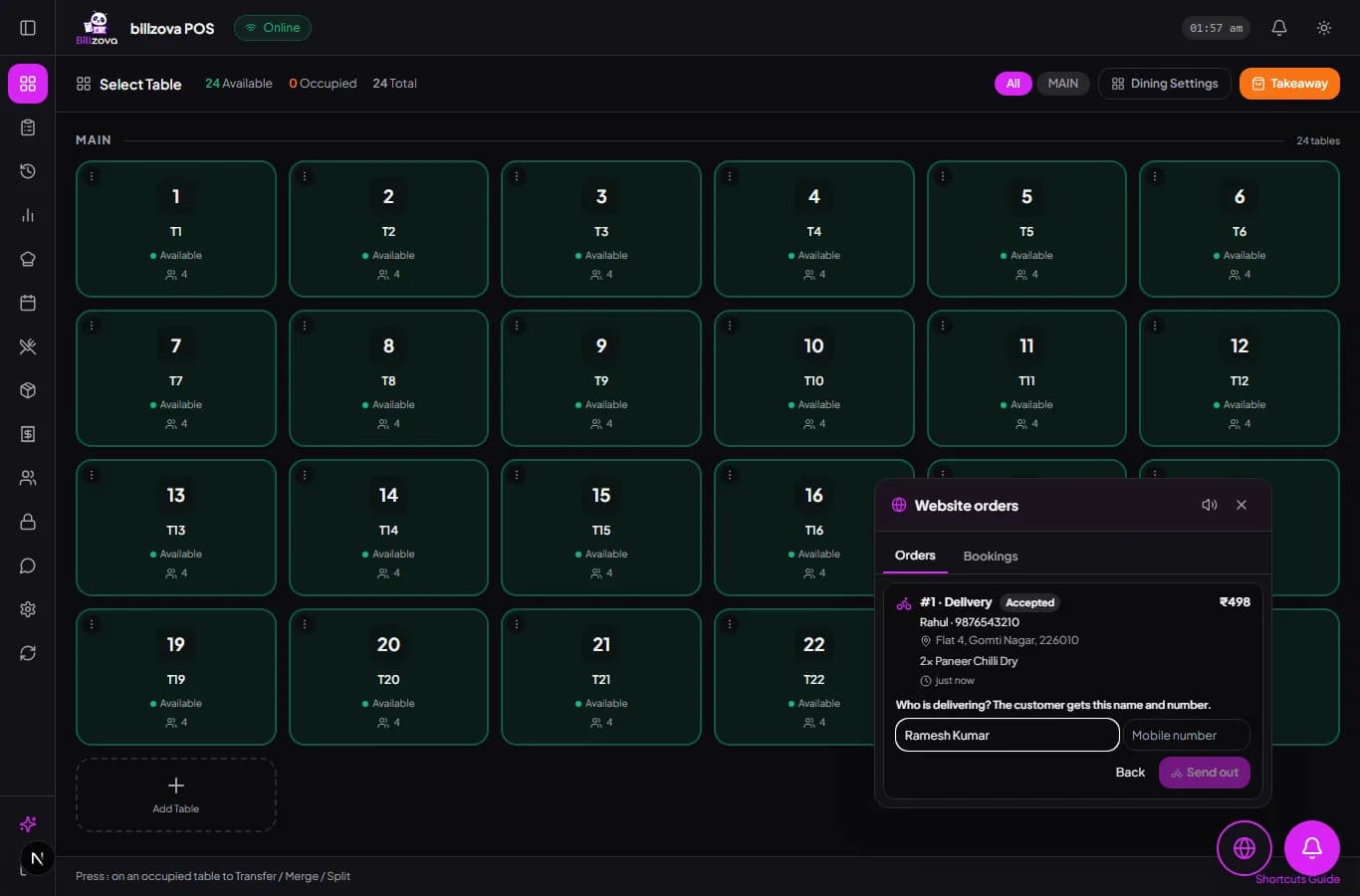
Billzova POS Website orders panel — a delivery order from the restaurant's own website, being sent out with the rider's details

The struggle

Sound familiar?

💸

Paying commission on your own regulars

The family that has ordered from you every Friday for two years still pays the delivery app's cut when they order through it. Restaurant bodies in India report commissions of roughly 16–30% on those orders.

📵

You never get the customer's number

Orders placed through aggregators usually keep the customer's contact details with the platform, so you cannot thank them, tell them about a new dish or invite them back.

🔁

Two systems that never agree

A website that takes orders on email or WhatsApp means someone re-types every order into the POS — wrong items, missing GST, a menu three price changes behind, and orders nobody sees until the customer calls.

Why your own website, now

Delivery apps find you new customers. Your website should keep them.

Zomato and Swiggy are brilliant at one thing: putting your restaurant in front of people who have never heard of you. The problem starts on the second order. A customer who already loves your dal makhani keeps ordering through the app out of habit — and every one of those orders carries the platform's commission. Restaurant associations have described those commissions as roughly 20–30% (Inc42 on NRAI), and industry reporting in 2025–26 put the usual range at 16–30% (Storyboard18). In 2026, restaurant owners in Bengaluru were openly threatening to stop taking orders over it (The Week).

The second problem is the customer relationship. For years, platforms masked customer phone numbers from restaurants; only recently have they started sharing contacts, and only with the customer's opt-in (Outlook Business). A restaurant that wants to know its regulars — to thank them, to tell them about the new thali, to fill a quiet Tuesday — needs a channel where the customer orders from the restaurant itself.

That is what a restaurant website with online ordering is for. Not to replace the apps, but to give the people who already know you a better, cheaper way to order again: your menu, your prices, your name on the page, and the order arriving straight in your POS.

A quick worked example

Say 300 of your monthly delivery orders come from repeat customers, at an average bill of ₹450. That is ₹1,35,000 of orders. At a 20% commission, ₹27,000 a month goes to the platform. If even a third of those regulars switch to ordering on your own website, you keep about ₹9,000 a month — and the ₹15,999 Website + Online Orders plan has paid for itself in under two months (sooner at an offer price). (Use your own numbers: your commission rate is in your platform agreement.)
Built by Billzova

Two restaurant websites we built this year

Hand-built, not a template with your logo dropped in — each site is designed around the restaurant, its food and the way its customers decide where to eat.

Desi Dera website on a laptop — menu highlights and Book a Table button
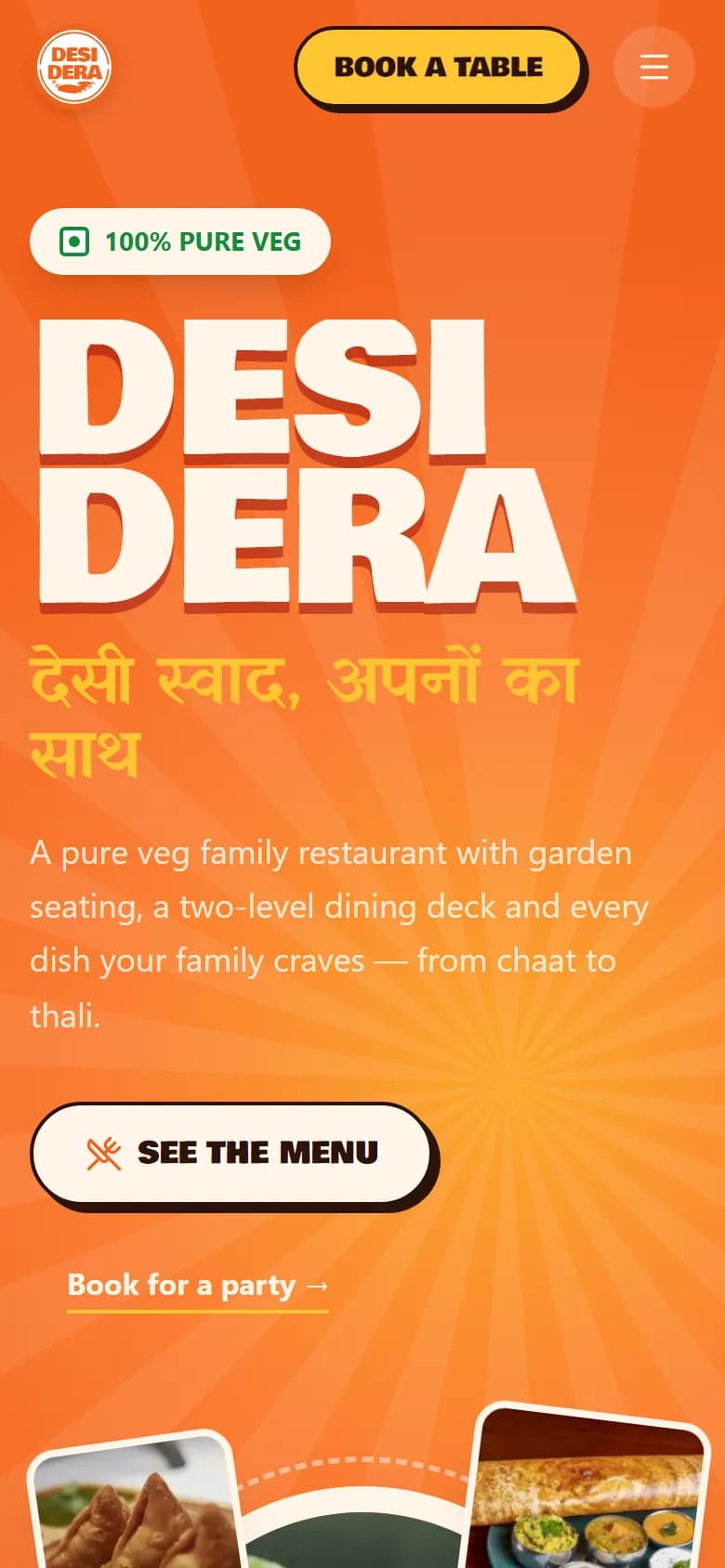
Desi Dera website on a phone

Desi Dera — pure veg family restaurant

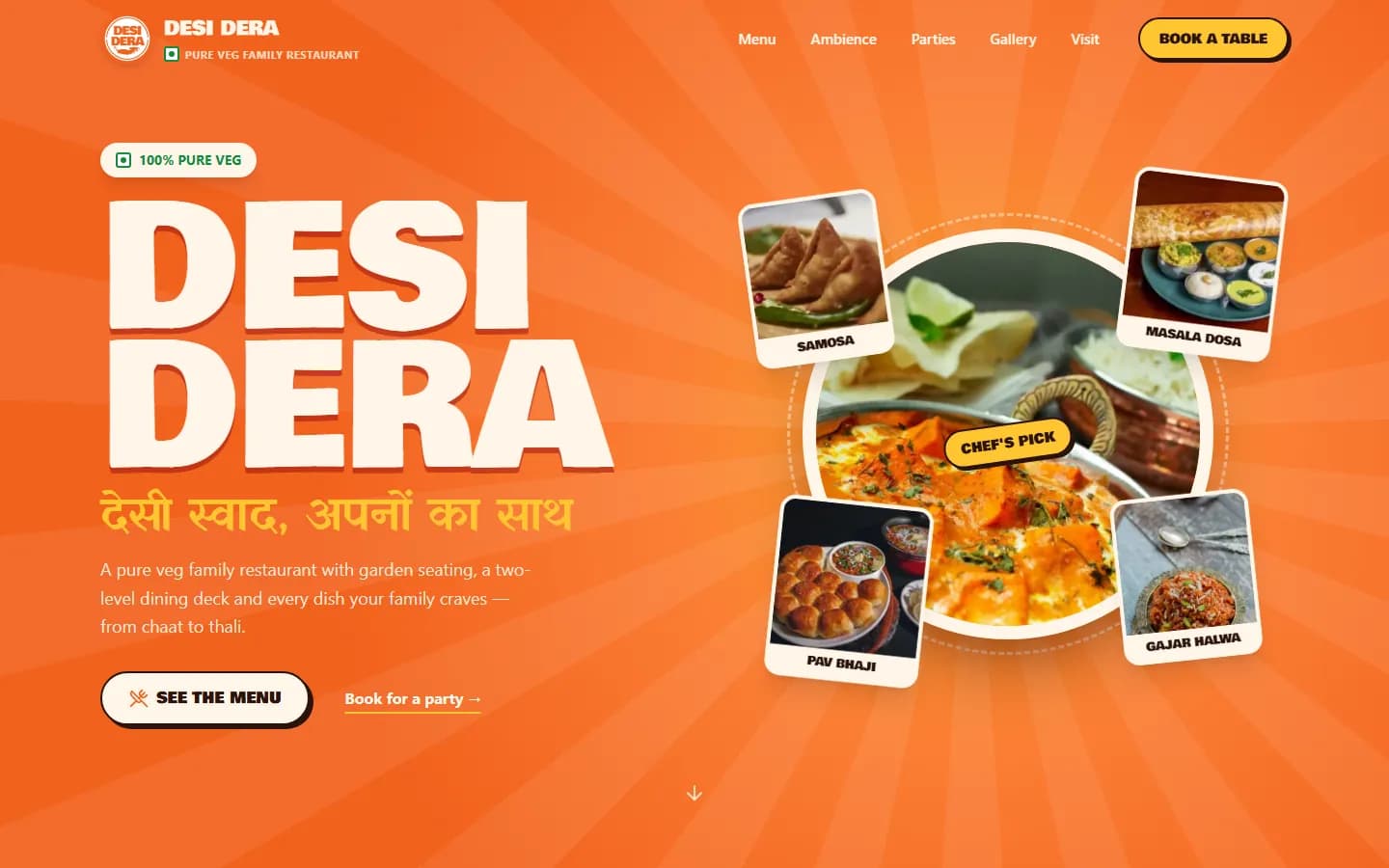
A bold, festive design in Hindi and English (“देसी स्वाद, अपनों का साथ”) for a family restaurant with garden seating and a two-level dining deck. The full menu — chaat, South Indian, North Indian mains, Chinese and desserts — is on the site, along with party bookings and a Book a Table section.

Visit desiderapureveg.com

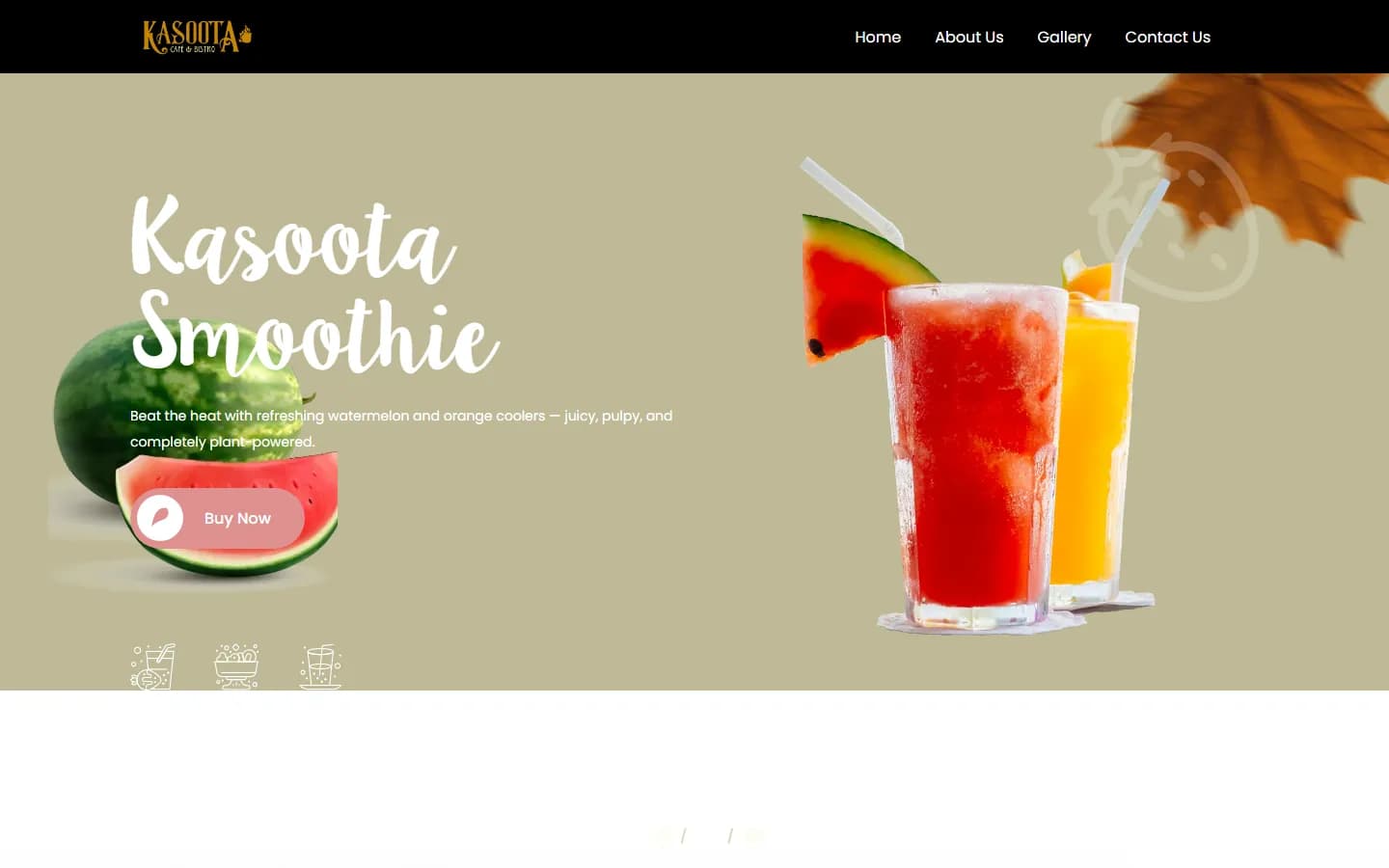
Kasoota Cafe & Bistro website on a laptop — smoothie banner and Buy Now button
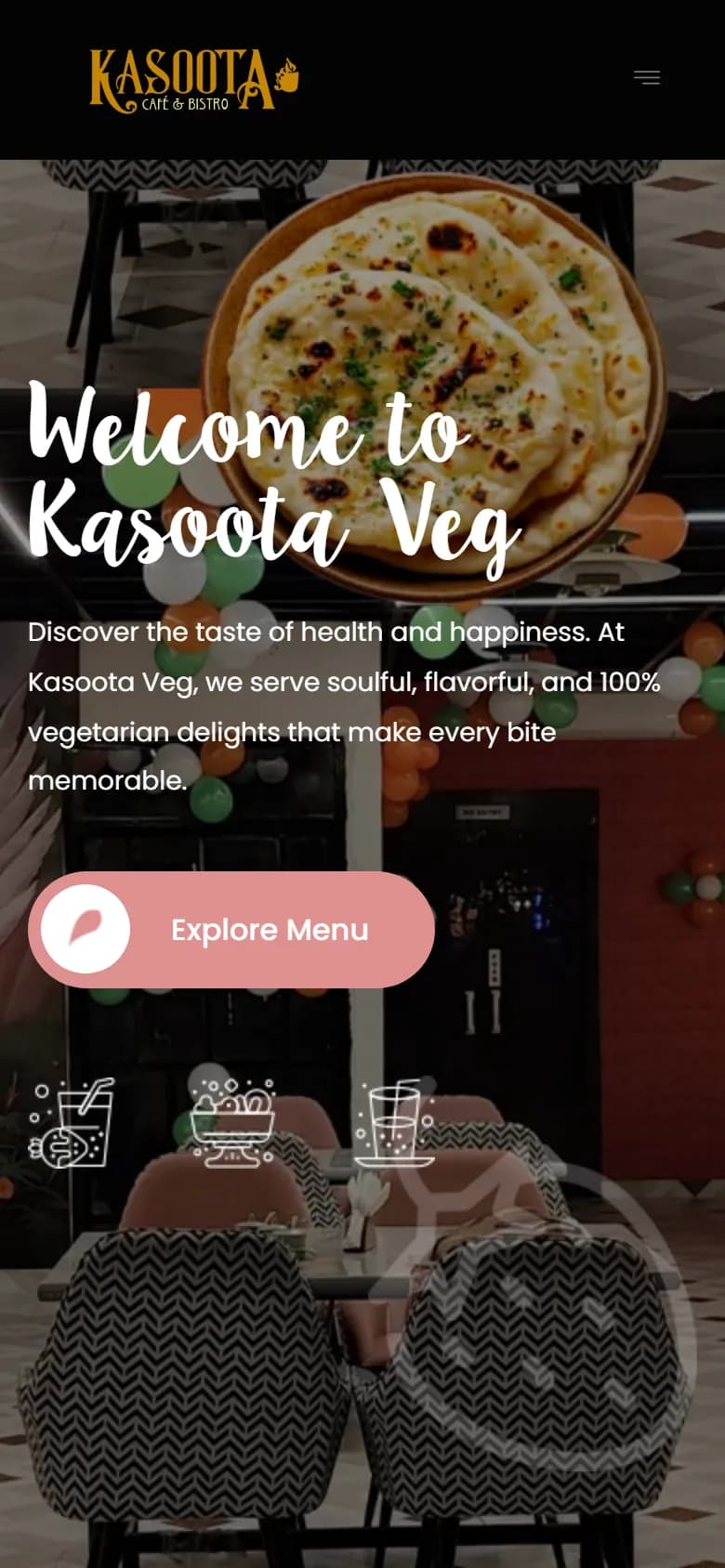
Kasoota Cafe website on a phone

Kasoota Cafe & Bistro, Faizabad

A light, fresh look for a 100% vegetarian cafe — seasonal coolers and smoothies up front, then the menu, an about page, a photo gallery and contact details. Kasoota also runs its counter on Billzova, so its menu is already managed in one place.

Visit kasootapureveg.in

Step by step

How a website order reaches your kitchen

Here is exactly what happens between a customer tapping “Order” on your website and your staff handing over the bag — no re-typing, no second system.

  1. 1

    The customer opens your website

    The menu they see is read live from your Billzova account — categories, items, sizes like half and full, add-on groups with their limits, veg / non-veg markers and GST. Anything you have marked unavailable in the POS simply cannot be ordered.

  2. 2

    They build a cart and see the exact total

    Billzova prices the cart with the same engine your POS uses for a counter bill, so the website total — including GST split, add-ons and sizes — is the same number your bill will show. The order can be checked against the total the customer saw, so if a price changed while they were browsing they are shown the new total instead of a surprise at the counter.

  3. 3

    They place the order

    They enter their name and a 10-digit mobile number, choose pickup or delivery (with address and pincode), and pick pay at counter or cash on delivery. Orders outside your delivery pincodes, below your minimum order, or while you are closed are politely refused on the website itself.

  4. 4

    Your POS rings

    The order appears in Website orders on the web POS, desktop app and Android app, with its own sound and a token number; the dashboard bell counts it and chimes, and the owner gets an email. If nobody responds, it rings faster after your reminder time.

  5. 5

    Staff accept, prepare and send it out

    Accept (or reject with a reason like "kitchen busy" that the customer sees), mark it ready, and for delivery pick "Out for delivery" and enter the rider's name and number. Mark it delivered when it arrives. Pickup orders are billed in Running Orders like any counter order.

  6. 6

    It counts like every other sale

    Because it is a normal Billzova order, it shows in your sales, item and GST reports — no spreadsheet to reconcile at the end of the month.

Nobody left waiting

Website ordering only switches on while you are open (from the opening hours you set) — and, if you choose, only while a staff device is online. If an order is still not accepted within your limit — 15 minutes by default — it is cancelled automatically and the customer is told, rather than turning up to collect food that was never made.

Website prices

One-time price, GST included. No commission, ever.

Pay once, GST included. When we run a website offer, the offer price and its countdown show right here. Online ordering needs an active Billzova POS subscription (₹399/month, see plans).

Website offerOffer prices below end in …

Business Website

₹7,999₹9,990

Save ₹1,991 · one-time, GST included · live in ~7 days after we have your content

  • Custom design with your brand, menu and photos
  • Looks great on every phone
  • Call, WhatsApp and Google Maps buttons
  • Photo gallery and contact page
  • Hosting for the first year
  • Online ordering into your Billzova POS
  • Table booking
Book Business Website
Most restaurants pick this

Website + Online Orders

₹13,999₹15,999

Save ₹2,000 · one-time, GST included · live in ~10 days after we have your content

  • Everything in Business Website
  • Online ordering straight into your Billzova POS
  • Email to you for every new order and booking
  • Table booking with confirm / decline
  • Pickup and delivery, your own delivery areas
  • WhatsApp alert for every ordercoming soon
Book Website + Online Orders

Ultra Premium + SEO

₹15,999₹18,999

Save ₹3,000 · one-time, GST included · live in ~14 days after we have your content

  • Everything in Website + Online Orders
  • Designed around your custom requirements
  • SEO: Google search, Google Business profile, local keywords
  • Pages that bring leads, bookings and enquiries
  • Party, catering and event pages
  • Priority changes
Book Ultra Premium + SEO

Prices include GST. First year hosting free; domain not included (we can buy it in your name at cost). From the second year, ₹2,499 a year for hosting and upkeep. 50% to start, 50% when your website goes live; your domain and content belong to you. Already on Billzova? Claim it with one tap in your dashboard → Offers — no payment, we call you within 24 hours.

After launch

Five ways to get regulars ordering on your website

A website only saves commission when people actually use it. These are the simple habits that move repeat customers from the app to your own link — none of them cost money.

  • Put the link where they already look. Add your website as the ordering link on your Google Business Profile, in your Instagram bio and on your WhatsApp Business profile. People searching your name should land on your menu, not a marketplace.
  • Print it on every bag and bill. A small QR code and a line like “Order direct next time at desiderapureveg.com” on the parcel and the printed bill reaches exactly the customers who already like your food.
  • Give a reason to switch. Price website orders a little below the app, or add a free sweet on website orders — you can afford it, because there is no commission to pay. Keep it simple and visible.
  • Tell the counter team. When someone calls to order, staff can share the website link. When a pickup customer comes in, a quick “you can order ahead on our website” does more than any advert.
  • Use the customer list you now have. Website orders arrive with the customer's name and number in Billzova. Thank first-time customers, and let regulars know about new dishes and festival menus — with their permission.

Keep the delivery apps for discovery — new customers in new areas. Your website is for everyone who already knows where the good food is.

What it does not do (yet)

We would rather you know now than find out after launch:

  • Online payment on the website is coming soon (into your own Razorpay account). Today customers pay at the counter or cash on delivery.
  • WhatsApp order alerts to the restaurant are coming soon. Today every new order and booking rings in the POS, chimes on the dashboard and reaches you by email.
  • Delivery riders are your own staff — Billzova does not provide a delivery fleet or connect to Zomato or Swiggy.
  • Customer accounts and coupons on the website are not part of the first release.

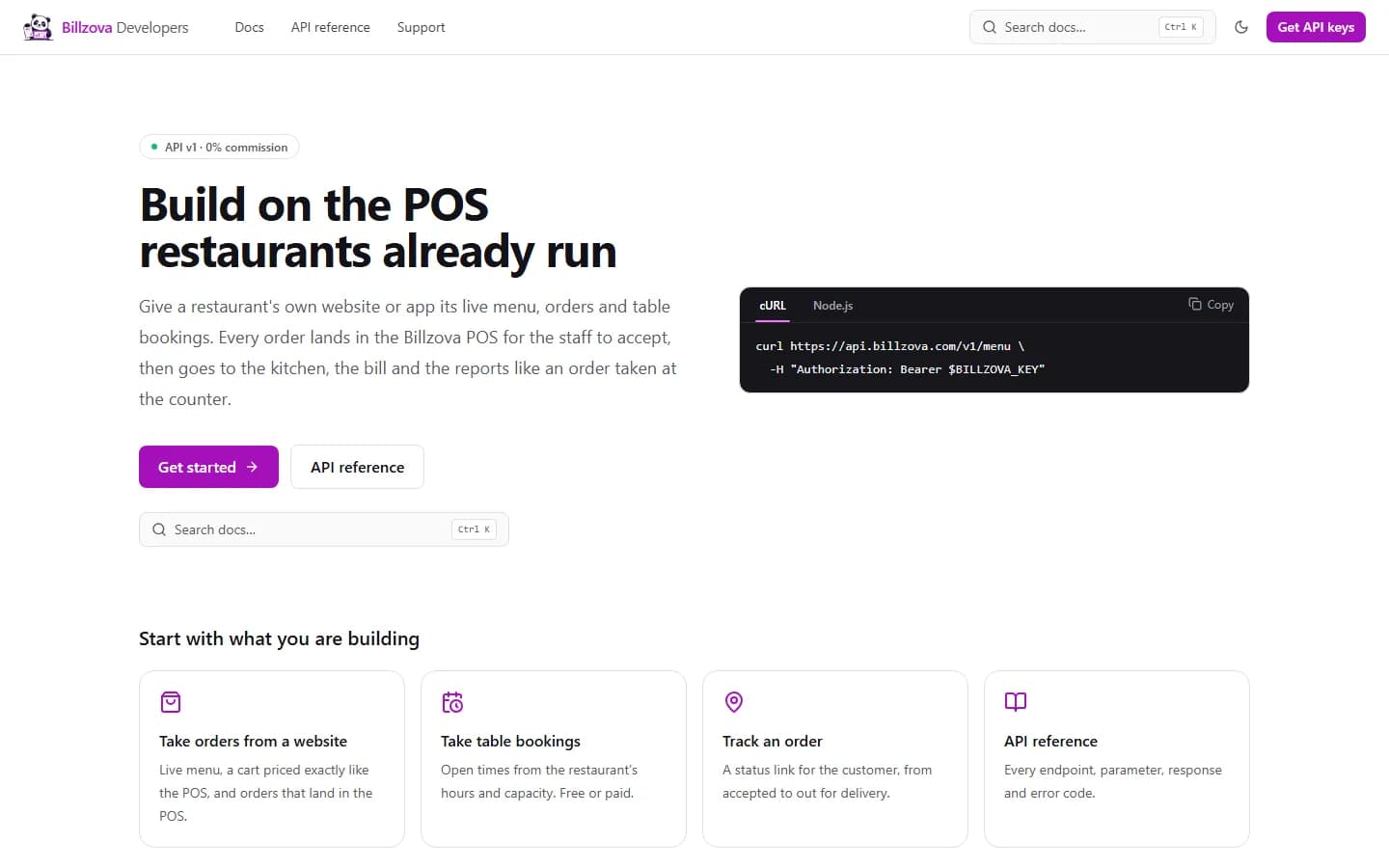
Already have a website and a developer? Your site can take orders into Billzova through our public API — menu, cart pricing, orders, table bookings and order status, with test keys that never touch your kitchen. Start at developers.billzova.com.

In your POS

Website orders ring on the screens your staff already use

Every website order lands in a separate "Website orders" button on the web POS, the Windows desktop app and the Android app — with its own sound, so staff can tell it apart from QR-table orders. Accept, or reject with a reason the customer sees. For delivery, pick "Out for delivery" and enter the rider's name and number, then mark it delivered.

  • Separate from the QR-order bell
  • Accept / reject with a reason
  • Ready, out for delivery, delivered
  • Rider name + number for the customer
  • Rings faster if an order waits too long
Billzova POS website orders panel — sending a delivery order out with the rider's name and phone number
Table bookings

Bookings from your website, confirmed from the POS

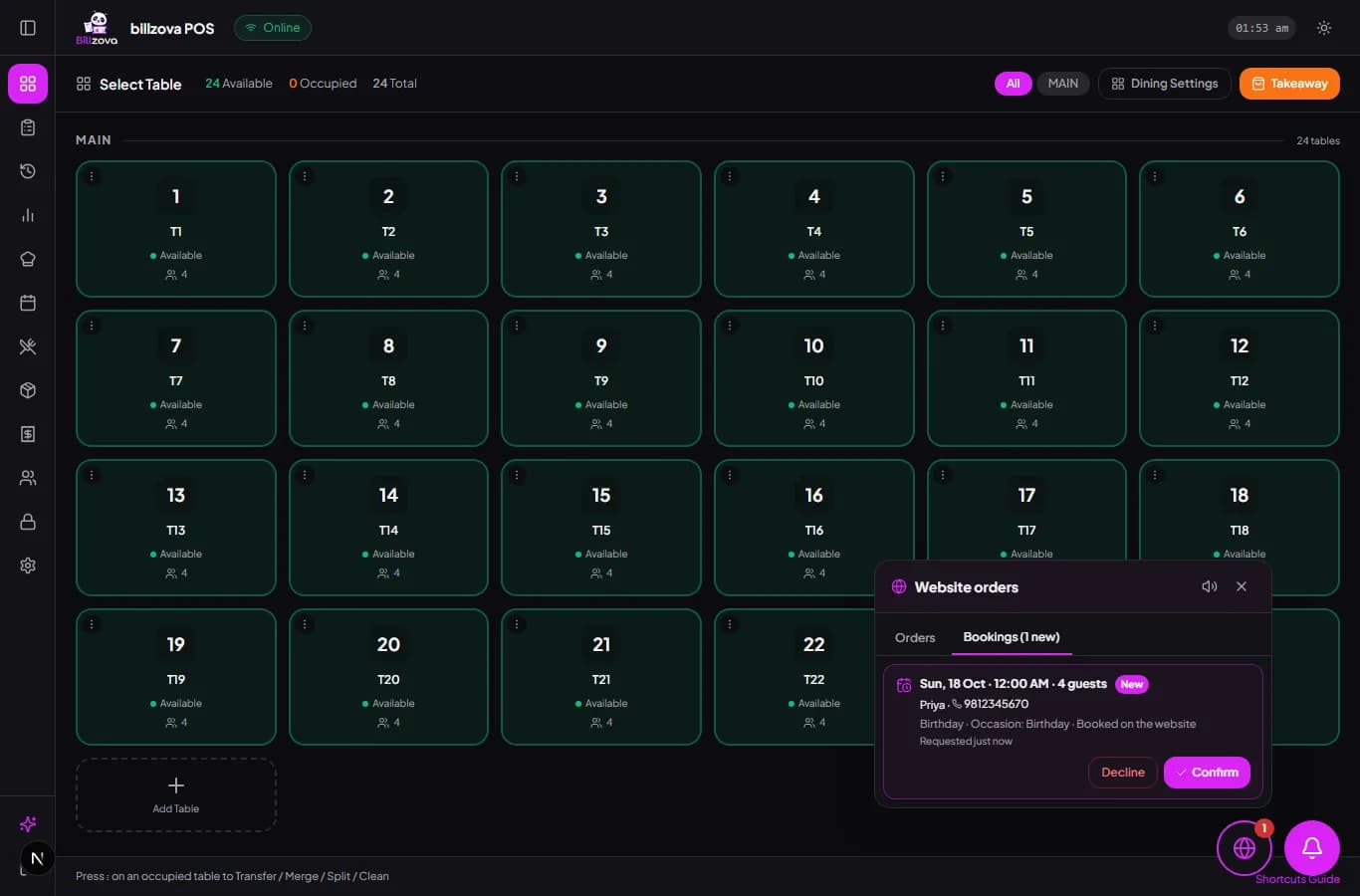
With the Online Orders plan, guests book a table from your website. Free times come from your opening hours, your slot length and how many guests you take per slot, so the website never offers a time you cannot serve. Each request shows the date, time, party size, occasion and phone number; you confirm or decline in one tap.

  • Slots from your real opening hours
  • Guests-per-slot limit, never overbooked
  • Occasion and notes captured
  • Confirm or decline with a reason
  • Free, per-booking or per-guest price shown
Billzova POS showing a website table booking for four guests with a Birthday occasion, ready to confirm
You set the rules

Pickup, delivery area, minimum order — all in your dashboard

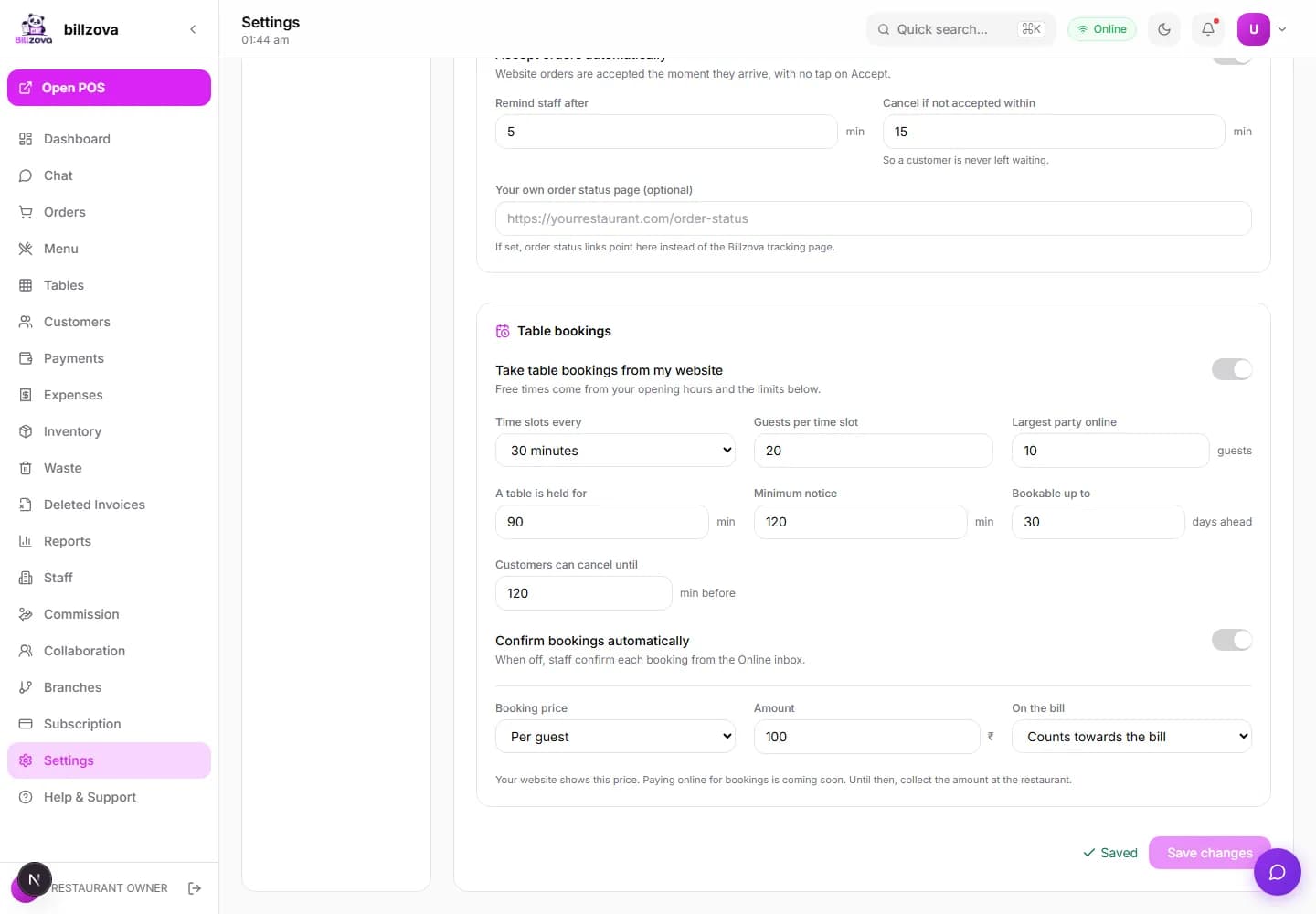
Switch website orders on or off, choose pickup, delivery or both, list the pincodes you deliver to, set a minimum order and your usual preparation time. Decide whether orders need a tap to accept, how soon staff are reminded, and when an unaccepted order is cancelled. Booking slots, guest limits and booking prices live on the same page.

  • Pickup / delivery / both
  • Delivery pincodes + minimum order
  • Reminder and auto-cancel times
  • Booking slots and guest limits
  • Owner and manager only
Billzova dashboard Online orders settings — delivery pincodes, minimum order, booking slots and price
Owner view

Know the moment an order or booking comes in — even away from the counter

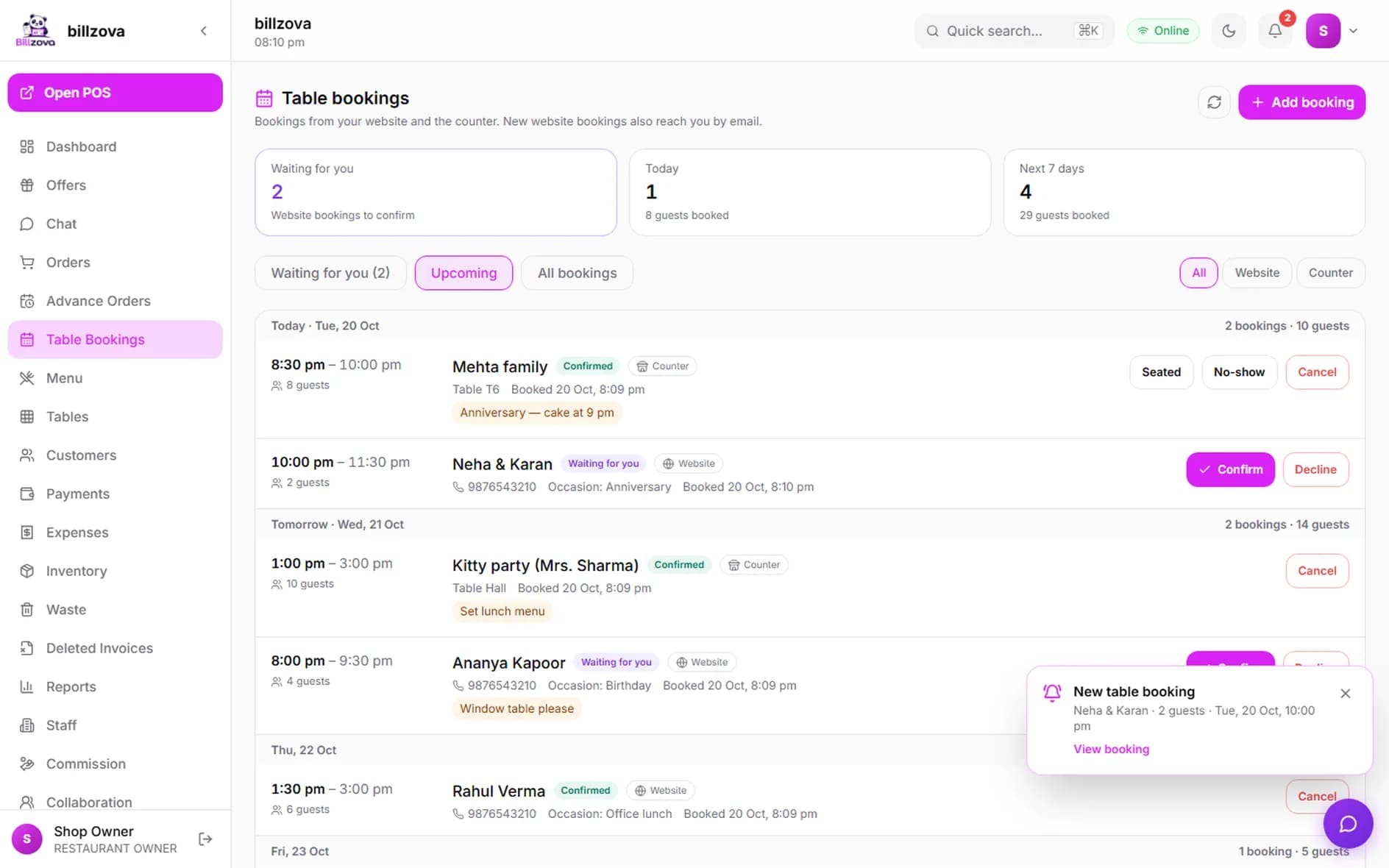
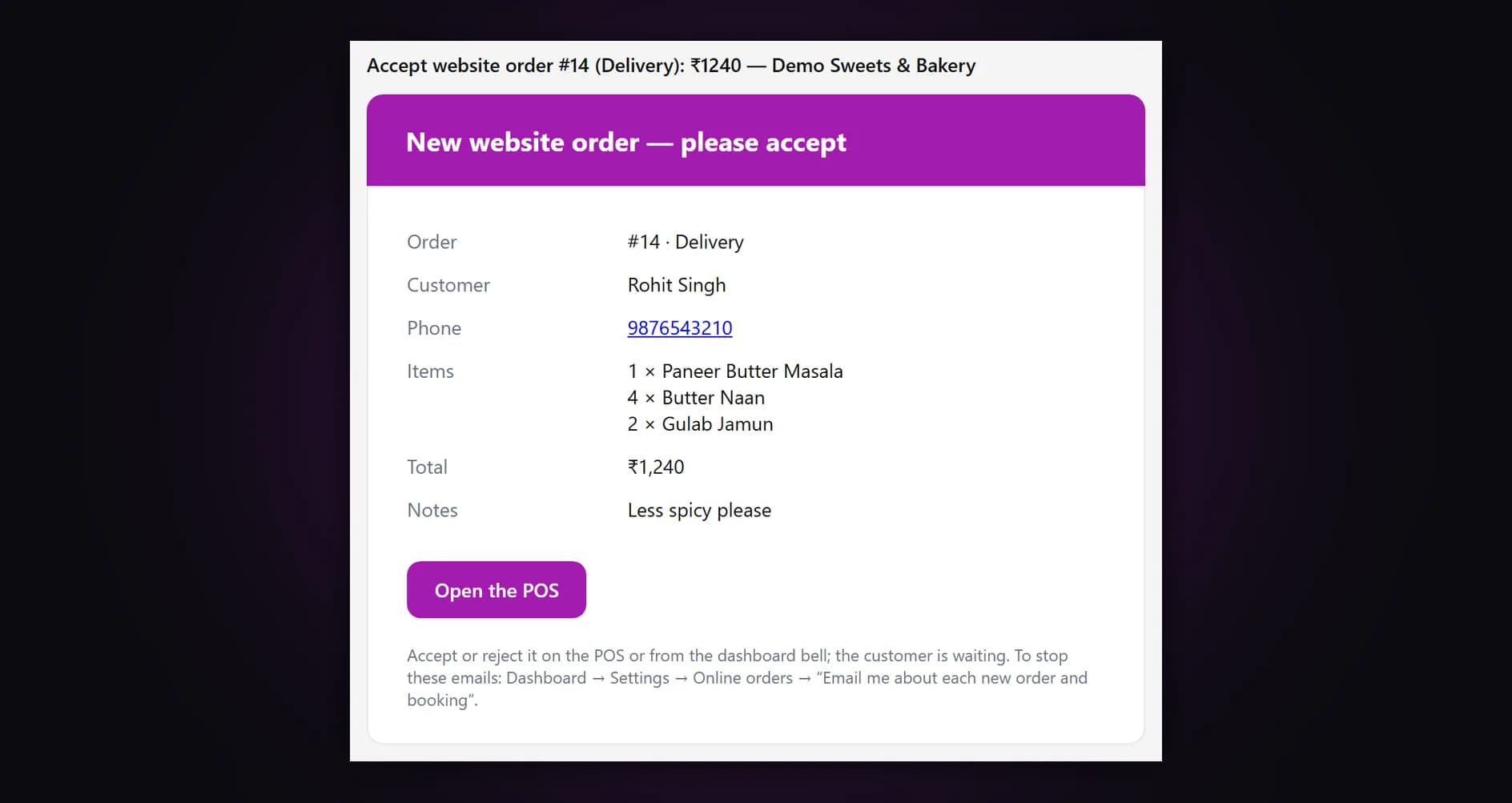
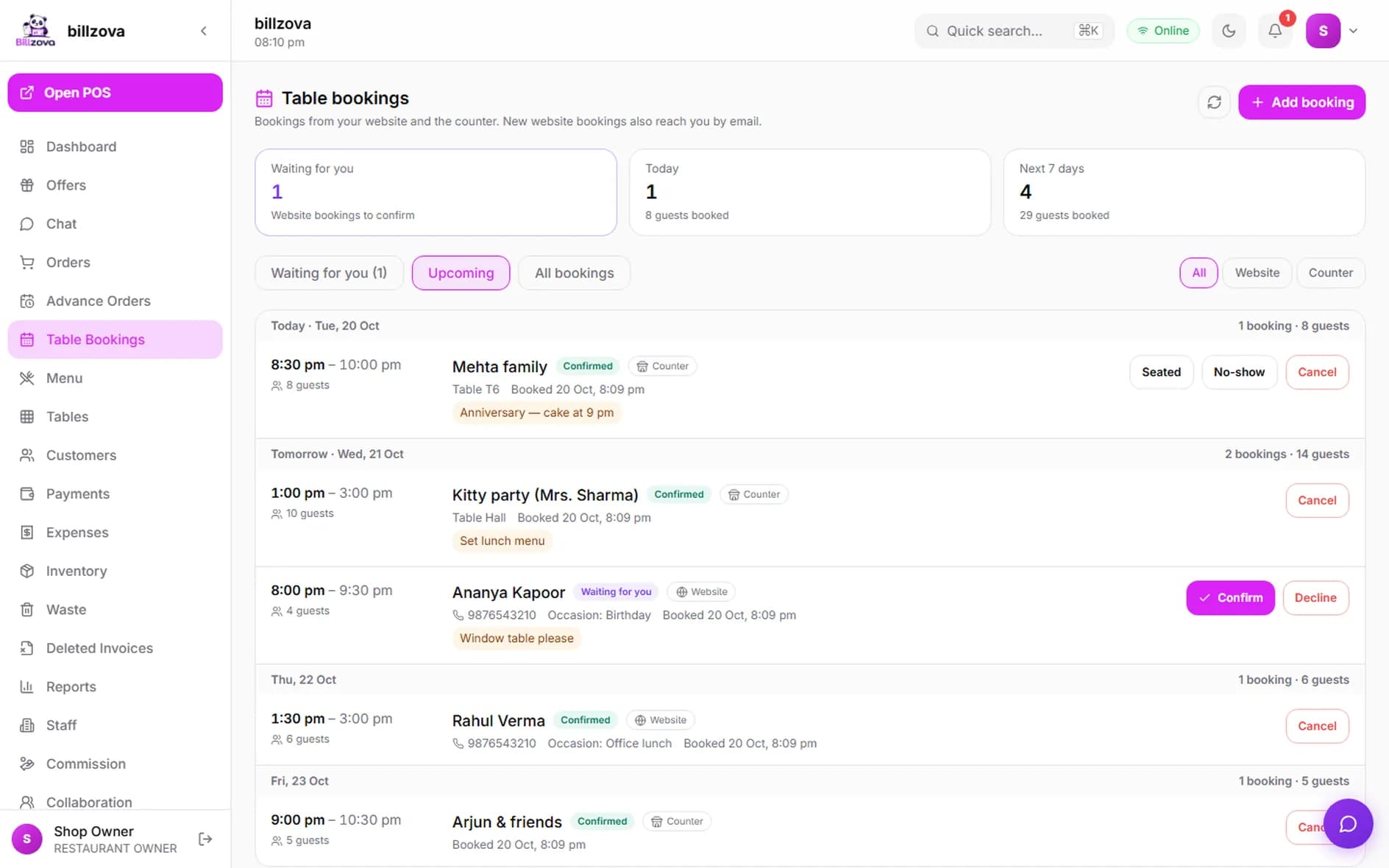
Every new website order and table booking is emailed to you straight away, with a button that opens it. With the dashboard open, it chimes and shows a pop-up; the bell and the browser tab keep the count. Accept an order or confirm a booking right there, and work every booking — waiting, upcoming, past — on the dashboard's Table bookings page.

  • Email for every order and booking
  • Chime + pop-up on the dashboard
  • Quick accept / confirm from the bell
  • Table bookings page for the full list
Billzova dashboard Table bookings page with a "New table booking" pop-up and the bell showing two waiting
Already on Billzova?

Claim a website from your dashboard or the app

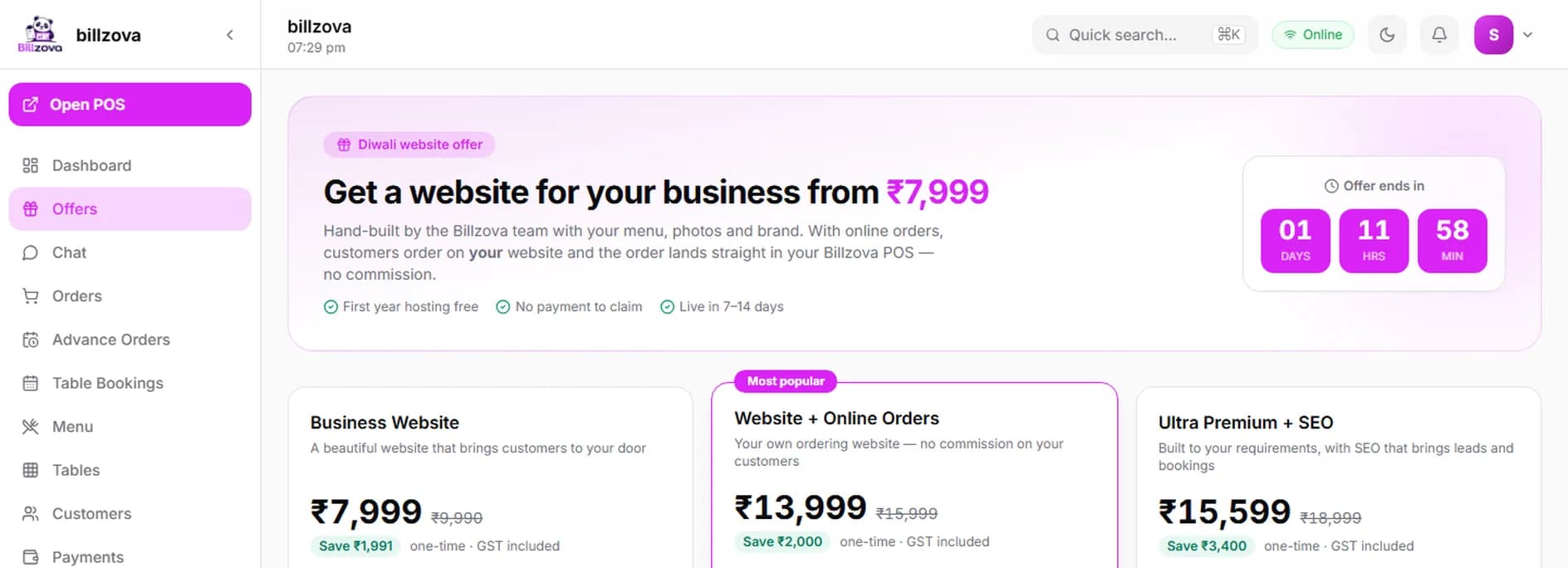
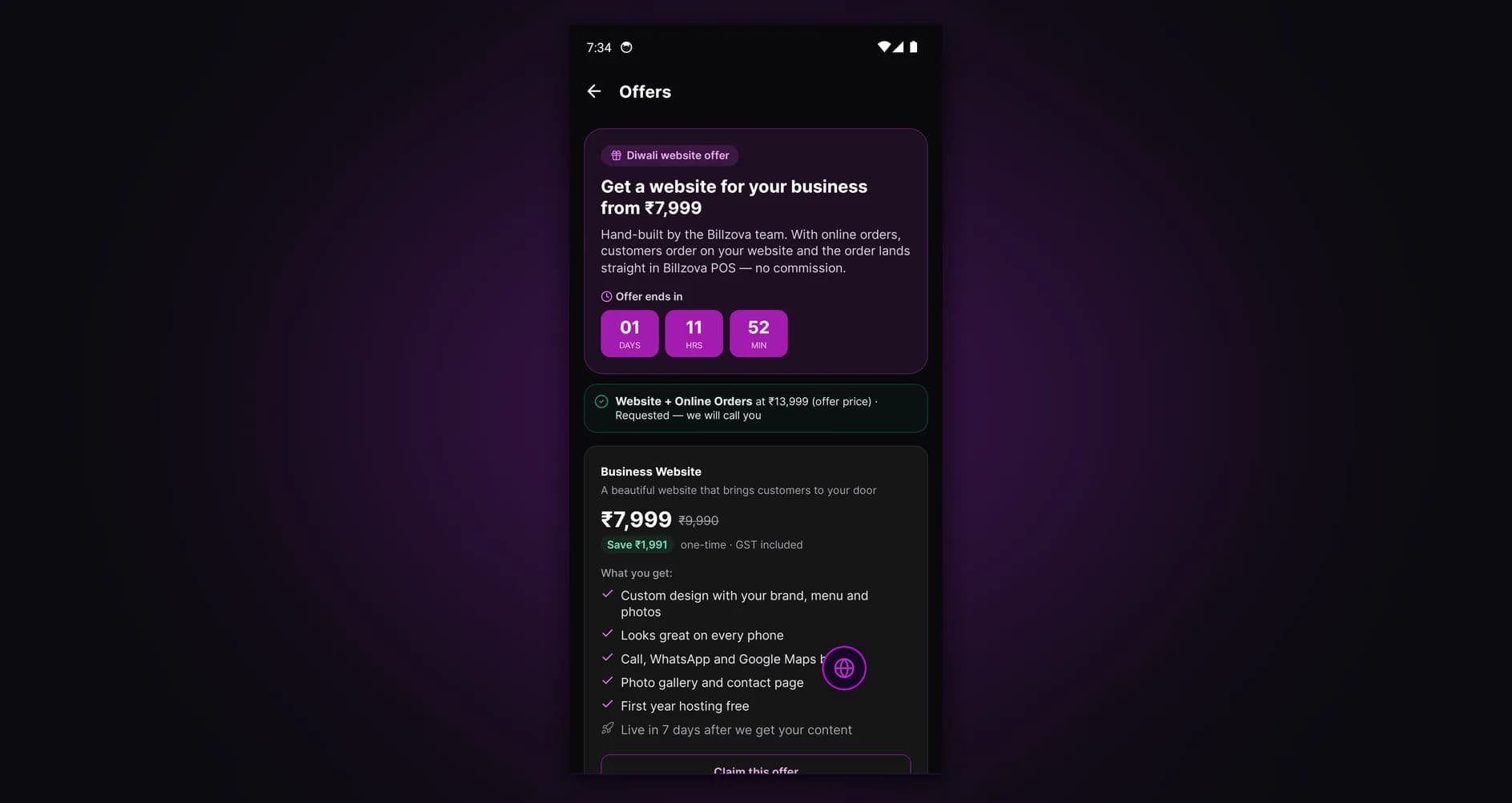
Billzova owners and managers see the website plans under Offers in the dashboard and "Get a website" in the Android app, with the offer price and countdown while an offer runs. Pick a plan and confirm — no payment at that point. Our team calls you to collect your menu, photos and details.

  • Dashboard → Offers, or Android → Get a website
  • Offer price and countdown while it runs
  • Confirm only — no payment to claim
  • We call you to get started
Billzova dashboard Offers page showing the three website plans with offer prices and a countdown

In the product

Websites we have built — and the API behind them

Real restaurants, real websites, hand-built by the Billzova team.

Desi Dera pure veg family restaurant website home page
Desi Dera — pure veg family restaurant
Kasoota Cafe & Bistro website, pure veg cafe in Faizabad
Kasoota Cafe & Bistro, Faizabad
Email to the restaurant owner for a new website delivery order, with items, total and an Open the POS button
The email you get for every new order
Billzova dashboard Table bookings page with website and counter bookings by day
Table bookings in your dashboard
Get a website screen in the Billzova Android app with website plans and the offer countdown
Claim a website from the Android app
Billzova Developers portal for connecting an existing website
Already have a website? Connect it with the API

Compared

Delivery app orders vs your own website

Ordering only through apps

  • A commission on every order, including your regulars
  • Customer contact details stay with the platform
  • Your menu sits next to every competitor's
  • Discounts and ranking rules set by someone else
  • Payouts arrive on the platform's schedule

Your own Billzova website

  • 0% commission on website orders
  • You see every customer's name and number
  • Only your restaurant on the page
  • Your prices, your offers, your hours
  • Orders land in the POS you already use

FAQ

Restaurant website with online ordering — questions owners ask

How much does a restaurant website with online ordering cost with Billzova?▾
Three one-time prices, GST included: Business Website ₹9,990, Website + Online Orders ₹15,999 (online ordering straight into your Billzova POS, table booking, an email for every order) and Ultra Premium + SEO ₹18,999 (built around your requirements, with SEO work). We run limited-time offers with lower prices; when one is on, the offer price and its countdown show in the price section. First year hosting is free; the domain is not included. From year two it is ₹2,499 a year.
Does Billzova take a commission on website orders?▾
No. There is no commission on any order that comes through your own website. You pay the one-time website price and your normal Billzova POS subscription — the order value stays with you.
Where do the website orders go?▾
Straight into your Billzova POS — the web POS, the Windows desktop app and the Android app all ring with a separate "Website orders" button (different from the QR-order bell), and the dashboard bell shows how many are waiting. Staff accept or reject from there.
Do the menu and prices on the website stay in sync with my POS?▾
Yes. The website reads your menu live from Billzova — items, sizes, add-ons, food type, GST and availability. Mark an item unavailable in the POS and it stops being orderable on the website; change a price and the website shows the new price.
Will the website total match my POS bill?▾
Yes. The cart total on the website is calculated by the same billing engine your POS uses, so GST, variants and add-ons come out exactly the same as the bill your counter prints.
Can customers pay online on the website?▾
Not yet. Today customers choose pay at the counter (pickup) or cash on delivery. Online payment into your own Razorpay account is coming soon.
How will I know when an order or a booking comes in?▾
Three ways. Every POS screen rings in Website orders; the owner gets an email the moment it arrives (restaurant email and owner login), with a button straight to it; and the Billzova dashboard chimes and shows a pop-up while it is open. The email can be switched off in Settings → Online orders.
Who delivers the orders?▾
Your own delivery staff. When an order goes out, staff pick "Out for delivery" in the POS and enter the rider's name and phone number, which is passed to the website's order status so the customer knows who is coming.
What happens if nobody at the restaurant accepts an order?▾
The POS rings again faster after your reminder time (5 minutes by default), and if the order is still not accepted within your limit (15 minutes by default) it is cancelled automatically so the customer is not left waiting.
What if the restaurant is closed or no staff is logged in?▾
Outside your opening hours the website stops taking orders and shows when you open next. If nobody is logged in, orders still come in — you get an email and a WhatsApp alert, and an order nobody accepts in time is cancelled and the customer is told. Prefer no orders at all while nobody is logged in? Switch on "Take orders only while a staff device is online" in the dashboard.
Can I limit delivery to my area?▾
Yes. In the dashboard you set the pincodes you deliver to, a minimum order value, your usual preparation time, and whether you take pickup, delivery or both.
Who owns the website and the domain?▾
You do. The restaurant owns its domain and content; Billzova builds and hosts the site. If you do not have a domain yet, we can buy it in your name at cost.
How long does it take to go live?▾
Business Website in about 7 days, Website + Online Orders in about 10 days and Ultra Premium + SEO in about 14 days after we receive your menu, photos and details.
I already have a website. Can it take orders into Billzova?▾
Yes. Your developer can connect it with the Billzova API — menu, cart pricing, orders, table bookings and order status. The documentation and test keys are at developers.billzova.com.
Can the website take table bookings?▾
Yes, with the Website + Online Orders and Ultra Premium plans. Guests pick a date, time and party size from the free slots (worked out from your opening hours and how many guests you take per slot); you confirm or decline from the POS or the Table bookings page in your dashboard.
🚀 Start your 30-day free trial

Start taking orders on your own website.

Tell us about your restaurant on WhatsApp — we'll share a plan, a timeline and examples. 50% to book your slot, 50% when your site goes live.