Independently-owned restaurants,
sharing one seating area — never one till.
billzova's Collaboration feature lets two or more independent restaurants share tables, share menu items, and offer one QR ordering flow across all of them — while each restaurant keeps its own completely separate GST billing, settlement, and reports. Built for food courts and any shared-seating layout. ₹399/month, first month free.
The struggle
Sound familiar?
A shared till makes tax filing a nightmare
Forcing every stall's sales through one central counter is painful when each stall is actually its own independently-registered business with its own GSTIN and its own accountant.
Sharing a table shouldn't mean sharing your data
Most "multi-vendor" setups assume one operator sees everything. Independent stall owners reasonably don't want a neighbouring stall — or the food-court operator — seeing their order details by default.
Customers can't order across stalls easily
Without a shared ordering flow, a table of four wanting food from three different stalls means three separate trips to three separate counters.
Commission agreements run on trust and spreadsheets
Whether an operator takes a cut of vendor sales or vendors split a table-sharing fee, most food courts track this by hand — with no consent trail if a rate is ever disputed.
How it works
How restaurants actually share space on billzova
Every step is opt-in, on both sides, and reversible. Nothing is shared as a side effect of something else.
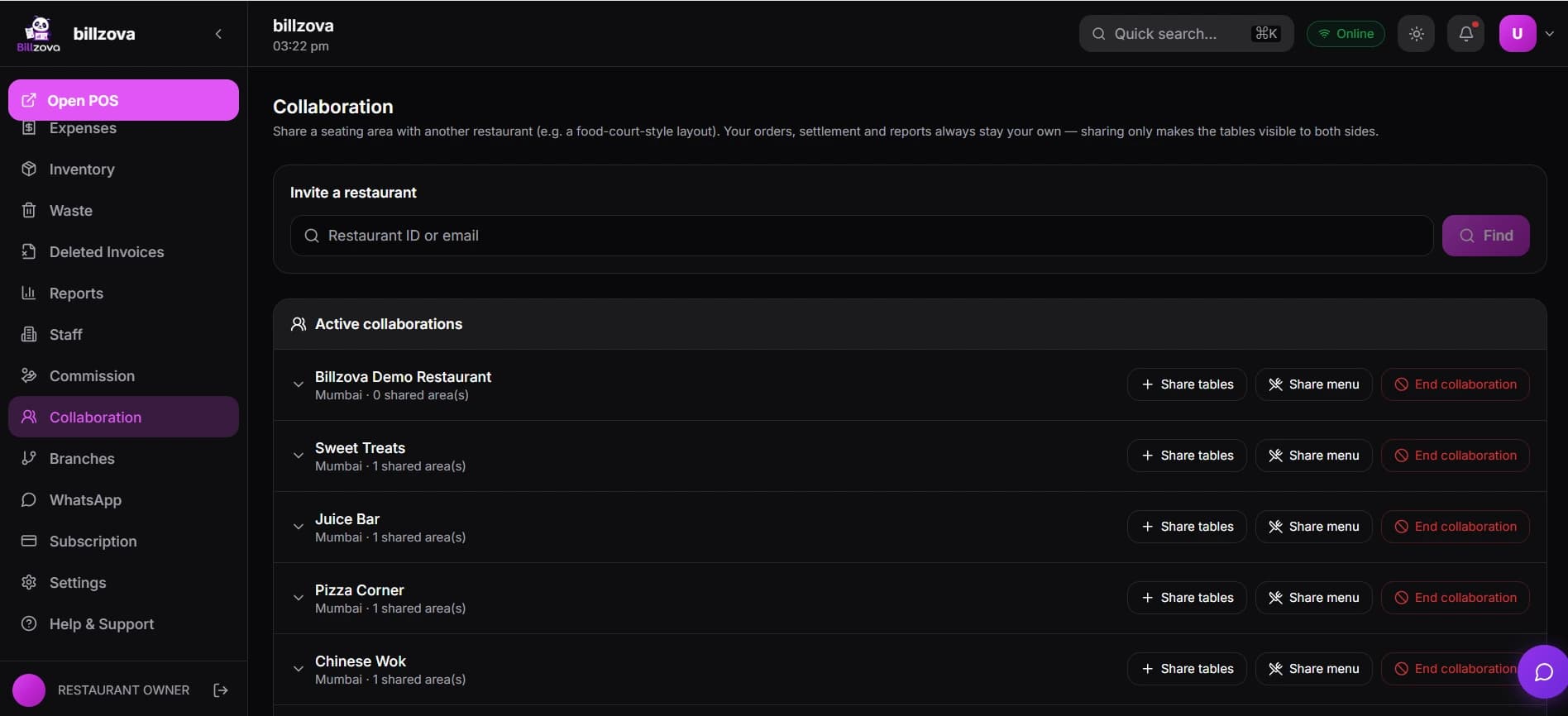
Both restaurants get Collaboration enabled
A one-time approval on each restaurant's account. Once granted, either side can start inviting other restaurants to collaborate.
One restaurant invites the other by ID or email
No open directory search — you invite a specific restaurant you already know, by their exact Billzova ID or email address.
The invite is accepted — this alone shares nothing
Accepting just creates the trust connection between the two businesses. No tables, menu items, or order data become visible yet.
The table-owning restaurant chooses what to share
Pick specific tables to expose as a shared area, specific menu items to make sellable by the partner, or both — entirely optional, entirely reversible.
Order visibility stays occupancy-only unless both sides opt in
By default, a partner only sees that a shared table has an active order — never its contents — until both restaurants separately turn on full visibility to each other.
Set the right expectations
What stays separate — and what's honestly not built
If you've looked at other multi-vendor or food-court software, some of this may run counter to what you'd expect. Here's exactly how billzova's version works — and doesn't.
Always true
- Every restaurant keeps its own separate GST billing and invoice numbering
- Every restaurant settles and reports on its own sales independently
- A shared table shows occupancy only, unless both sides opt in to more
- Kitchen displays and KOT printers only ever show your own orders
- Sharing is table-by-table and item-by-item, never all-or-nothing
Not built — don't expect this
- No prepaid smart cards or stored-balance wallets
- No central cash counter or single unified till
- No merged bill across stalls — every order settles separately
- No online payment collected through the QR ordering flow
- No automatic order acceptance — staff always confirm manually
Shared menus & QR ordering
Selling across the table, without copying any data
A shared menu item isn't duplicated anywhere — it's the owning restaurant's real menu item, made orderable (and, with an extra permission, editable) by a partner. When a partner's counter sells it, the order is created under the item owner's own restaurant, with the owner's own GST invoice and the owner's own settlement — the partner's staff member who took the order is simply recorded for accountability, not for billing.
The same principle carries into QR self-ordering: when a shared table's QR code is scanned, the customer sees every collaborating, QR-enabled restaurant available at that table and can order from more than one — but each restaurant's order is still its own transaction, accepted or rejected by that restaurant's own staff, and billed on that restaurant's own invoice. One QR code, several kitchens, zero shared billing.
Vendor commission
Commission settlement, done with consent on both sides
Many food courts run on a commission model — an operator takes a percentage of each vendor's sales instead of charging flat rent, or vendors agree to split a table-sharing fee. billzova treats this as a real financial arrangement between two independent businesses, not a number either side can quietly change.
Either restaurant can propose a rate — percentage or fixed amount — and name who pays it. Only the paying restaurant can accept, so nothing is ever charged without their consent. Once active, it's calculated automatically on every completed order, with a real payout ledger tracking what's accrued, what's been paid, and what's still outstanding — and only the restaurant receiving the commission can end an active arrangement, so a vendor can never unilaterally walk away from a rate they already agreed to. If a disagreement does come up, billzova can freeze the arrangement until it's resolved outside the platform.
Where this fits
Built for any shared-seating setup, not just malls
"Food court" is the most common case, but the same Collaboration tools work for any two independently-owned restaurants sharing physical space.
Traditional food courts
Several independent stalls around one shared seating area — the classic case this feature is built around.
Co-located but separately owned
A cafe and a bar sharing a rooftop or patio, each independently owned and billing separately, but wanting one ordering experience for the shared seats.
Shared kitchen facilities
Multiple independent brands operating out of one physical kitchen space, each keeping fully separate billing and reporting.
Events & pop-ups
Multiple vendors temporarily sharing one space, where a quick opt-in and opt-out arrangement matters more than permanent shared infrastructure.
Nothing is visible until both sides explicitly agree
A collaboration starts as a simple invite between two restaurants — accepting it grants zero data access on its own. Tables and menu items are shared as separate, deliberate steps afterward, only by the restaurant that owns them, and order details stay occupancy-only until both sides opt in to show each other more.
- Invite by exact restaurant ID or email only
- Accepting an invite shares nothing by itself
- Table-owner decides exactly what to expose
- Order details need consent from both sides
- Either restaurant can revoke the whole arrangement any time
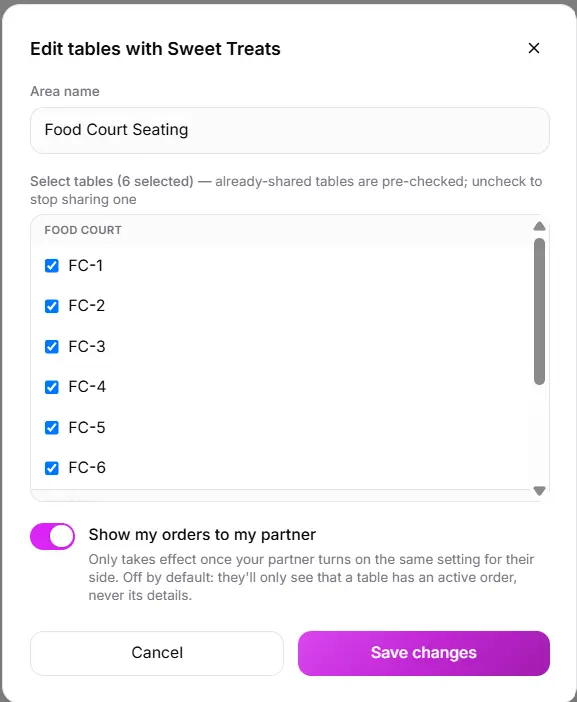
Pick exactly which tables to share, and with whom
Choose specific tables from your own floor plan to expose to a collaborating restaurant — not your whole restaurant by default. Already-shared tables stay pre-checked so it's always clear what's currently exposed, and you can stop sharing any single table without affecting the rest.
- Table-by-table selection, never all-or-nothing
- Already-shared tables clearly pre-checked
- Stop sharing one table without touching the others
- Shared tables appear in their own section on both sides
- Never merged into either restaurant's own floor view
Let a partner sell your menu — or even edit it, if you choose
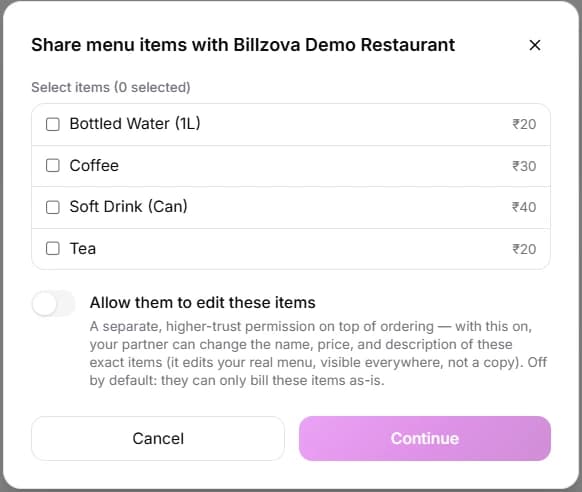
Share specific menu items so a partner restaurant's own counter can sell them directly — the sale is still billed under you, the item owner, with your own GST invoice. A separate, off-by-default permission lets a trusted partner also edit an item's name, price, or description.
- Item-by-item sharing, not your whole menu
- Sale still belongs to and bills under the item owner
- Editing rights are a separate, higher-trust toggle
- Off by default — partners can only sell unless granted more
- Real accountability: which staff member placed it is recorded
A real, consent-gated ledger — not a spreadsheet
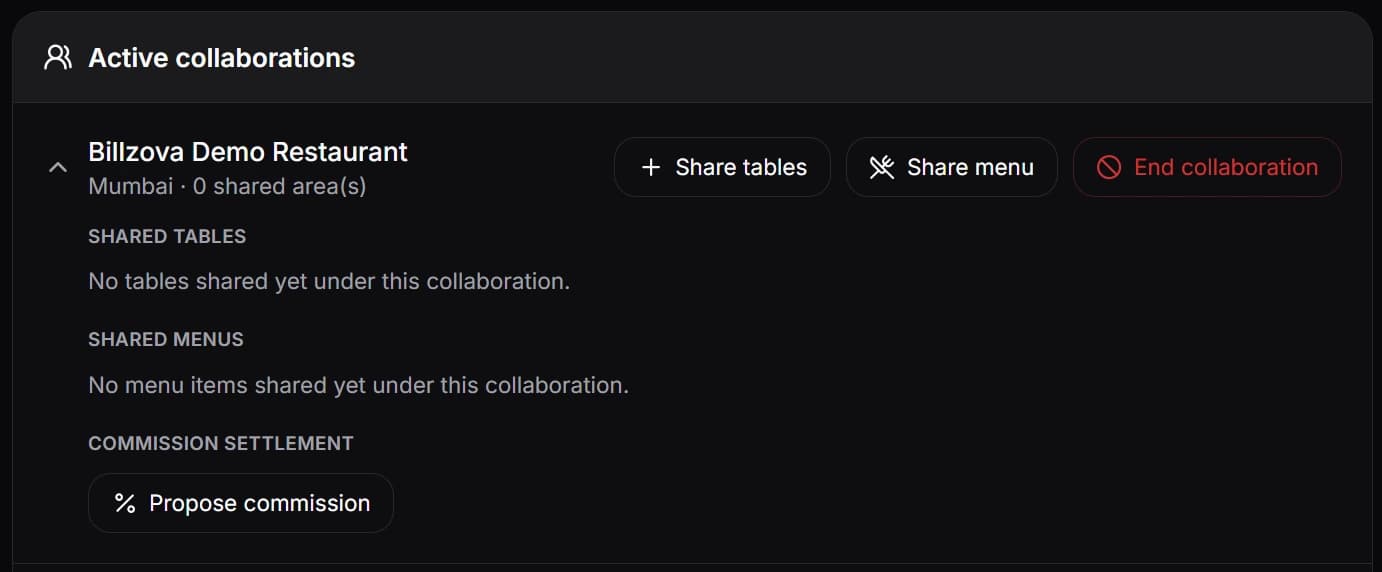
Either restaurant can propose a commission rate and who pays it — only the paying side can accept, so nothing goes live without their consent. Once active, it's applied automatically to every order, with an actual payout ledger tracking what's accrued, paid, and outstanding.
- Propose → accept — never one-sided
- Payer must consent before anything is charged
- Only the payee can end an active arrangement
- Applies automatically — no manual entry per order
- Real payout ledger, not just a displayed percentage
One QR code, every collaborating kitchen
A customer scanning a shared table's QR code sees every participating, QR-enabled restaurant at that table and can order from more than one — each restaurant still gets its own separate order, its own bill, and its own GST invoice. No account, app, or login required from the customer.
- One scan surfaces every collaborating restaurant
- Customer can order from more than one at once
- Each restaurant's order and bill stay fully separate
- No app, login, or OTP for the customer
- Staff accept/reject from the tables screen they already use
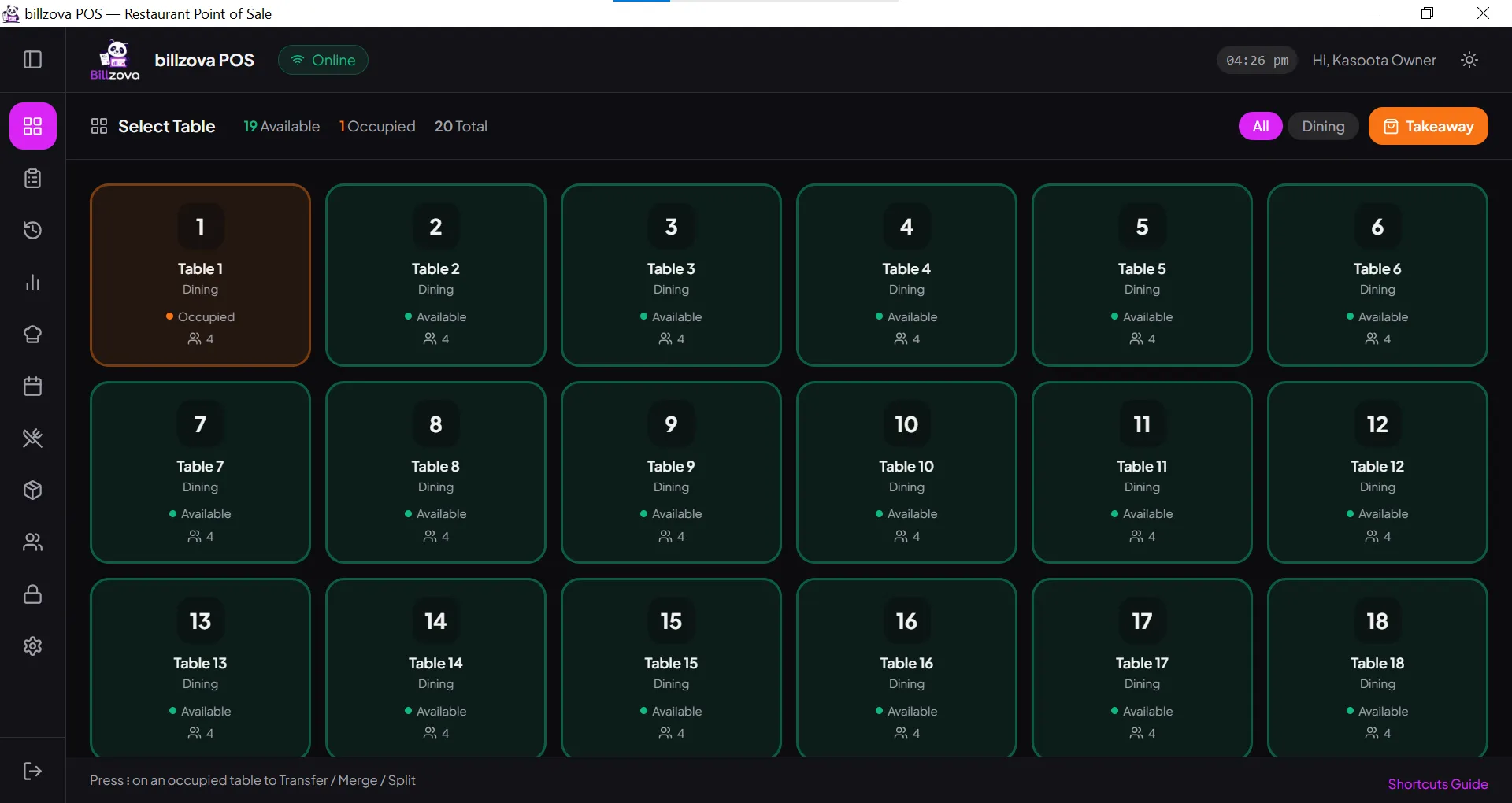
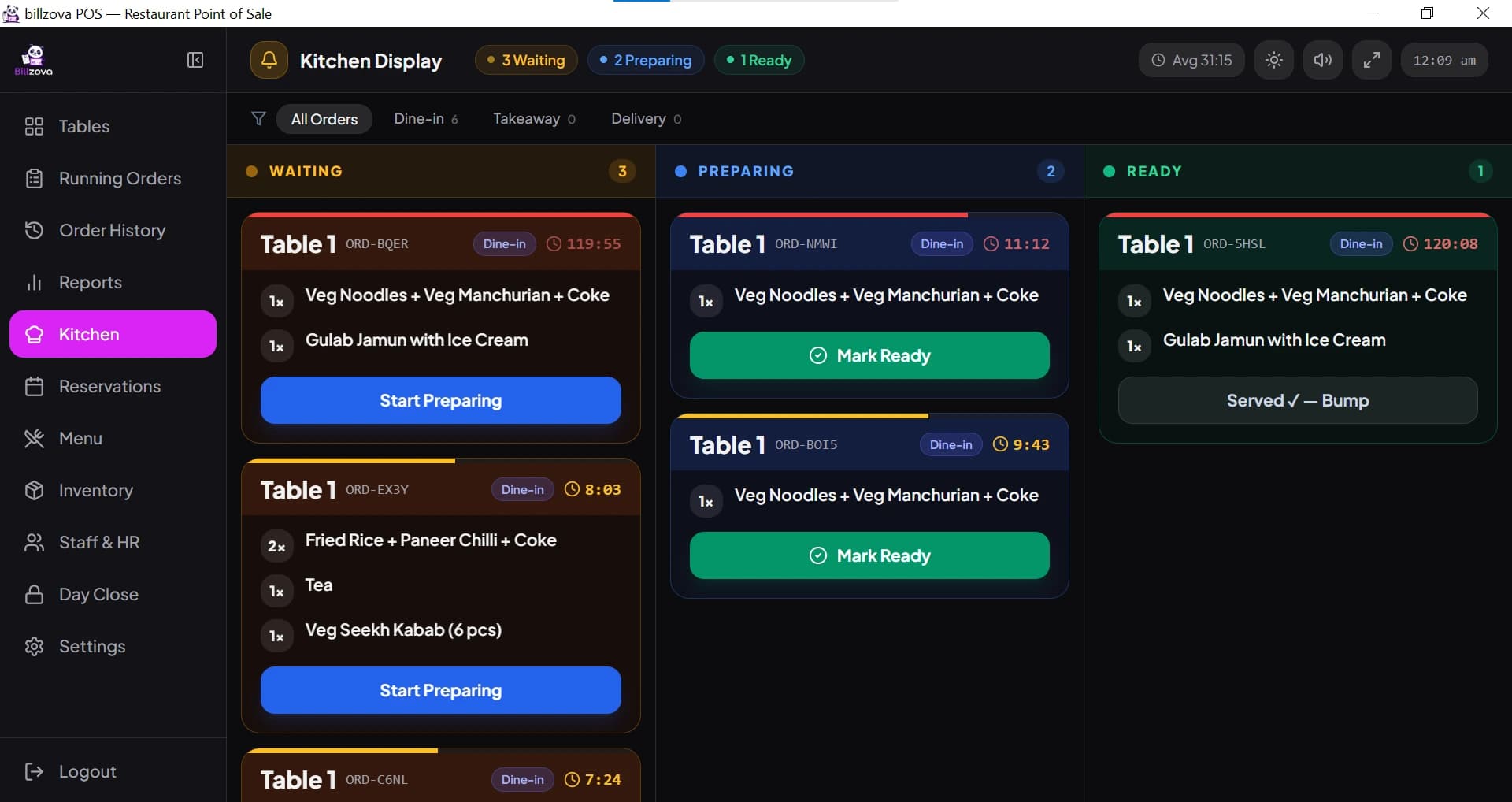
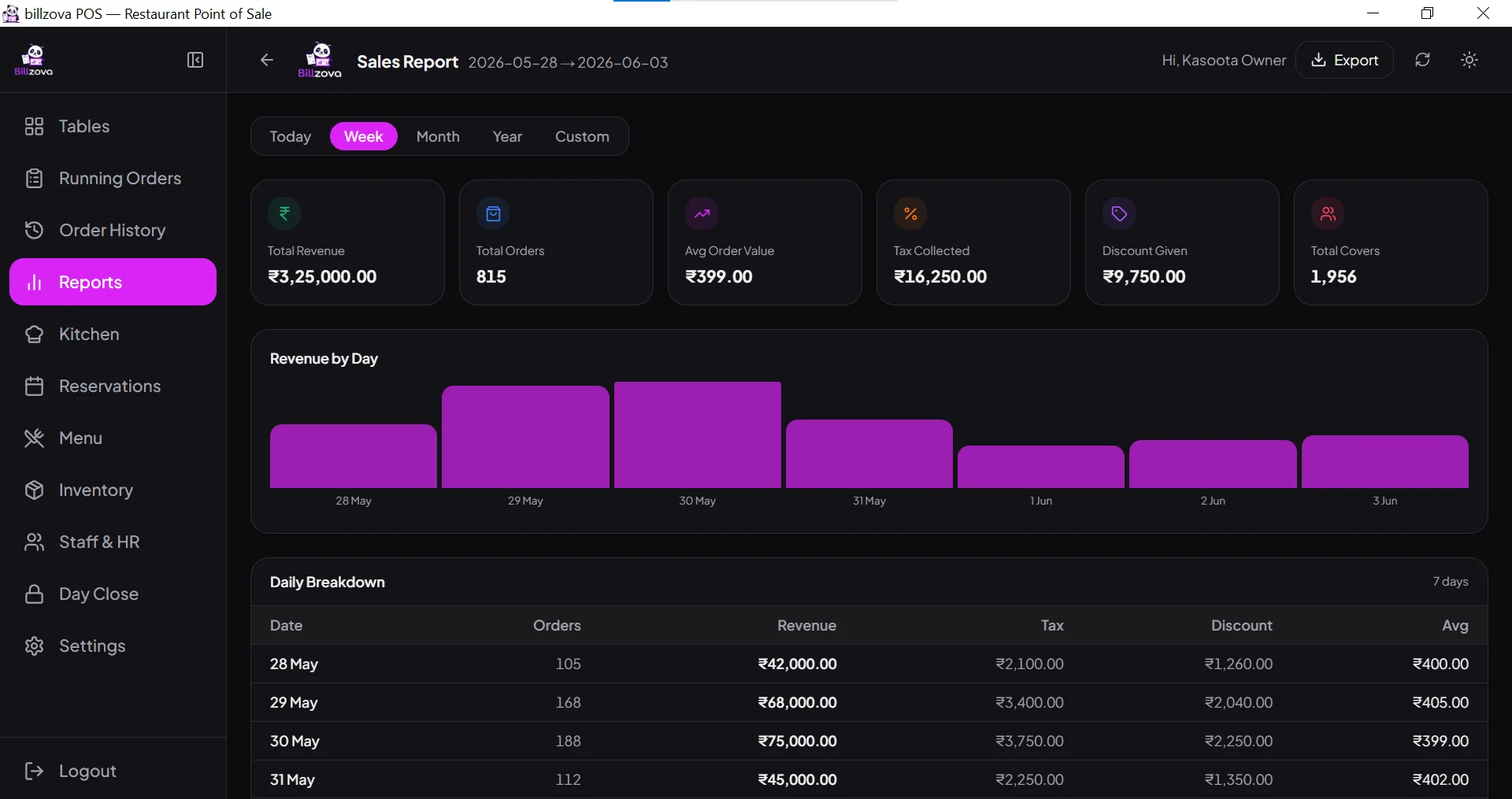
In the product
See every screen
Real product screenshots — not stock illustrations.
Compared
A shared till vs billzova Collaboration
One shared till / manual tracking
- One merged bill across stalls to reconcile
- A single operator sees every vendor's data
- Customers queue separately at every stall
- Commission tracked by hand, on trust
- No consent trail if a rate is disputed
billzova Collaboration
- Every restaurant bills and settles its own sales
- Occupancy-only visibility unless both sides opt in
- One QR code orders across every collaborating stall
- Commission needs the payer's explicit acceptance
- Real payout ledger — accrued, paid, outstanding
FAQ
Frequently asked questions
What is billzova's food court / multi-vendor solution?▾
Does billzova support prepaid smart cards or wallets for food courts?▾
Is there a central cash counter or unified till across all stalls?▾
Do vendors keep their own GST billing when they're sharing tables?▾
How does a restaurant invite another to collaborate?▾
Does accepting a collaboration invite automatically share tables or menus?▾
Can a restaurant choose exactly which tables to share?▾
Can my collaboration partner see my order details on shared tables?▾
What's the difference between sharing tables and sharing a menu?▾
Can a collaboration partner edit my menu items?▾
If a partner sells my menu item from their counter, who does the sale belong to?▾
Can one QR code let a customer order from multiple stalls at the same table?▾
Is each stall's order billed separately, even through the shared QR flow?▾
How does commission settlement between a vendor and the food-court operator work?▾
Can a vendor walk away from an agreed commission rate unilaterally?▾
What if there's a dispute over a commission arrangement?▾
Can a restaurant end a collaboration entirely?▾
What happens to shared tables and menus if a collaboration is revoked?▾
Do kitchen order tickets (KOTs) from a partner's order show up on my kitchen display?▾
Is this only for food courts, or can any two restaurants use it?▾
Is the Collaboration feature included in the ₹399/month plan?▾
Does either restaurant need special hardware to use Collaboration?▾
Does each restaurant need its own separate billzova account?▾
Can more than two restaurants collaborate, like six stalls in one food court?▾
Is there a limit to how many tables can be shared in one area?▾
Can I see one combined sales report across every collaborating restaurant?▾
Does Collaboration affect my own restaurant's existing table transfer, merge, or split features?▾
What happens if my collaboration partner's restaurant is closed or offline?▾
Start billing in 10 minutes.
Full access to every feature. Cancel anytime. ₹399/month after your free trial.