Sweet shop billing software —
weigh, bill, and take the Diwali orders.
Set a price per kg, tap 500 g or type the scale reading, and the box weight comes off by itself. Book festival and party orders with an advance and collect the rest at pickup. GST bills, UPI and stock of khoya and ghee — on Windows, Android and the web. ₹399/month, 30-day free trial.
The struggle
Sound familiar?
Weight maths at the counter
₹ per kg × 350 g, minus the box, worked out on a calculator while a queue waits — and sometimes worked out wrong.
Festival rush
Diwali, Raksha Bandhan and Bhai Dooj bring the biggest queues of the year. A slow or offline billing system costs real sales.
Advance orders in a notebook
Diwali boxes and party orders written in a register — who paid how much, when they come, and whether the karigar saw the note.
Weight & piece billing
How a mithai shop bills in billzova
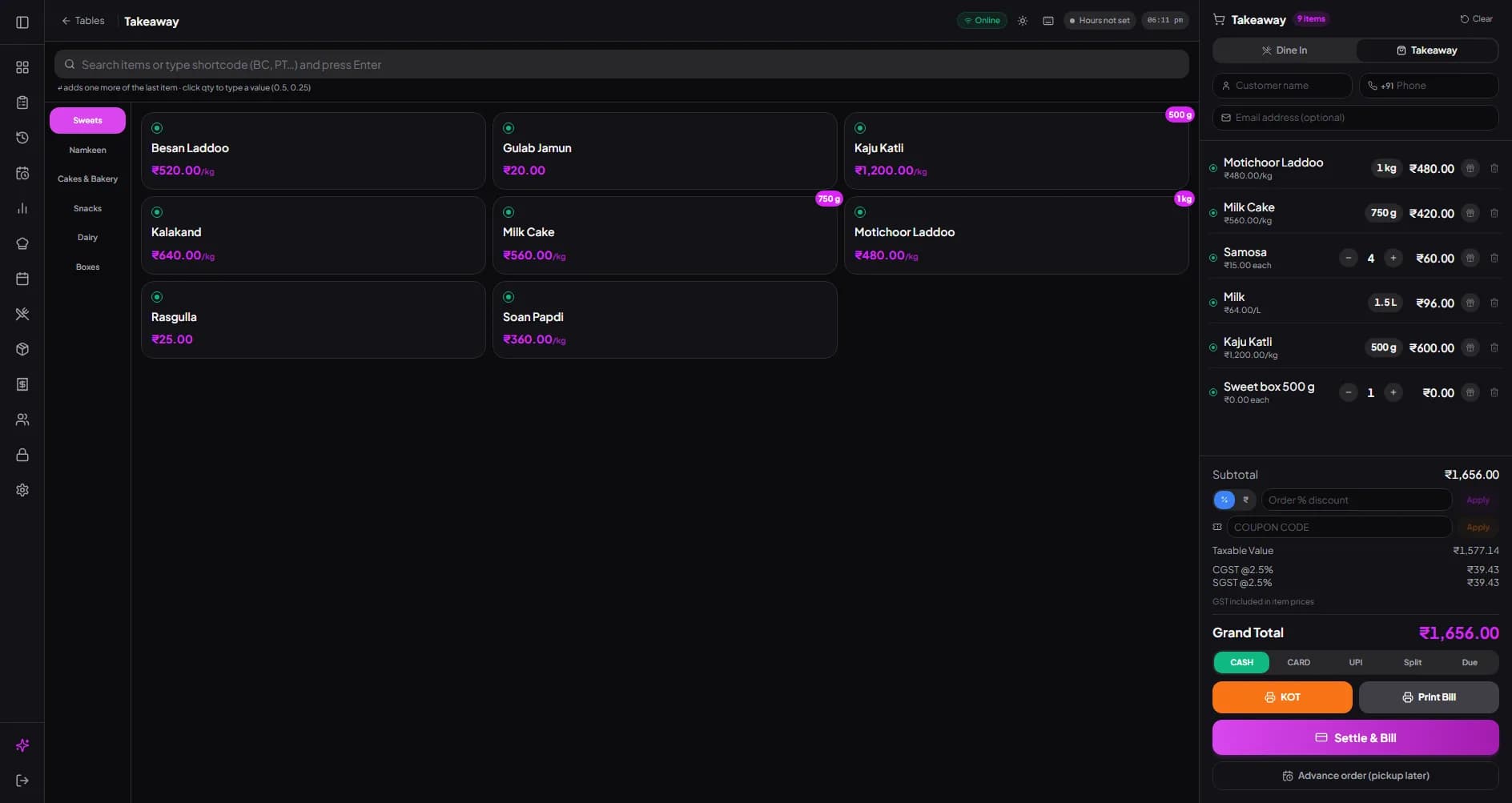
A sweet shop sells in five ways. Each item is set once in the menu — by piece, per kg or per litre — and the counter does the rest.
| How you sell | Example | Works on | Good to know |
|---|---|---|---|
| By weight (price per kg) | Kaju katli at ₹1,200/kg — tap 250 g, or type the scale reading | Every device | The bill shows “250 g × ₹1,200/kg”. Quantities are kept to the gram. |
| By ₹ amount | “Give me ₹100 of soan papdi” | Every device | Switch the weight pad to ₹ Amount; it works out the grams. |
| By litre | Milk or rabri by the litre — type 1.5 l or 750 ml | Every device | Price per litre; the bill shows the litres. |
| By piece | Samosa, kachori, a single rasgulla or a cake | Every device | Ordinary item; tap again to add one more. |
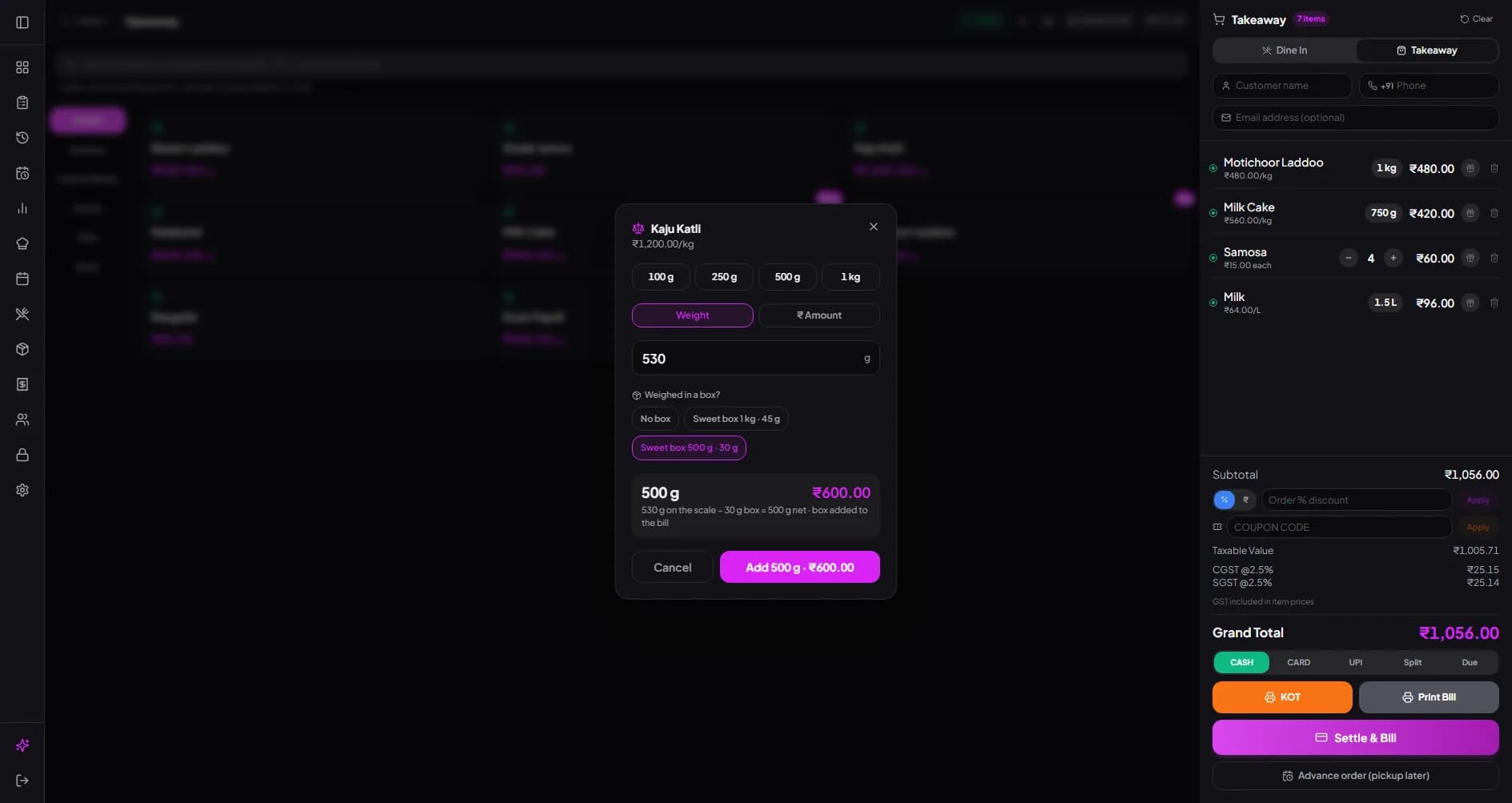
| In a box | 530 g on the scale in a 30 g box | Every device | Pick the box; 500 g is billed and the box is added at its price. |
Example: billing by weight
Say an item is priced at ₹800 per kg and the customer asks for 350 g. The cashier puts it in a 30 g box, the scale shows 380 g, they type 380 and pick the box. billzova bills 350 g at ₹280 and adds the box. GST is worked out on that. (Prices here are only an example.)
No weighing-scale connection
billzova does not read the weight from an electronic scale. Staff weigh on your existing scale and type the reading, or tap one of the item's ready-made weights — usually the quickest for standard packs.
GST on sweets and namkeen
Under the GST rate notification in force since 22 September 2025 (Notification No. 9/2025-Integrated Tax (Rate), dated 17 September 2025), sweetmeats, namkeen, bhujia and mixture, and bakery items such as cakes, pastries and biscuits are listed in the 5% schedule — 2.5% CGST plus 2.5% SGST on a bill within your state. Cold drinks, packaged goods and dine-in service can follow different rules, so ask your CA which rate applies to each item and enter it once on that item. billzova then applies it on every bill and adds the totals to your GSTR-1 and GSTR-3B reports. See GST billing for how bills are laid out.
Is billzova right for your shop?
billzova was built as restaurant billing software, and it fits sweet shops that sell from a counter, maybe with a few tables for chaat and snacks. Check these limits first:
- • No weighing-scale integration. Weights are typed in, or you tap a ready-made weight.
- • No barcode label printing. It does not print weight or price labels for pre-packed boxes.
- • No batch or expiry tracking. Stock is tracked as quantities of raw materials, not batches with dates.
- • No loyalty points. You get a customer list with visits and spend, plus coupon codes and discounts.
- • Advance orders need the internet. Everyday billing keeps working offline on the Windows app.
- • No Swiggy or Zomato orders. Aggregator orders are not pulled into billzova.
- • Several outlets? Multi-branch is set up on request on a custom plan.
If that works for you, start today: download the Windows app, read how inventory and recipe costing work, or see pricing. Run a bakery too? See bakery billing.
Weigh, tap, done — the box weight comes off by itself
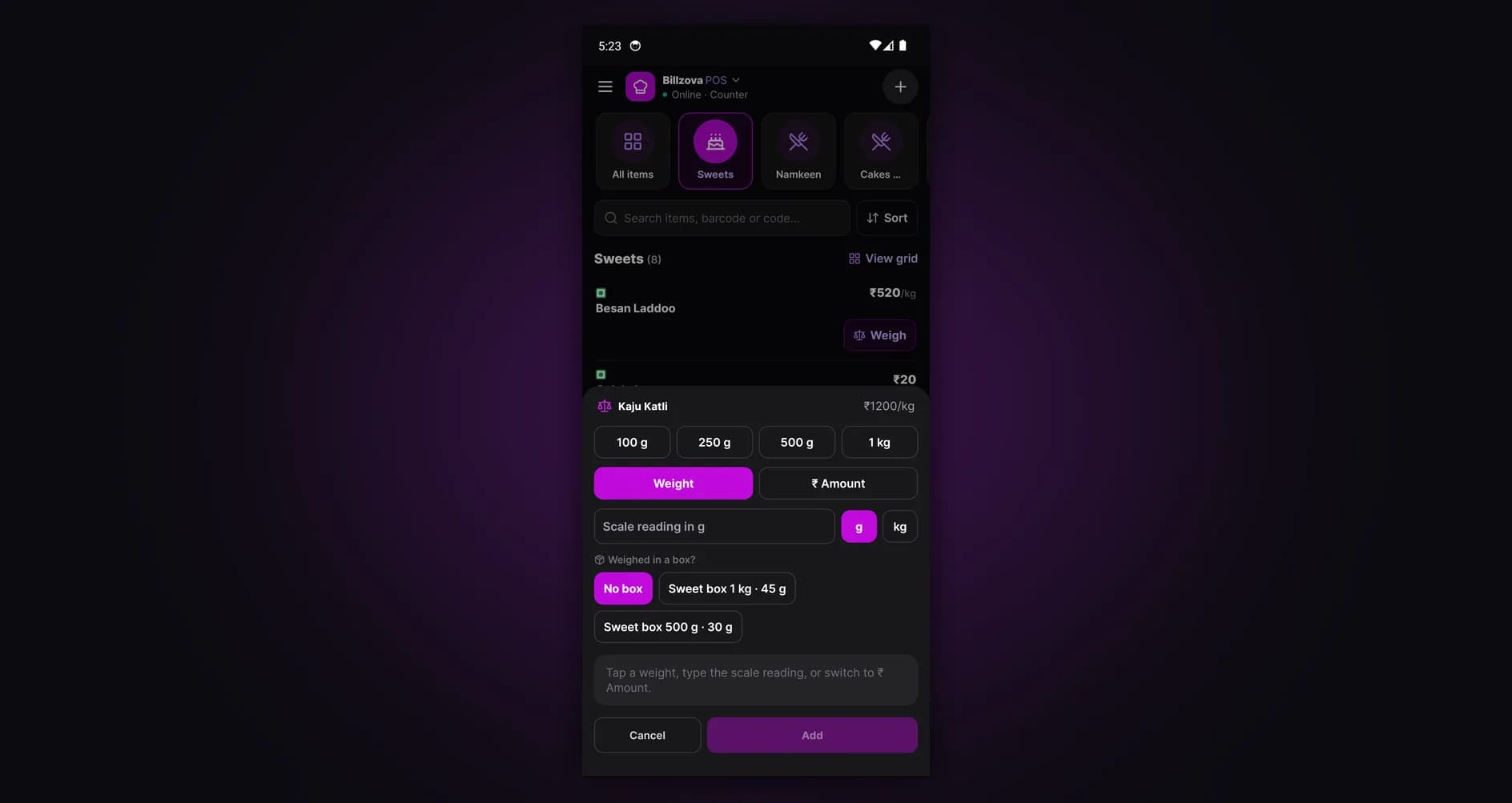
Tap an item sold by weight and the weight pad opens. Tap 250 g or 1 kg, type the scale reading in grams or kg, or switch to ₹ Amount for “₹100 worth”. Weighed in a box? Pick the box: its weight is taken off and the box goes on the bill. Correct a weight later by tapping it in the cart.
- One-tap weights per item (100 g, 250 g, 500 g, 1 kg by default)
- Scale reading in g or kg; milk and rabri in ml or litres
- ₹ Amount mode works out the grams
- Box weight taken off, box added to the bill
- Same pad on Windows, Android and the web POS
A bill your customer can check
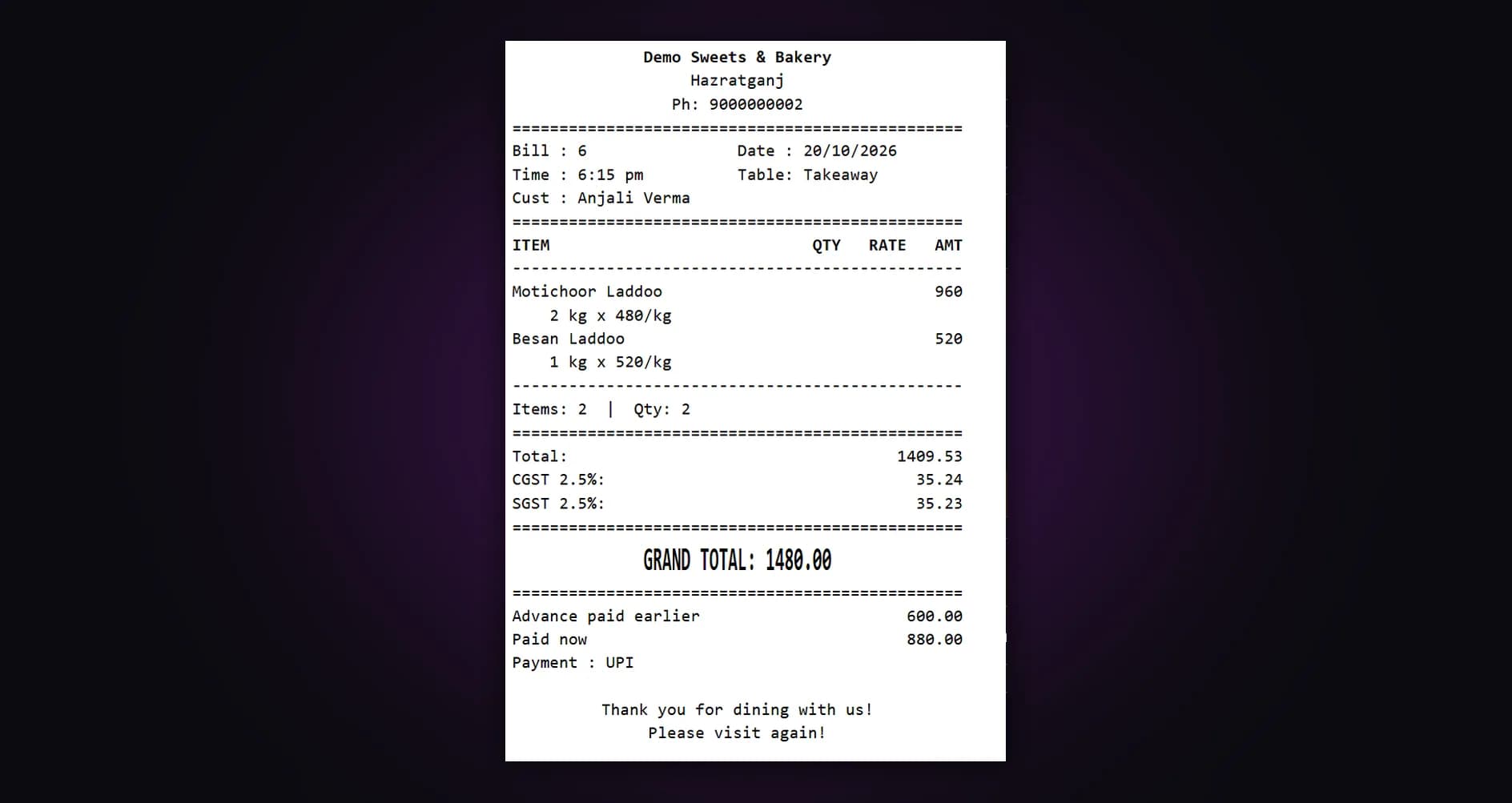
Every weighed line prints its weight and rate — 2 kg × ₹480/kg — with GST worked out per item. Each item keeps its own GST rate and a “price includes GST” switch. Under the composition scheme, bills print as a Bill of Supply; not registered for GST, as a plain bill.
- Weight × rate on every weighed line
- GST per item, CGST + SGST on the bill
- Bill of Supply for composition-scheme shops
- 58mm or 80mm thermal printers
Festival boxes and party orders, booked properly
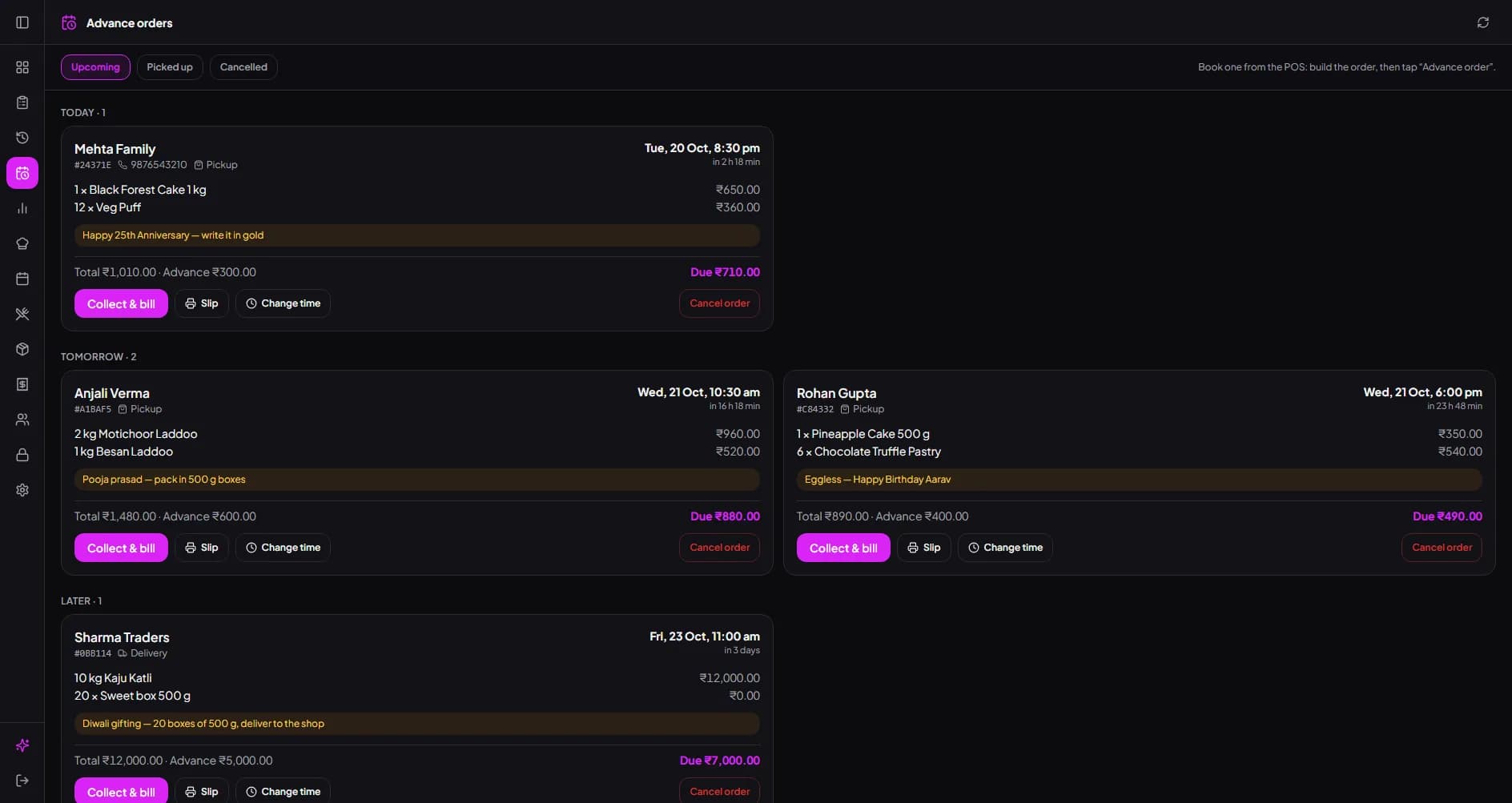
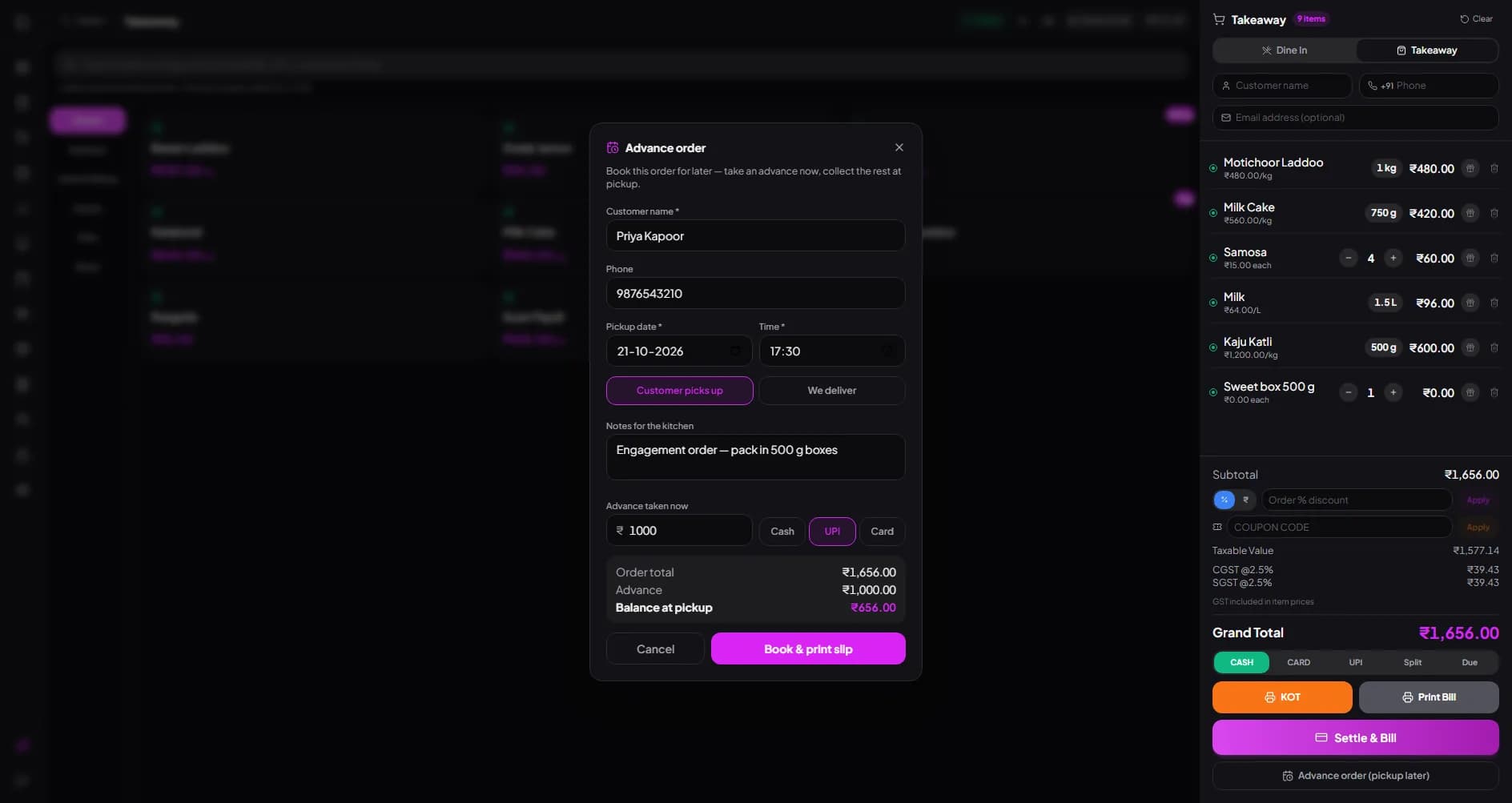
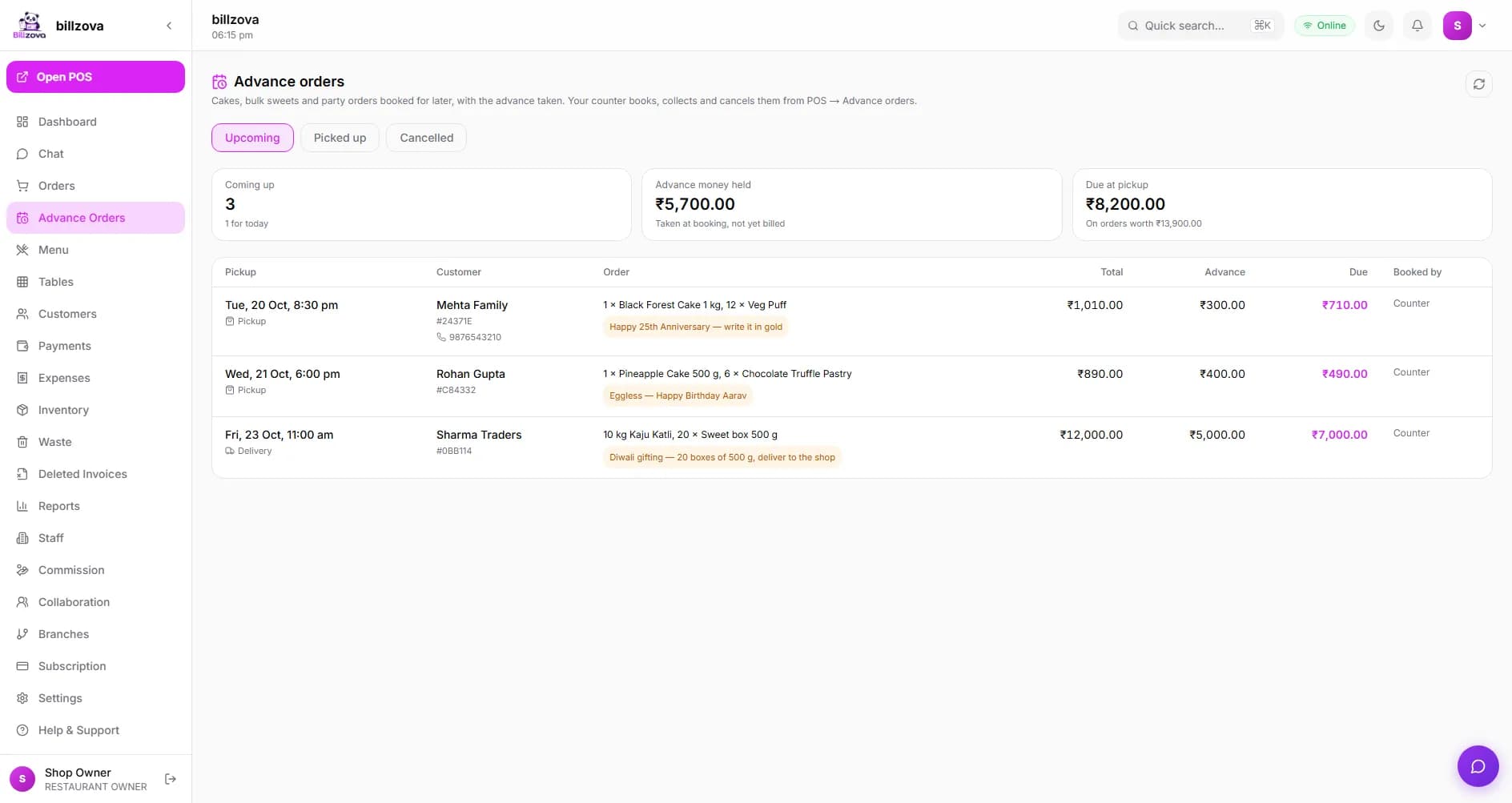
Build the order at the counter and tap “Advance order”: customer, pickup or delivery time, notes for the karigar and the advance by cash, UPI or card. A customer slip and a kitchen slip print. The Advance orders screen lists what is due today, tomorrow and later; at pickup, Collect & bill takes only the balance.
- Advance by cash, UPI or card, balance at pickup
- Customer slip and kitchen slip with the notes
- Overdue, today, tomorrow and later at a glance
- Change the pickup time; cancelling gives the advance back
- Owner sees advance money held and due in the dashboard
Change every rate in one go
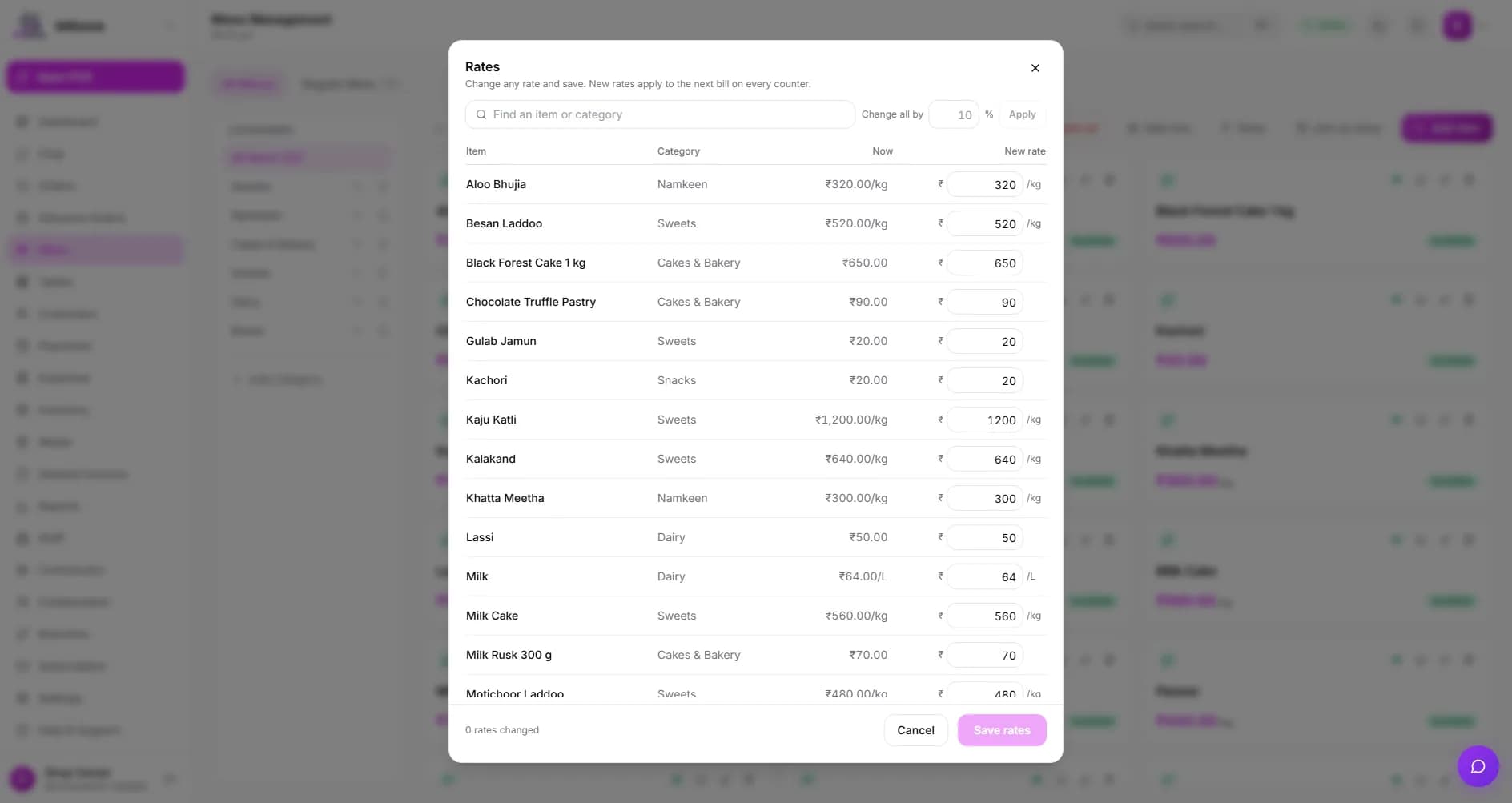
Milk went up? Festival prices? Open Rates in the dashboard menu: every item’s rate is on one screen, per kg, per litre or each. Type new rates or raise everything shown by a percentage. New rates reach every counter on the next bill. New shops can start from a ready sweet-shop rate list and just fill in their prices.
- Every rate on one screen, searchable
- Change all shown items by %
- Starter rate list for sweets, namkeen, dairy and boxes
- Item report shows kg and litres sold
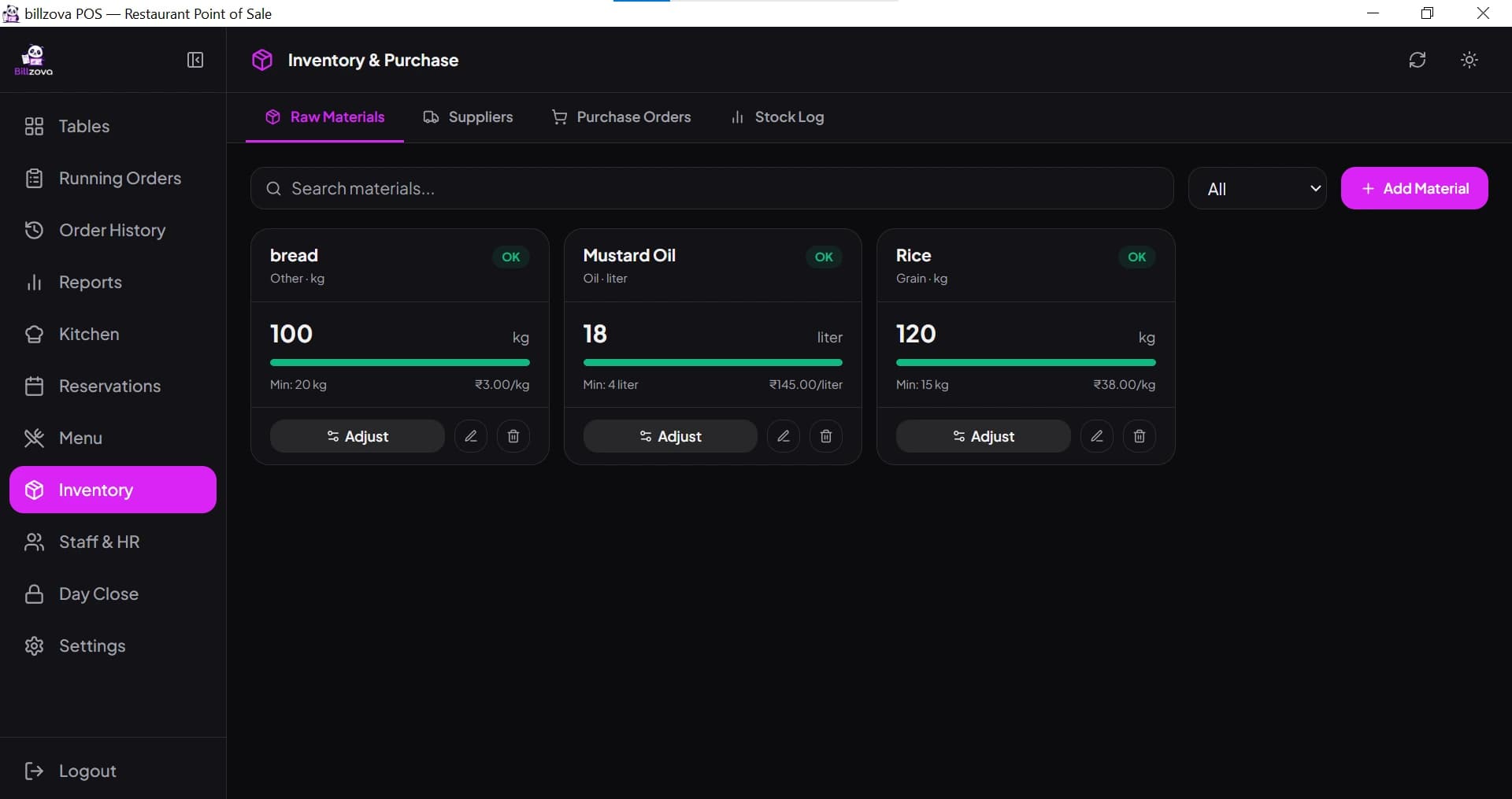
Know your khoya, sugar and ghee before you run out
Add raw materials in their own units, set a minimum stock level and record every purchase. Give each sweet a recipe and see its cost. With automatic deduction on, every paid bill takes its ingredients out of stock.
- Raw materials with units, cost and minimum-stock alerts
- Suppliers and purchase orders (receiving one adds stock)
- Recipes with cost per serving and food-cost %
- Auto-deduction on by default for new accounts
In the product
See every screen
Real product screenshots — not stock illustrations.
Compared
Calculator and bill book vs billzova
Calculator and bill book
- Weight × rate, minus the box, worked out by hand
- GST added (or forgotten) by hand
- Advance orders in a notebook
- Rates changed one by one
- Khoya runs out without warning
billzova
- Tap 500 g or type the reading — box comes off
- Item-wise GST on a printed bill
- Advance orders with slips and balance at pickup
- Every rate on one screen
- Minimum-stock levels on raw materials
FAQ
Sweet shop billing — frequently asked questions
Can billzova bill sweets by weight?▾
What if the sweets are weighed in the box?▾
Does it work on the Android app too?▾
Can I take advance orders for Diwali boxes and party orders?▾
Does billzova connect to my weighing scale?▾
How do I change rates before a festival?▾
What GST rate applies to sweets?▾
Can billzova track khoya, sugar and ghee stock?▾
Does it work when the internet goes down during the Diwali rush?▾
Does billzova have loyalty points or batch and expiry tracking?▾
How much does it cost?▾
Ready before the next festival rush.
Full access to every feature. Cancel anytime. ₹399/month after your free trial.