Download Restaurant POS for Windows
The online + offline billzova POS for billing, KOT printing and GST invoices. Install in under 3 minutes — your first month is free.
Version 1.0.47· Windows 10 & 11 (64-bit) · Free download
Install guide
Five quick steps from download to your first bill.
- 1
Download the installer
Click the Download for Windows button above. It saves a file named
billzova-POS-Setup-1.0.47.exe(about 80 MB) to your Downloads folder. - 2
Open the downloaded file
Double-click
billzova-POS-Setup-1.0.47.exe. Windows may take a moment to scan it before anything appears. - 3
Pass the “Windows protected your PC” screen
Because the app is new and not yet code-signed, Windows shows a blue “Windows protected your PC” SmartScreen. This is expected and safe — just:1 Click More info2 Click Run anyway
- 4
Finish the installer
The setup runs automatically and opens billzova POS when it’s done. A desktop shortcut is created so you can reopen it any time.
- 5
Log in & claim your free month
Sign in with your billzova account (or create one free). At checkout, apply coupon LUNCHCELEBRATION to activate your first month free with full access to every feature.
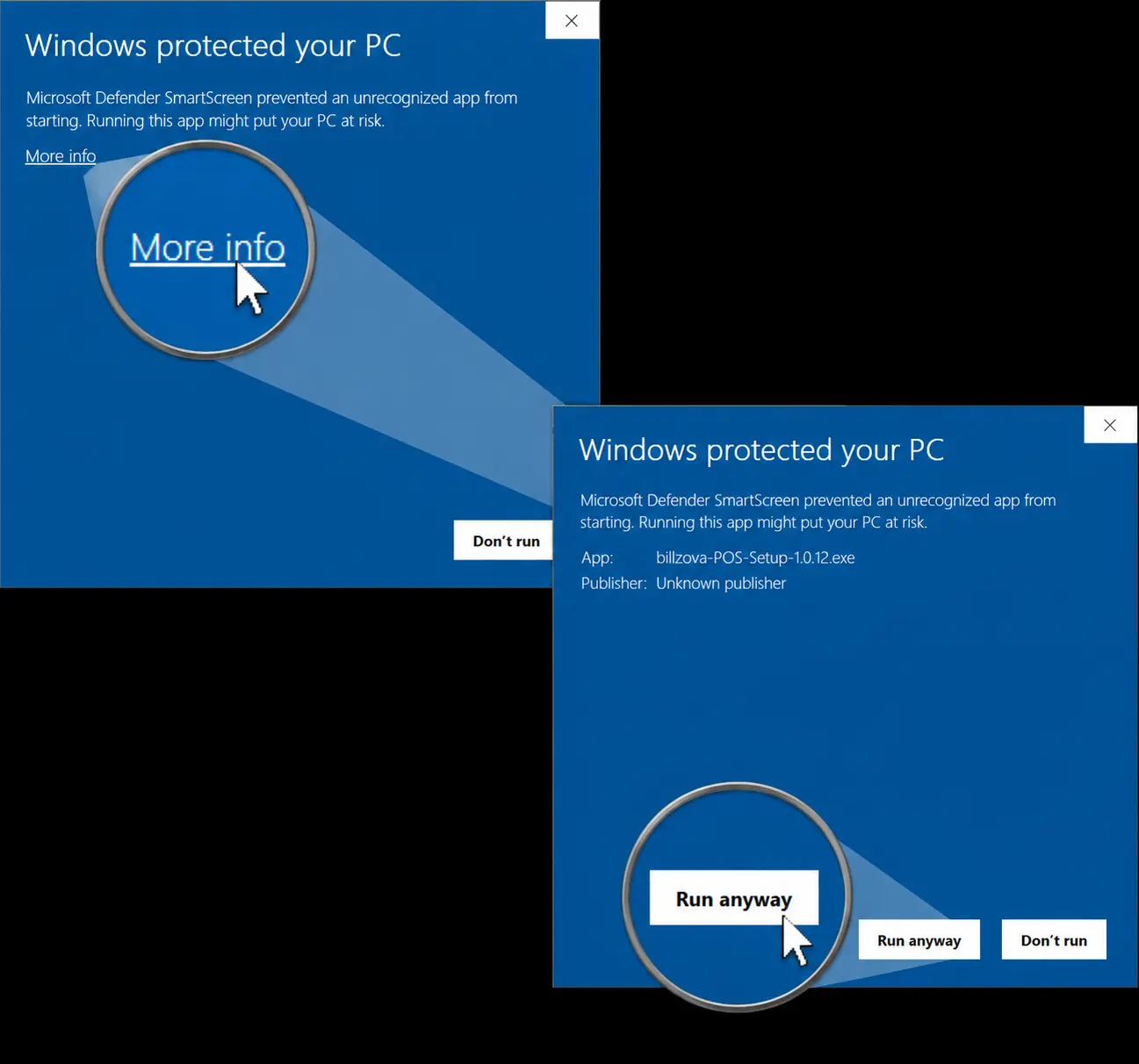
Step 3: More info → Run anyway
Is it safe? Yes. The warning only appears because the installer isn’t code-signed yet — not because anything is wrong. The app is downloaded directly from billzova’s official release page over HTTPS.
Windows 10 & 11
64-bit. Works on any modern laptop or billing PC — no high-end hardware needed.
Works offline
Take orders, print KOTs and bills with no internet. Syncs automatically when back online.
Always up to date
The app updates itself in the background, so you’re always on the latest version.