Build restaurant websites
that order straight into the POS.
The Billzova API gives your restaurant clients a live menu, correctly priced carts with Indian GST, pickup and delivery orders and table bookings — landing in their Billzova POS the second the customer taps Place order. No tablets, no emails, no re-typing.
The struggle
Sound familiar?
Orders that end in an inbox
Most restaurant websites send orders by email or WhatsApp. Someone has to notice, re-type it into billing and call the customer back. Orders get missed.
Prices that never match the bill
Menus copied into a website drift from the POS. GST, packing charges and rounding are guessed in JavaScript, and the customer is charged a different amount at the counter.
Integrations that break quietly
Unversioned APIs change under you, retries create duplicate orders, and error messages in prose are impossible to handle properly in code.
Who it is for
For the people who build restaurant websites in India
Most restaurant websites in India are built by small web agencies, freelancers, or a nephew who is good with WordPress. They look great — and then the “Order now” button sends an email, or opens WhatsApp, or links out to a delivery app that takes a commission on every order.
The Billzova API exists so that the website you build can do the real thing: take an order that the restaurant's staff see on their POS screen, with the right prices, the right GST, and the customer's name, number and address already filled in. It is a plain REST API with JSON in and out, so it works with whatever you already build in:
- Next.js, Nuxt, Astro or Remix — call it from a route handler or server action.
- WordPress or PHP — call it from a small server-side endpoint with cURL.
- Node.js, Python, Go, Laravel — any language that can send an HTTPS request.
- Flutter or React Native apps — through your own backend, which holds the key.
If your client already uses Billzova for billing, connecting their website is usually a small job, not a project. If they do not yet, Billzova POS starts with a free trial — and you get a client whose website and counter finally agree.
What is in it
Twelve endpoints that cover a restaurant website
Deliberately small. Everything a restaurant's own website or app needs for menu, ordering and booking — and nothing that would let a website change the restaurant's menu, prices or reports.
| Method | Path | What it does |
|---|---|---|
| GET | /v1/restaurant | Name, address, opening hours, open/closed right now, and whether ordering and booking are on. |
| GET | /v1/menu | Live categories, items, sizes and add-ons with availability. Supports ETag / If-None-Match caching. |
| POST | /v1/orders/quote | Price a cart with the restaurant's own GST, charges and rounding. Show these totals — never your own maths. |
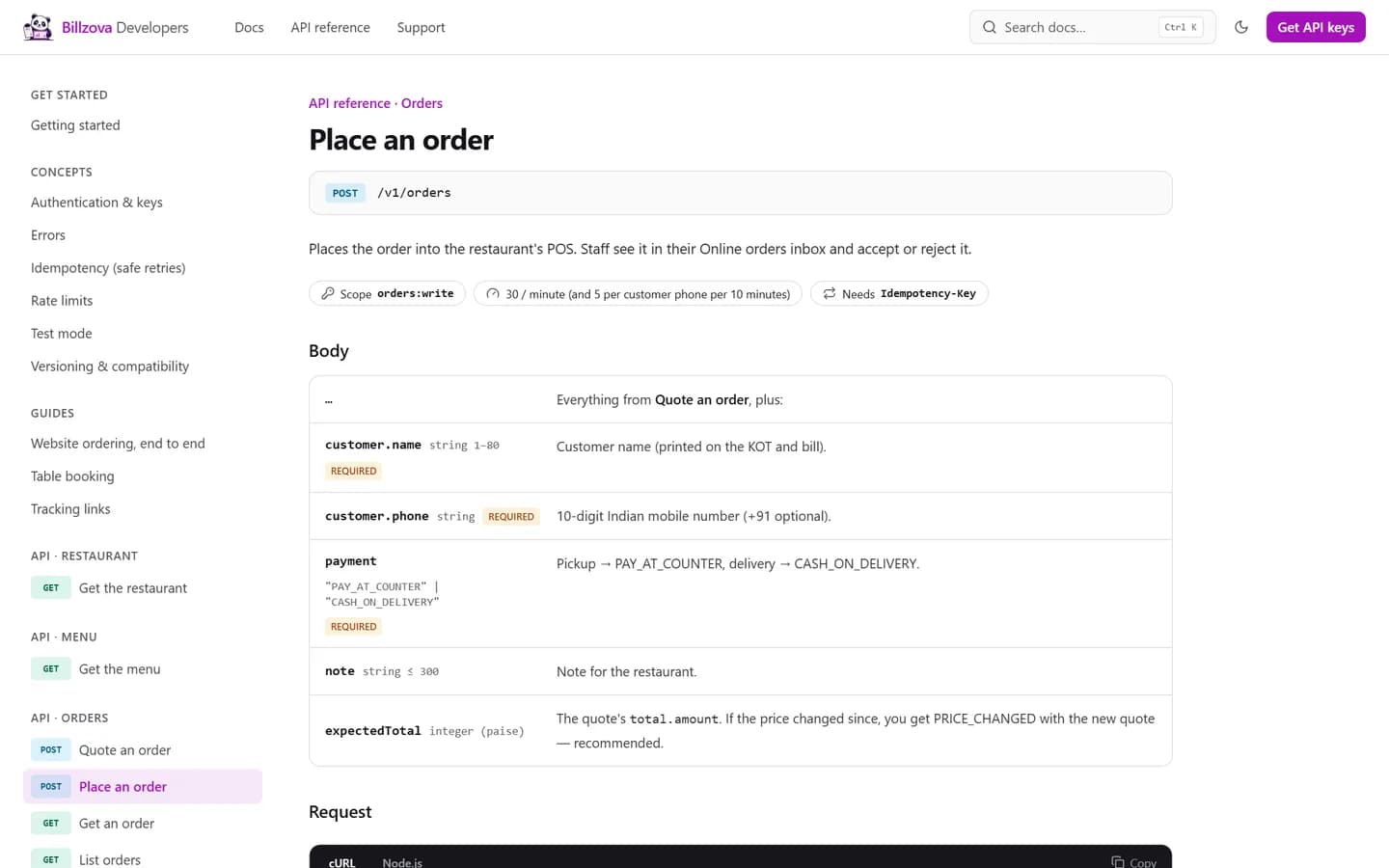
| POST | /v1/orders | Place a pickup or delivery order into the POS. Needs an Idempotency-Key. |
| GET | /v1/orders/{id} | Status, timeline, rider name and number once out for delivery, and rejection reason if any. |
| GET | /v1/orders | List orders, with updated_since for syncing changes in order. |
| POST | /v1/orders/{id}/cancel | Customer cancels while the order is still waiting for the restaurant. |
| GET | /v1/reservations/availability | Free booking times for a date and party size, from opening hours and the restaurant's limits. |
| POST | /v1/reservations | Book a table. Needs an Idempotency-Key. |
| GET | /v1/reservations/{id} | Booking status, price, and decline reason if any. |
| POST | /v1/reservations/{id}/cancel | Customer cancels before the restaurant's cut-off. |
| GET | /v1/track/{token} | Public tracking data for an order or booking — no key needed. |
Full details for each — fields, errors, examples — are in the API reference.
The flow
A website order in five calls
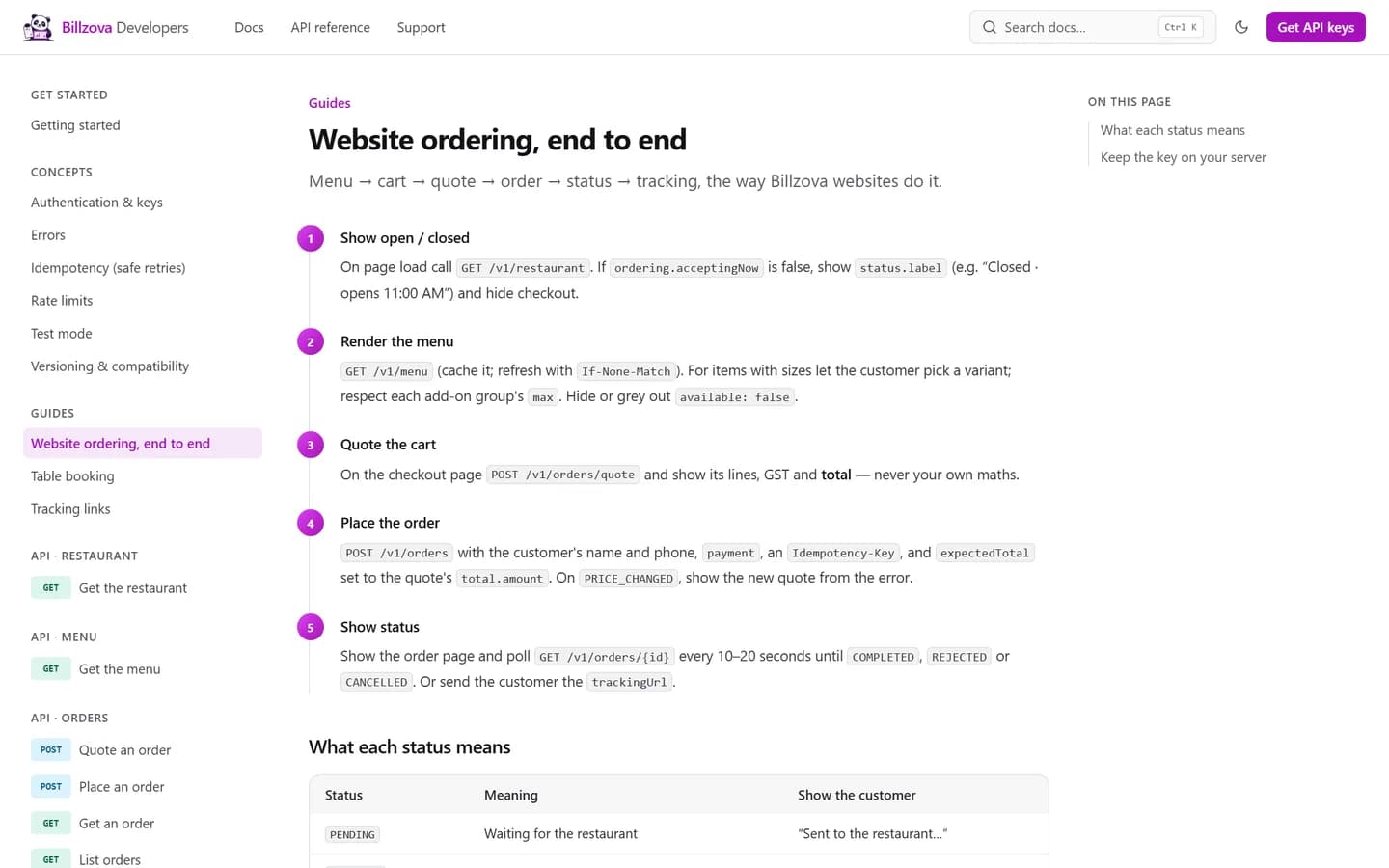
This is the same flow Billzova's own restaurant websites use. The website ordering guide has the code.
- 1
Show open or closed
GET /v1/restaurant on page load. If the restaurant is not accepting orders — outside opening hours, switched off, or (if the owner chose it) no staff device online — show the label it gives you, such as "Closed · opens 11:00 AM", and hide checkout.
- 2
Render the menu
GET /v1/menu, cached with ETag. Let customers pick sizes and add-ons within each group's limits, and grey out anything marked unavailable.
- 3
Quote the cart
POST /v1/orders/quote returns lines, GST, charges and the total, computed by the same engine that prints the restaurant's bills. Show these numbers as they are.
- 4
Place the order
POST /v1/orders with the customer's name and phone, the payment mode, an Idempotency-Key, and expectedTotal from the quote. If prices changed in between, you get PRICE_CHANGED with a fresh quote instead of a surprise at the counter.
- 5
Show status
Poll GET /v1/orders/{id} every 10–20 seconds until it is completed, rejected or cancelled. When the restaurant sends it out, the response includes the rider's name and number.
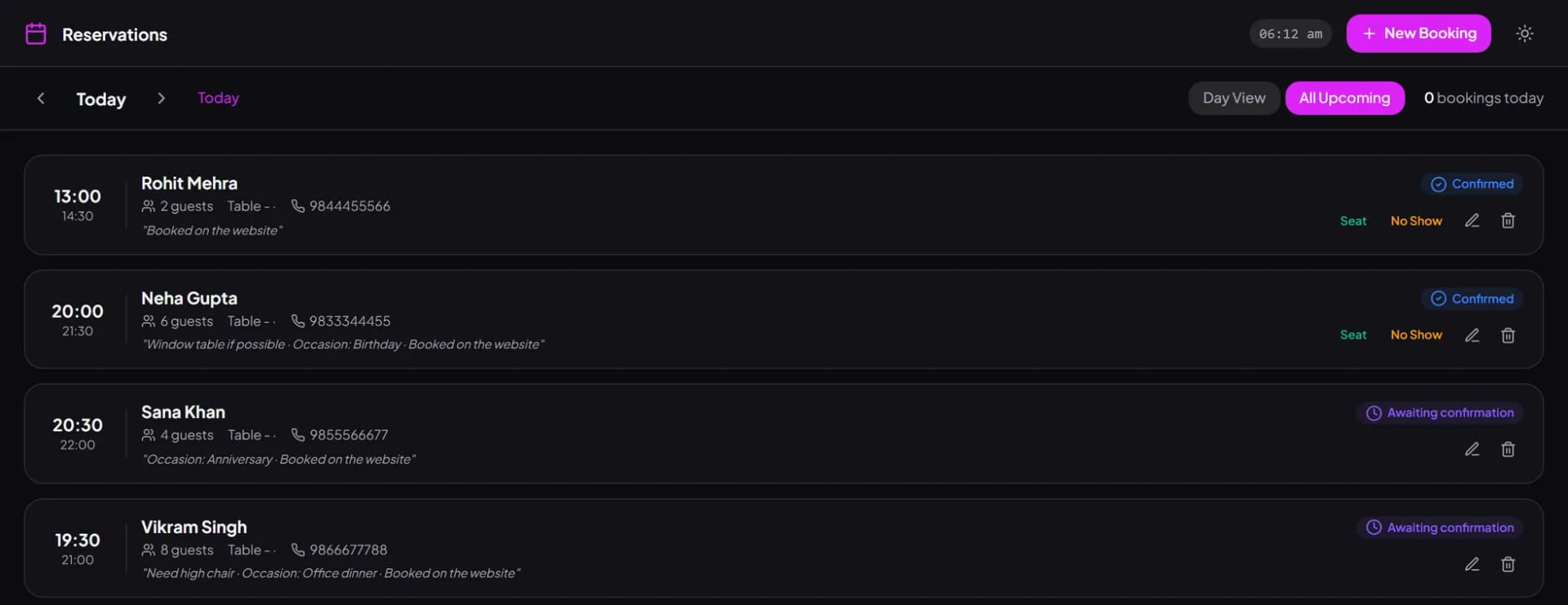
Table booking follows the same pattern: check availability for a date and party size, show the free times, book with an Idempotency-Key, and poll for confirmation. The restaurant's staff confirm or decline in their POS — see how that looks on our online table booking page.
Built not to break
Designed so the websites you ship keep working
You will build a site, hand it over and move on to the next client. The API is designed around that reality.
A dated version contract. Every key is pinned to the API version it was created with (currently 2026-10-17). Inside a version, changes are additive only — new fields, new enum values — so a site you shipped this year keeps working next year. You can ask for a version explicitly with the Billzova-Version header. See versioning & compatibility.
Safe retries. Orders and bookings need an Idempotency-Key. A retry with the same key returns the first result instead of placing a second order; if the first request is still being processed, you get IDEMPOTENCY_IN_PROGRESS and simply retry a few seconds later. A customer on patchy 4G never sends the kitchen two orders.
Errors you can branch on. Every error has a stable code such as ITEM_UNAVAILABLE, CLOSED or PRICE_CHANGED, a human message you can show the customer, the field it relates to, a request ID and a link to its documentation.
Money you cannot get wrong. Amounts come as an object with the value in paise, the currency and a ready-formatted display string like “₹1,194.00”. Show the display string and you will never have a rounding argument with a customer.
Test mode that is honest. A test key uses the real menu and the real pricing engine, but test orders and bookings never reach the POS, printer or WhatsApp — so you can demo the whole flow to your client without the kitchen cooking anything.
Handing over
A go-live checklist for restaurant website projects
Most problems on launch day are not code problems — they are restaurant settings nobody checked. Run through this list with the owner before you switch to the live key:
- Opening hours are right, including weekly offs and the next holiday. The API refuses orders when the restaurant is closed, and your site should show the closed label it returns.
- The menu in Billzova is the menu on the website. Photos and descriptions can be yours, but items, sizes, add-ons and prices must come from the API. Ask the owner to mark sold-out items unavailable in the POS, not to email you.
- Online order settings are filled in — pickup and/or delivery, delivery pincodes, minimum order, preparation time and the reminder and auto-cancel times.
- Someone is there to accept orders. Orders placed while nobody is logged in still arrive with email and WhatsApp alerts, and are cancelled (customer told) if nobody accepts them in time. Owners can also choose to take orders only while a staff device is online — then the API refuses orders when nobody has been active for a while. Tell the owner which setting they picked; it is the most common “the website is broken” call.
- Do a full test with the test key — menu, quote, order, booking — then one real order with the live key that the staff accept, cook and bill, so everyone has seen it once.
- Store the key on your server only, limit its scopes to what the site uses, and add your server's IP to the allowlist if it is fixed.
- Keep the request ID. Every response carries an X-Request-Id. Log it with errors, and quote it when you or the owner contact support.
The getting started guide covers the first request in a few lines of cURL, and the table booking guide covers bookings the same way.
Before you quote a client
What the API does not do yet
We would rather you know this before you promise anything to a restaurant. Each item below is on our list, but none of it works today:
- No online payments yet. Orders are pay at counter or cash on delivery; booking amounts are collected at the restaurant.
- No webhooks yet. Poll order and booking status, or use the tracking link.
- No browser keys yet. Keys are secret and must stay on your server.
- No partner (OAuth) apps yet. Each restaurant creates its own key for you.
- No delivery-app connection. The API is for the restaurant's own website and app, not for importing orders from food-delivery apps.
Webhooks, server-side offers and coupons, online payments, partner apps and publishable keys are listed as coming next in the changelog. When they ship, they arrive as additions — nothing you build today needs to change.
Questions, or want to tell us what your clients need first? Use the developer support page or contact us.
The restaurant creates the key — and can see every request
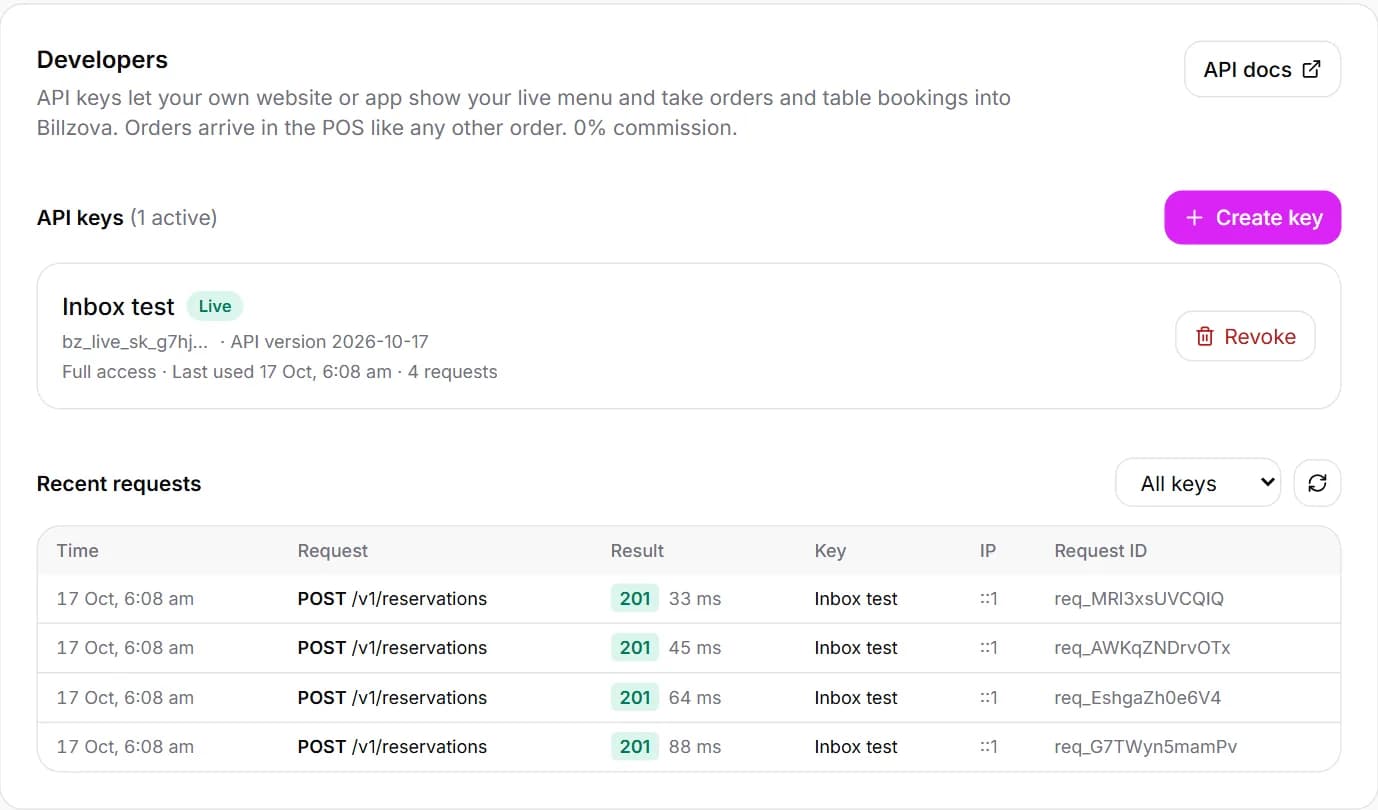
Your client creates a live or test key in their dashboard, limits it to the scopes you need and, if you like, to your server's IP address. Every request shows up in their request log with the result, time and request ID, so support conversations start from facts.
- Live and test keys
- Scopes: restaurant, menu, orders, reservations — read or write
- Optional IP allowlist
- Instant revoke, request log with IDs
Every endpoint with fields, limits, errors and copy-paste code
The reference lists each field with its type and limits, the scope and rate limit for each endpoint, every error code, and cURL and Node.js examples. Guides walk through website ordering and table booking end to end.
- Field-by-field reference
- cURL and Node.js examples
- Website ordering and booking guides
- Searchable, light and dark
In the product
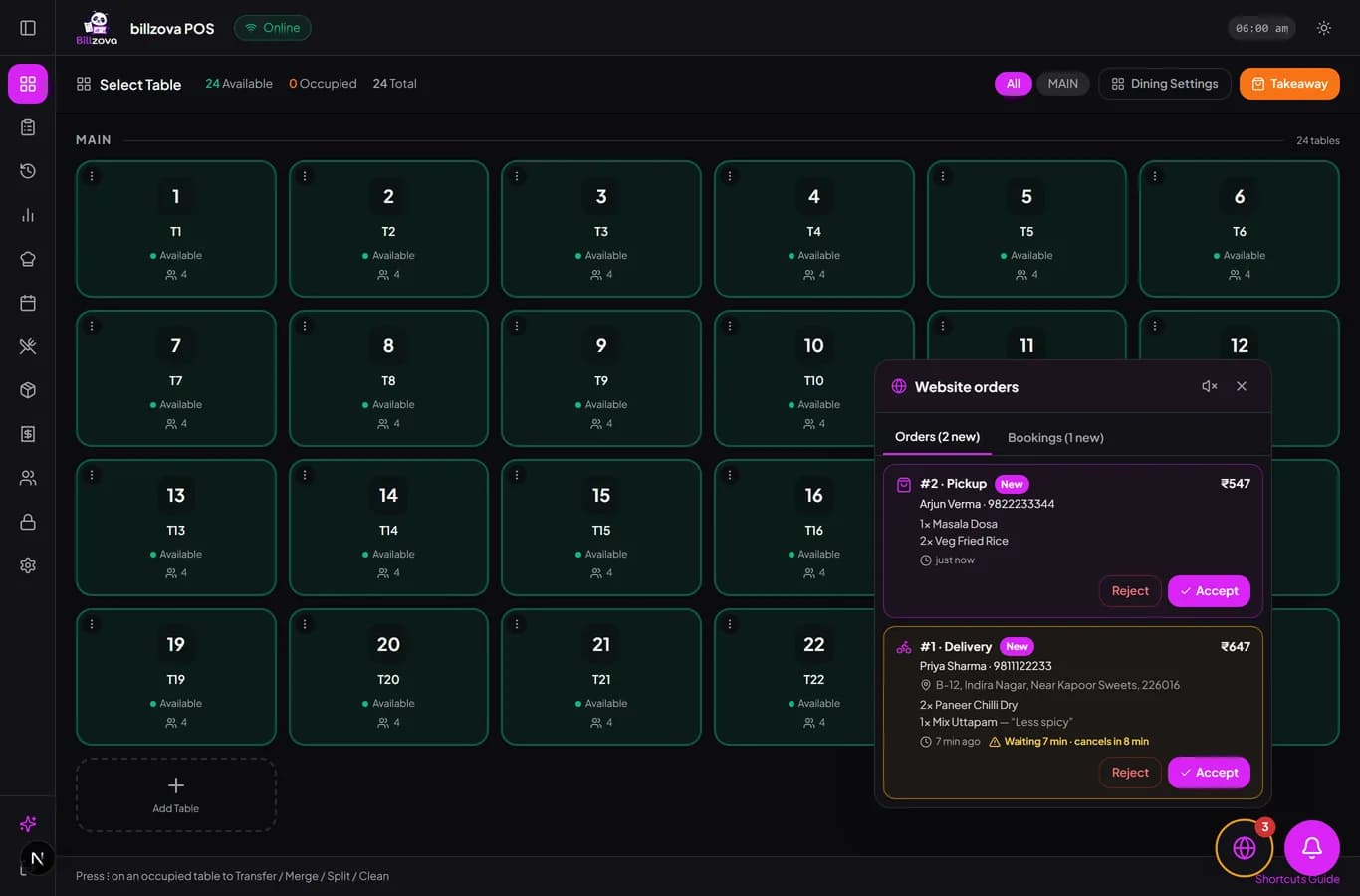
What your client's staff see
Orders and bookings from your website land in the same screens they already use.
Compared
A typical restaurant website integration vs the Billzova API
Email / WhatsApp / spreadsheet integrations
- Menu copied by hand, goes stale
- Totals calculated in the browser
- Orders re-typed into billing
- Retries create duplicate orders
- No way for the owner to see what was sent
Billzova API
- Live menu and availability from the POS
- Server-side quote with the restaurant's GST and charges
- Orders and bookings straight into the POS
- Idempotency keys make retries safe
- Request log in the owner's dashboard
FAQ
Billzova API — questions developers ask
What can I build with the Billzova API?▾
Who gives me an API key?▾
Can I test without sending orders to the kitchen?▾
Is the API safe to call from the browser?▾
What happens if my request times out and I retry?▾
Will my integration break when you change the API?▾
Are there webhooks?▾
Can customers pay online through the API?▾
Does the restaurant pay commission on API orders?▾
What are the rate limits?▾
Can Billzova build the website instead?▾
Your clients' websites, connected to their kitchen.
Docs, a full API reference and a step-by-step ordering guide are free to read at developers.billzova.com.