Advance order software —
take the advance, collect the rest at pickup.
Birthday cakes, Diwali sweet boxes, 50 thalis for a puja: book them at the billing counter with an advance by cash, UPI or card. A customer slip and a kitchen slip print, every counter sees what is due today, and at pickup you collect only the balance. Web POS, Windows and Android — included in ₹399/month.
The struggle
Sound familiar?
Orders in a register
Cake orders on a notepad by the counter: who paid how much, which day, which message on the cake — and whose handwriting it was.
Advance money that doesn’t add up
Advances mixed into the day’s cash. At closing nobody can say how much belongs to orders still to be picked up.
The kitchen finds out late
“Eggless, pink icing” told at the counter never reaches the person making it — or reaches them on the morning of pickup.
From booking to pickup
What happens to the order — and the money
An advance order is a normal bill that is paid in two parts. Here is each step and where the money sits.
| Step | What you do | The money |
|---|---|---|
| 1. Booking | Items on a takeaway bill → Advance order. Name, phone, pickup time, notes, advance. | Advance taken (cash, UPI or card) |
| 2. Same minute | Customer slip and kitchen slip print. The order leaves the counter’s open bills. | Shown as advance money held |
| 3. Before pickup | Change items, pickup time or notes if the customer calls. | Total can’t drop below the advance |
| 4. Pickup | Collect & bill. The final bill prints with the advance shown. | Only the balance is collected |
| Or: cancelled | Cancel the order and hand the advance back. | Advance marked refunded, not in sales |
Example: a birthday cake
A 1 kg cake and half a kilo of kaju katli come to ₹1,250. The customer pays ₹500 by UPI and asks for “Happy Birthday Riya — eggless, pink icing” for Wednesday 5:30 pm. Both slips print; the kitchen copy carries the message. On Wednesday the cashier taps Collect & bill, takes the remaining ₹750 in cash, and the bill shows ₹500 paid in advance. (Prices here are only an example.)
Good to know
- • Advance orders need the internet to book, change, collect or cancel.
- • They are booked from a takeaway bill, not a dine-in table.
- • No SMS or WhatsApp reminder to the customer yet — the printed slip is their reminder.
Selling sweets by the kilo too? See sweet shop billing and the weight pad, or bakery billing.
Book from the billing screen you already use
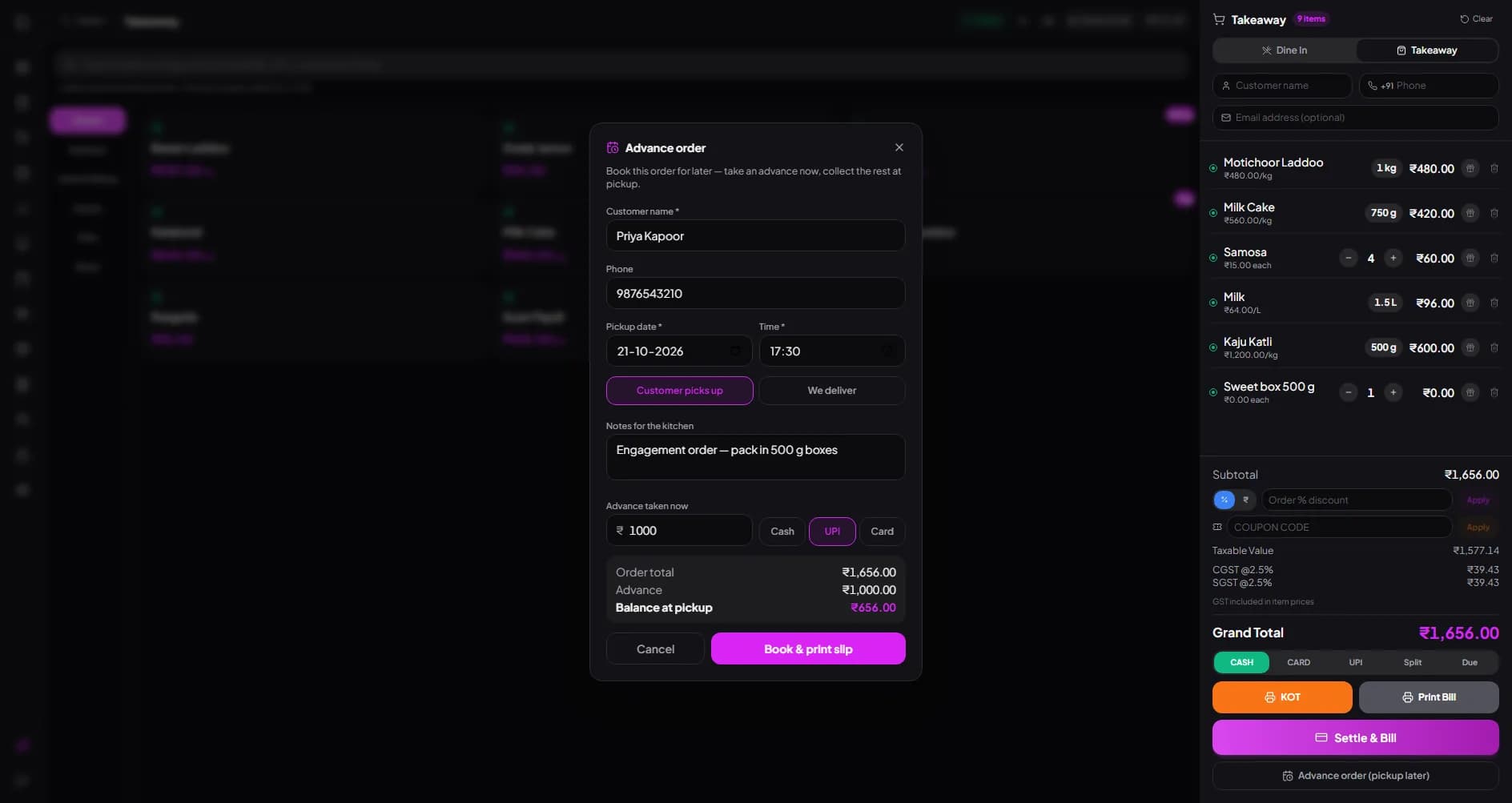
Add items to a takeaway bill exactly as you would for a walk-in — sweets by weight, cakes by piece — and tap “Advance order (pickup later)”. Enter the customer, pickup date and time, pickup or delivery, notes for the kitchen and the advance. The balance at pickup is worked out for you.
- Customer name, phone, pickup date and time
- “Customer picks up” or “We deliver”
- Advance by Cash, UPI or Card
- Up to 6 months ahead
- Same items, prices and GST as a normal bill
A slip for the customer, a slip for the kitchen
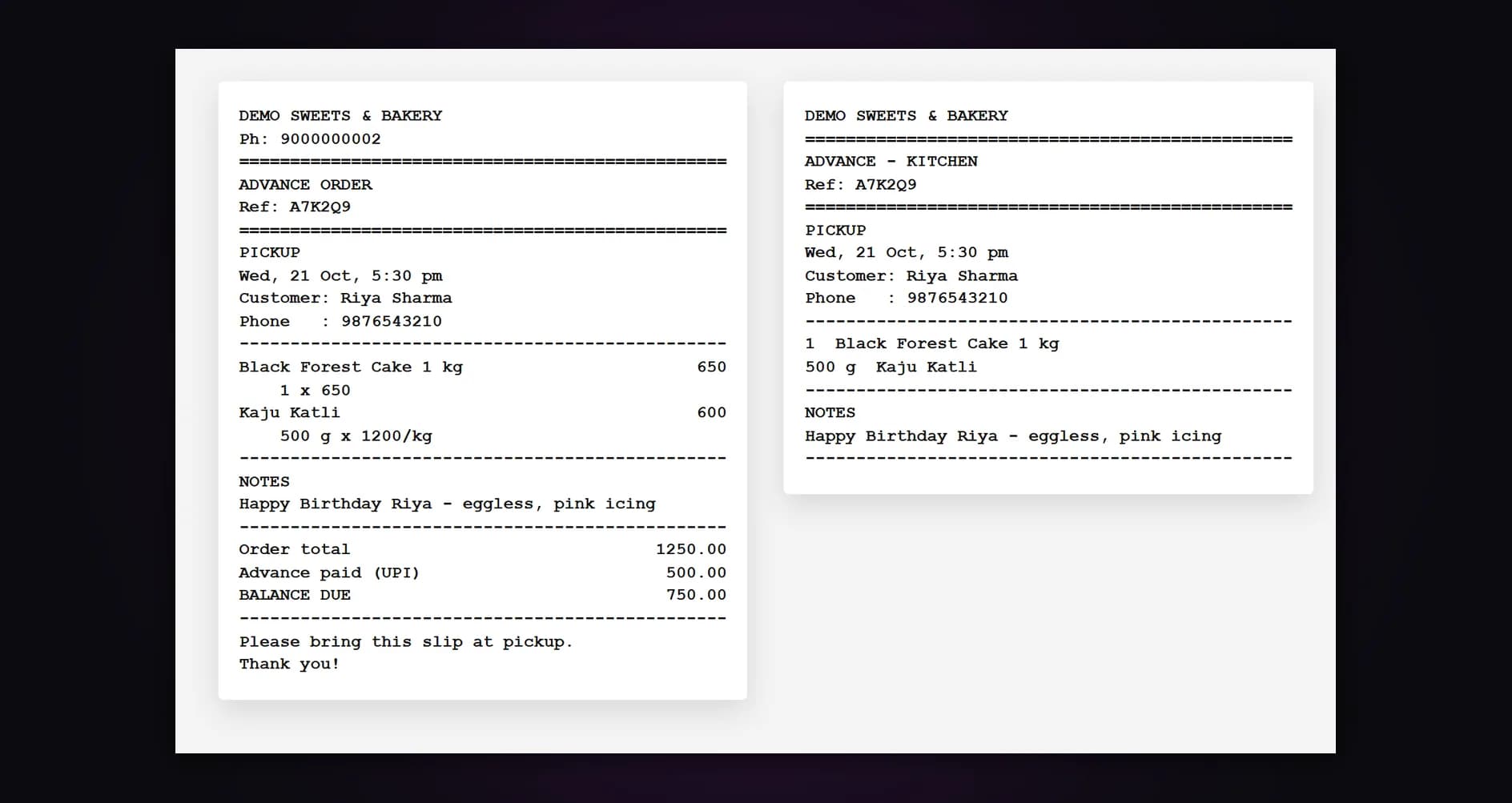
The customer slip carries a booking reference, the pickup time, the items, the advance paid and the balance due — proof of their order and their money. The kitchen slip prints the items, the pickup time and your notes with no prices, so whoever makes the order reads “eggless, pink icing” the day it is booked.
- Booking reference on both slips
- Advance paid and balance due in print
- Kitchen slip with notes, no prices
- 58mm and 80mm thermal printers
Overdue, today, tomorrow, later — at a glance
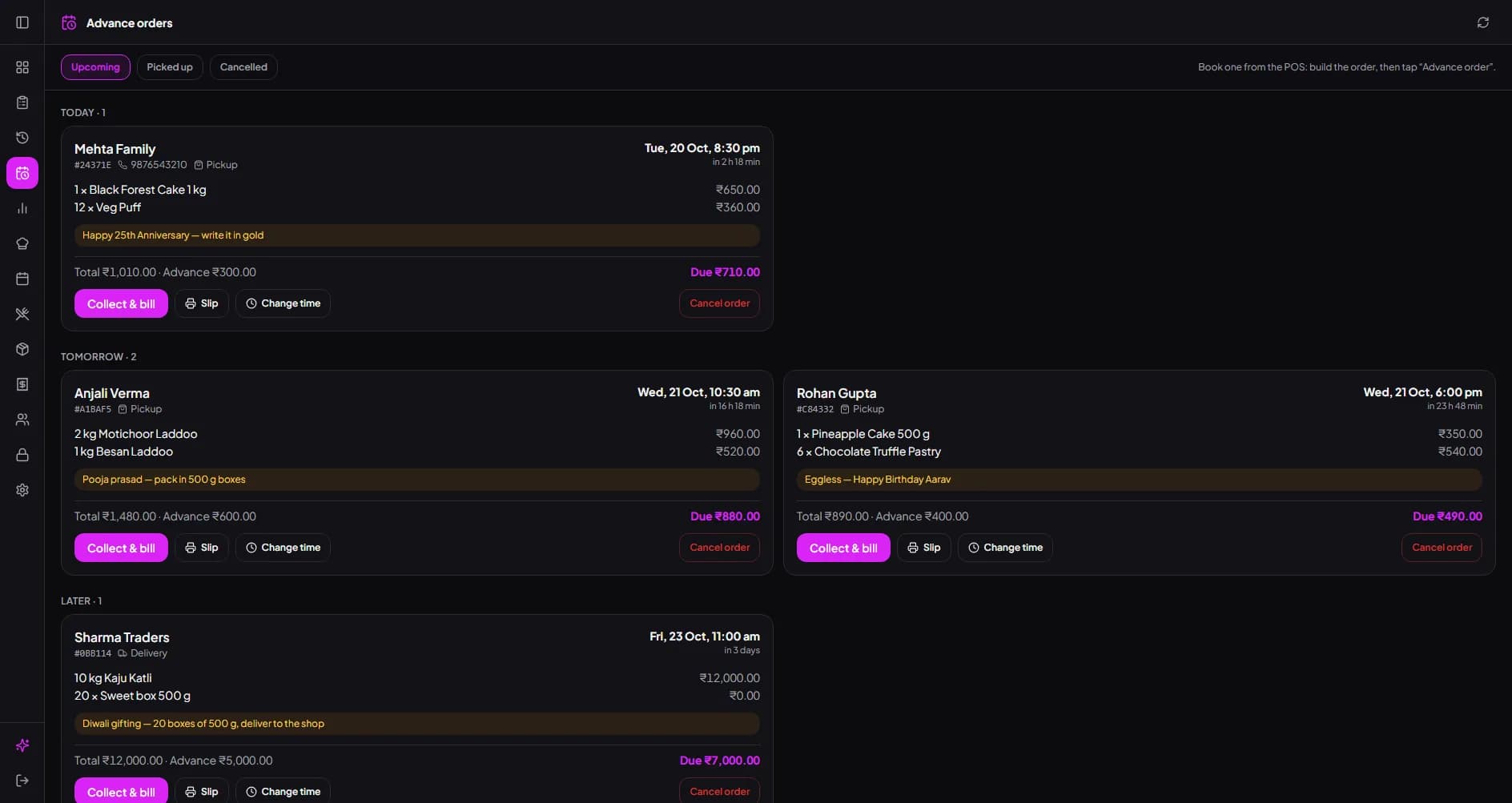
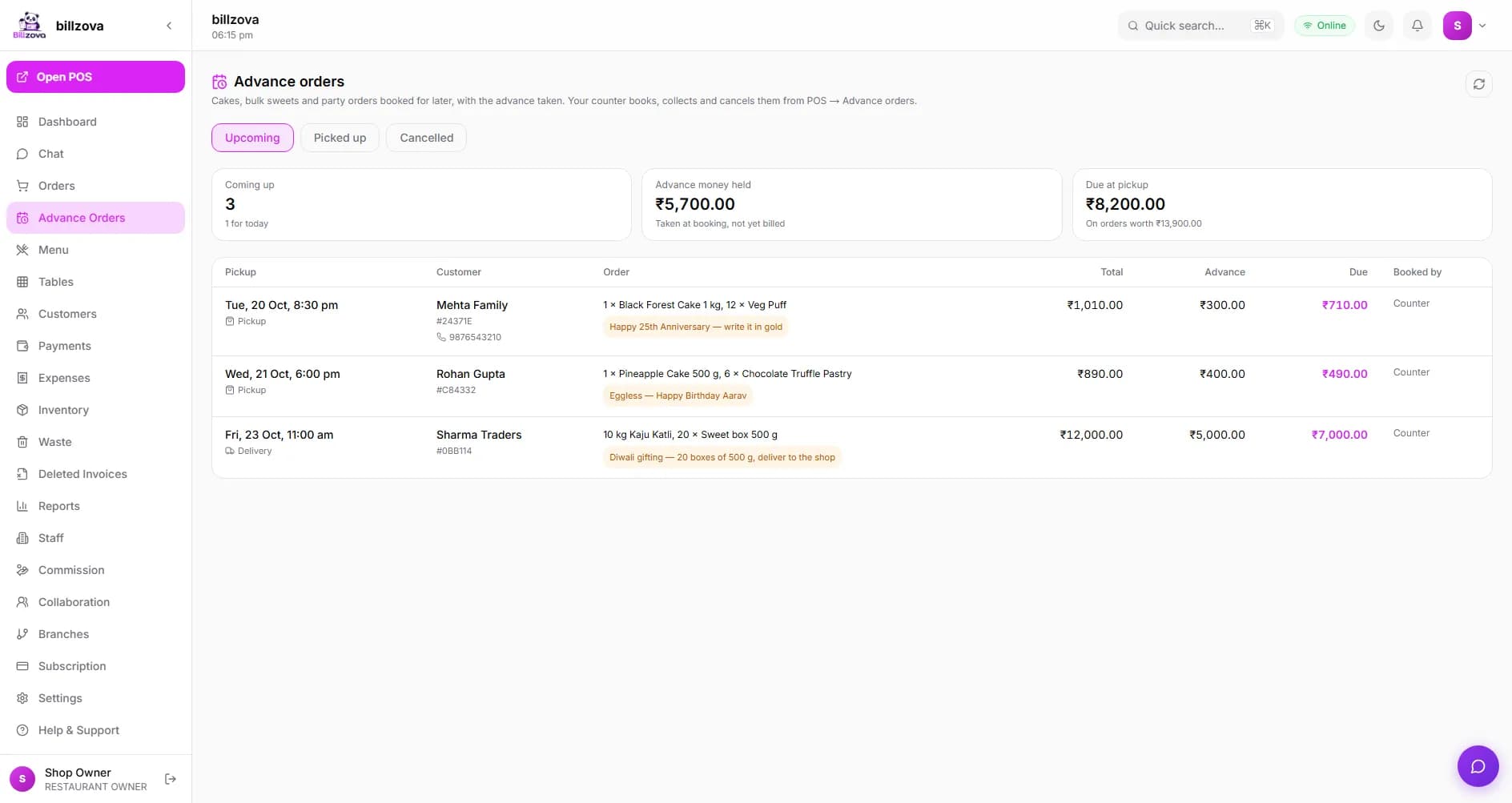
The Advance orders screen on every counter lists open orders by when they are due, with the advance taken and the balance left. Change the items, the pickup time or the notes when a customer calls; the new total can’t drop below the advance already taken.
- Grouped by overdue, today, tomorrow and later
- Advance and balance on every order
- Change items, time, notes or customer
- Upcoming, picked up and cancelled tabs
Collect only the balance — the bill shows the advance
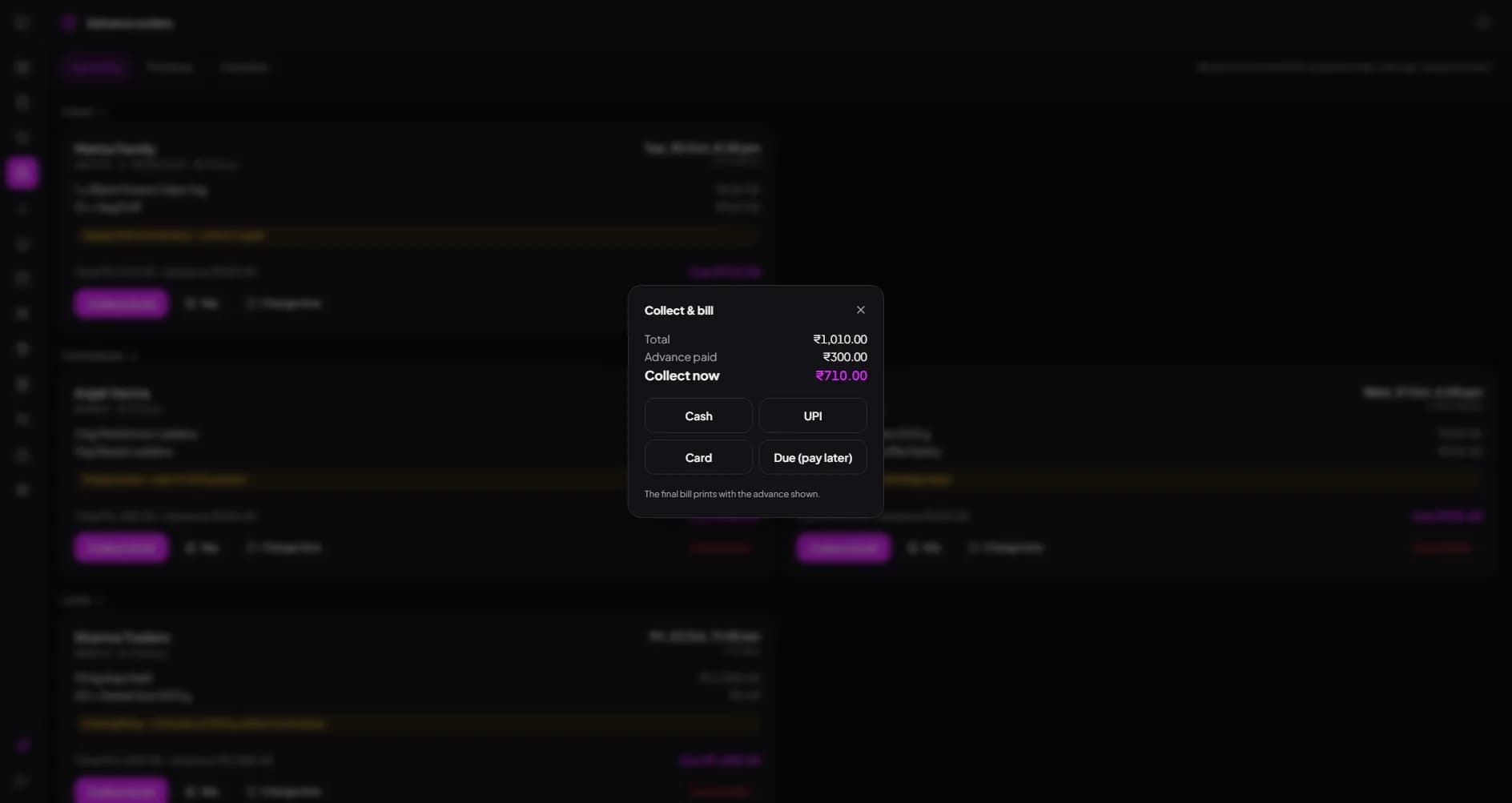
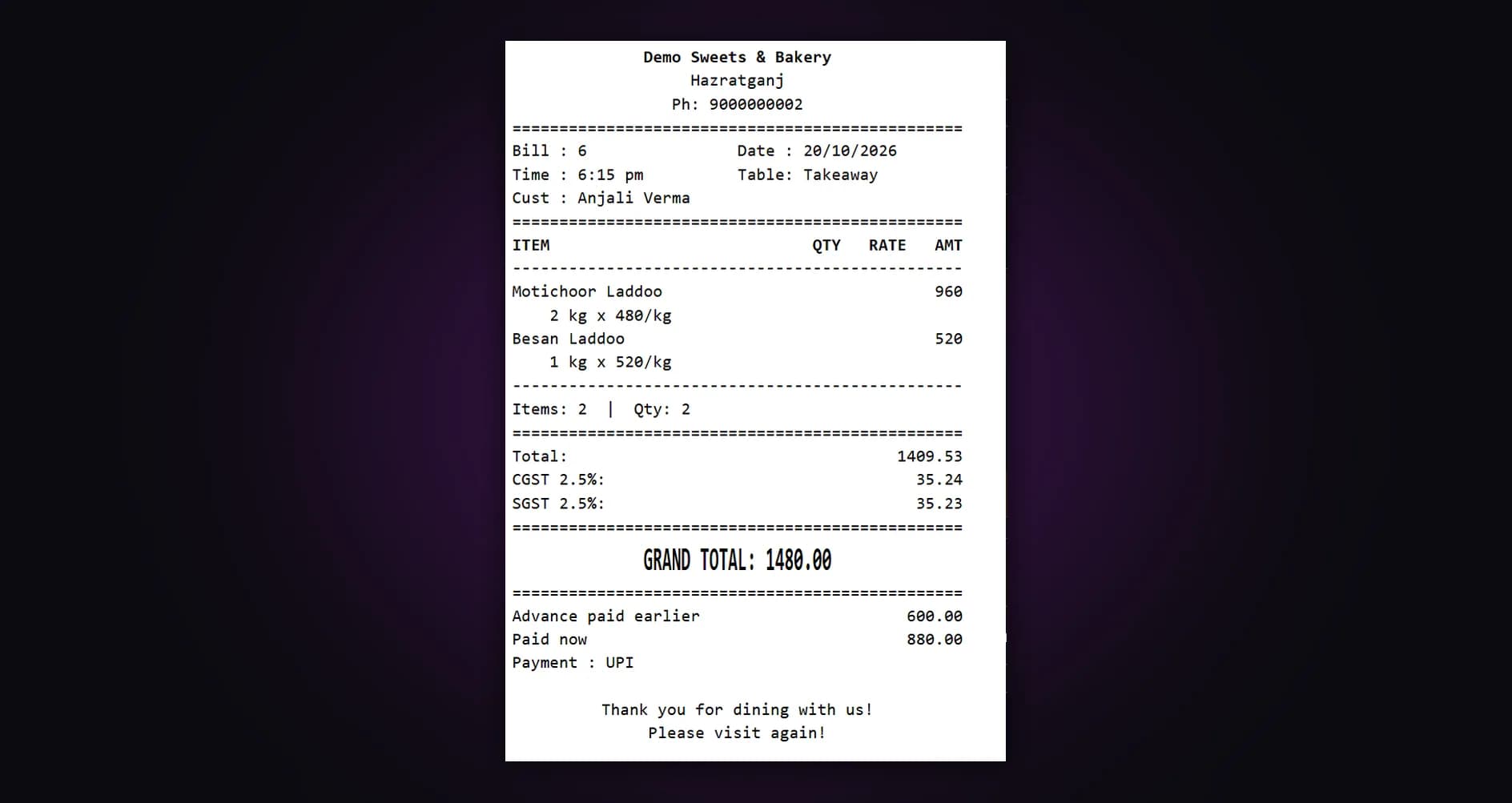
When the customer arrives, tap Collect & bill. billzova shows the total, the advance already paid and what to collect now. Take it by cash, UPI or card, or mark it due. The final bill prints with the advance on it, so there is no arguing over what was paid.
- Total, advance paid, collect now
- Cash, UPI, Card or Due (pay later)
- Final bill prints with the advance
- Cancelled? The advance is marked given back
Know how much advance money you are holding
The Advance orders page in your dashboard shows the advance money held — taken at booking, not yet billed — and what is still due at pickup. Picked-up orders are already in your sales; cancelled ones show the advance given back and are not counted. Branch and who booked it are on every order.
- Advance money held and due at pickup
- Picked up and cancelled, by date
- Who booked it, and at which branch
- From your phone or laptop
In the product
See every screen
Real product screenshots — not stock illustrations.
Compared
Order register vs billzova
Notebook by the counter
- Handwritten orders, easy to miss
- Advance mixed into the day’s cash
- Kitchen hears the details late
- Balance worked out at pickup
- Cancelled? Who gave what back?
billzova advance orders
- Every order due today on every counter
- Advance money held shown separately
- Kitchen slip prints at booking
- Collect & bill takes only the balance
- Cancelled advance marked given back
FAQ
Advance orders — frequently asked questions
How do I book an advance order in billzova?▾
What does the customer slip show?▾
How do I collect the balance when the customer comes?▾
Can I change an advance order after booking?▾
What happens if the customer cancels?▾
Does the advance show in my sales straight away?▾
Which apps can take advance orders?▾
Does it work offline?▾
Can I take an advance order on a dine-in table?▾
Does billzova send the customer a reminder?▾
Is it a paid add-on?▾
Take your next cake order properly.
Full access to every feature. Cancel anytime. ₹399/month after your free trial.