Opening a Second Restaurant Branch? Here's Your Multi-Location Checklist
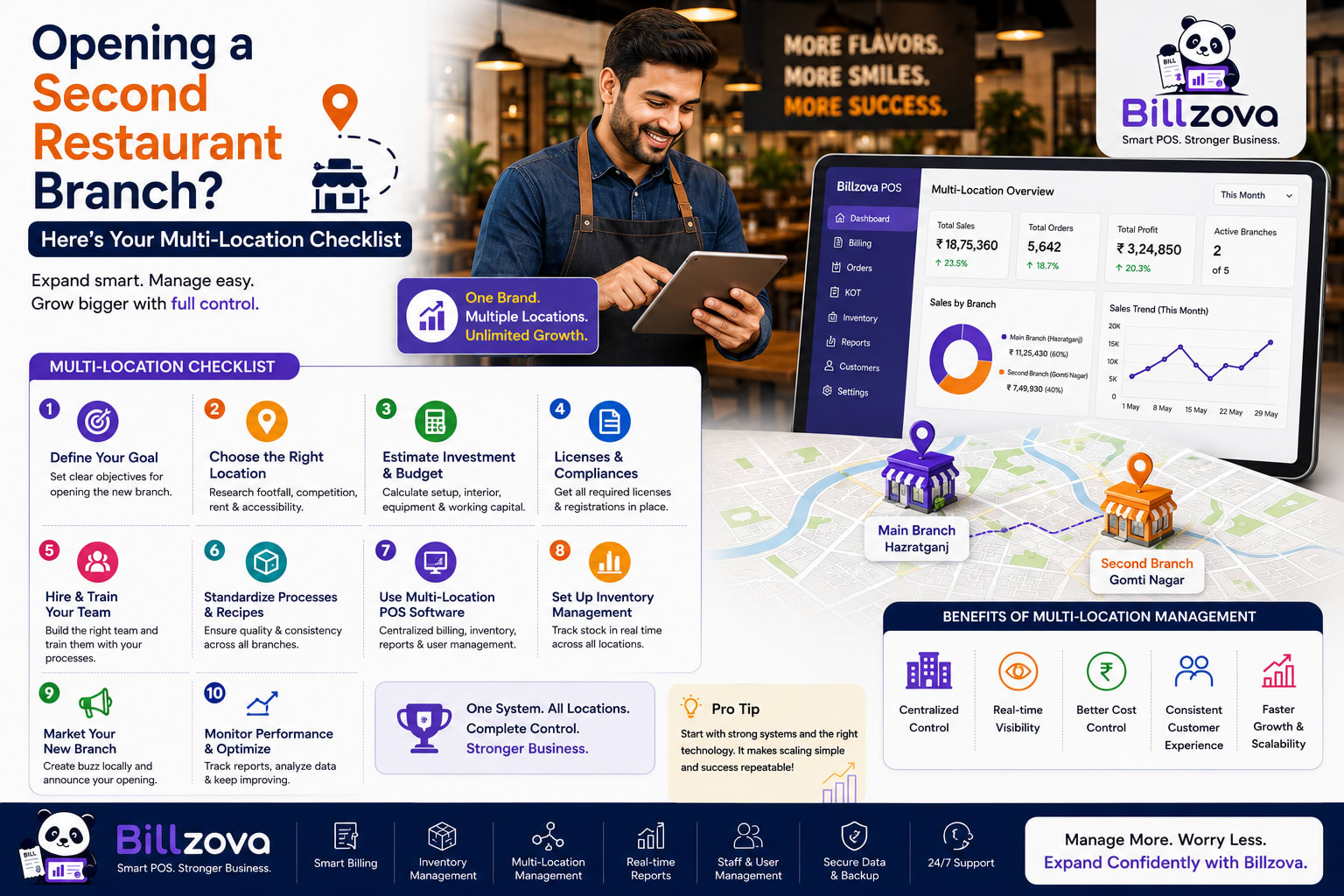
The first restaurant is hard in an obvious way — building a concept, a menu, a team, a customer base, all from nothing. The second branch is hard in a much less obvious way: everything that worked because you were personally there, watching, adjusting, remembering — all of that quietly stops scaling the moment there are two locations instead of one. A system built around one owner's direct attention doesn't multiply cleanly. It just runs out.
Sam Walton
Founder, Walmart
That's the real challenge of a second branch, stated plainly: building something that works well without you standing in it. This guide is a practical checklist for exactly that transition — what genuinely needs to be centralized, what should stay independent per location, and the specific operational gaps that catch most restaurants off guard the first time they try to run two kitchens instead of one.
Why a Second Branch Isn't Just "The Same Thing, Twice"
The instinct going into a second location is often to simply replicate the first one exactly — same menu, same processes, same everything, just in a new address. That instinct is mostly right, but it misses the actual operational shift: at one location, you personally are the consistency mechanism. You taste the food, you notice if a dish is priced wrong, you catch a staffing problem by walking the floor. At two locations, you're physically at one of them at any given moment, which means the other one needs systems doing the job your personal presence used to do.
This is the gap that catches most second-location owners off guard — not the big, obvious decisions like location and lease terms, but the dozens of small consistency mechanisms that were invisible because they lived entirely in one person's daily habits. None of it shows up on a checklist for signing a lease or hiring a chef, which is exactly why it tends to surface only after opening day, once the new branch has been running for a few weeks and small inconsistencies start compounding into something noticeable.
The Menu Consistency Problem
A menu price change, a new dish, a GST rate correction — at one location, you make the change once, in one place. At two locations without centralized menu management, you're making every single change twice, in two separate systems, and trusting that both got updated correctly and simultaneously. It's exactly the kind of repetitive manual task where drift creeps in silently — a price gets updated at the original location but forgotten at the new one, and nobody notices until a customer or an audit catches the mismatch.
A properly centralized menu structure flips this: manage the master menu from one place, push updates to every branch at once, while still allowing genuine local differences — a location-specific special, a regional item the other branch doesn't carry — as deliberate overrides rather than accidental drift. GST rate corrections, in particular, benefit enormously from central control, since a compliance-relevant number should never depend on two separate people remembering to update it in two separate places.
Reports: Consolidated View vs Per-Branch View
Two branches means two different questions you need answered, and a good reporting setup answers both without forcing you to choose. Sometimes you need the chain-wide number — total revenue across both locations, for a board meeting or your own overall sense of how the business is doing. Other times you need to know specifically how Branch B is doing compared to Branch A — which one has a higher average order value, which one is trending up or down, which one needs your attention this week.
| View | What It Answers | When You Need It |
|---|---|---|
| Consolidated | "How is the whole business doing?" | Overall performance review, big-picture decisions |
| Per-branch | "Which location needs attention?" | Comparing performance, spotting an underperforming outlet early |
| Item-wise across branches | "Does this dish sell the same everywhere?" | Menu decisions that should apply chain-wide vs stay local |
Without both views available, owners tend to default to whichever one their system makes easier — often consolidated, since it's simpler to look at one number. That default hides exactly the comparison that matters most for a growing chain: not "how are we doing overall," but "is the new branch performing the way the first one did at the same stage," which only a real per-branch view can actually answer.
The specific metrics worth comparing across branches are the same ones covered in our restaurant sales reporting guide — gross revenue, order count, average order value — just viewed side by side rather than in isolation. A new branch running meaningfully below the original location's numbers at the same number of weeks post-launch is a concrete, checkable signal, not just a feeling that "the new place feels slower."
A Price Change, Handled Two Ways
Take something as ordinary as a routine ingredient-cost-driven price adjustment on a popular dish, and trace it through both setups.
Without central menu management: The owner updates the price at the original location, where they happen to be that day. The update to the second branch depends on remembering to call, message, or visit — and if the week gets busy, that second update slips. For days, sometimes longer, the same dish is priced differently at two branches of the same restaurant, which customers occasionally notice and mention, awkwardly, at the counter.
With central menu management: The price is updated once, from wherever the owner actually is, and both branches reflect it within moments — no phone call, no separate login, no gap where the two locations disagree with each other. The owner didn't do anything differently in terms of effort; the system simply removed the step that used to require remembering and repeating a manual action.
The difference isn't about diligence — plenty of diligent owners still let this slip under a manual system, purely because remembering to do the same thing twice, every time, indefinitely, is a harder habit to maintain than it sounds like it should be.
Staff Access Across Branches — Who Sees What
A second location changes the staff-access question in a specific way: not just "who can see what," but "who can see which branch's data." A head-office role reasonably needs visibility across every location. A branch manager's job is running their own outlet well, which usually means their meaningful, day-to-day data is that branch's own performance, not a blended chain-wide number that doesn't tell them anything actionable about their own floor. Cashiers, as at a single location, generally only need their own session's activity.
Tip
This is really the same underlying principle covered in more depth in our staff management guide — roles and permissions matched to what a person's actual job requires — extended across physical locations rather than just job function. A branch manager's role at a multi-location restaurant is a variant of the same "give people exactly the access their job needs" logic, with location as an additional dimension alongside job function.
What Should Stay Independent Per Branch
Centralization is valuable, but not everything should be centralized — some things genuinely need to stay local, and getting this distinction wrong in the other direction creates its own problems. Each branch's day-to-day billing operation should run independently: its own table layout (a new location's floor plan is rarely identical to the original), its own inventory tracking (stock levels are a physical, local reality, not something meaningfully shared across locations), and critically, its own resilience to a local outage.
That last point matters more than it might seem. If a network issue or connectivity problem at one branch could bring down billing at the other branch too, you've built a single point of failure into what should be two genuinely independent operations. Each location's core billing should work regardless of what's happening — technically or operationally — at the other one, syncing centralized data (reports, menu updates) whenever connectivity allows, rather than depending on it moment to moment.
The Pre-Launch Checklist for a New Branch
Checklist
- Confirm the master menu is correctly set up and ready to push to the new location
- Set up the new branch's own table layout, matching its actual physical floor
- Register new branch staff with their own logins and roles — never reusing accounts from the original location
- Configure branch-specific settings: printers, local tax nuances if any, and any location-specific menu items
- Test that reporting correctly separates and also correctly consolidates data from both branches before opening day
- Decide, explicitly, who has chain-wide visibility versus branch-scoped visibility, rather than defaulting to "everyone sees everything"
- Run a trial day, if possible, before the first real service — confirm printers, staff logins, and menu items all work as expected under real conditions
Common Multi-Branch Mistakes
Treating the second branch's staff like an extension of the first branch's team. Even with the same owner and the same brand, a second location's staff are a genuinely separate team with their own dynamics, their own training needs, and their own access requirements — not simply more headcount added to the original roster.
Letting menu drift happen silently. Without deliberate central control, prices and items at the two locations gradually diverge — not from any decision, just from the accumulated effect of updates happening in only one place at a time.
Under-preparing for the first branch manager's independence. A branch manager who's never had to run a location without the owner physically present needs real preparation for that responsibility — a second branch is often the first time anyone in the business has had to operate genuinely independently, and that's a bigger adjustment than it sounds.
Not deciding reporting cadence in advance. How often will you actually check consolidated versus per-branch numbers? Without a real answer, "I'll check when I think of it" tends to mean checking only when something's already gone wrong, rather than catching a trend early.
When Is It Actually Time to Open a Second Branch?
There's no universal revenue or profit threshold that applies to every restaurant, but a few practical signals are worth checking honestly before committing. Is the first location's operation genuinely stable without your constant, daily intervention — or is it still quietly dependent on you catching problems personally? Do you have a real candidate for branch manager at the new location, someone who's already demonstrated they can run a shift independently and well? Is your current systems setup (menu, reporting, staff access) actually ready to be split across two locations, or would opening a second branch today mean building that infrastructure reactively, under pressure, after you've already signed a lease?
Answering these honestly before committing to a second location tends to matter more for how smoothly the expansion goes than almost any other single factor — a great location with weak underlying systems tends to struggle in ways a great system with a mediocre location often doesn't.
Pricing and Cost Considerations for a Second Outlet
Beyond the obvious costs — rent, fit-out, initial staffing — a second branch has a few less-obvious ongoing costs worth planning for explicitly: software and systems costs that now scale per location rather than being a one-time setup, the management overhead of actually reviewing two locations' worth of reports and performance regularly, and the real cost of the branch manager role itself, which is a genuinely different and typically more senior position than a single-location shift lead.
None of these should be surprising in hindsight, but they're commonly under-budgeted precisely because they're less visible than rent and fit-out costs during the initial planning phase.
The First 90 Days at a New Branch
Opening day is the visible milestone, but the first three months are where a new branch's real operating rhythm actually gets established — and where most of the systems-versus-instinct gaps from earlier in this guide first show up in practice.
Best Practice
- Compare weekly numbers against the original location's own first-90-days performance, not against its current, mature numbers
- Check menu consistency between branches at least weekly during this period — drift happens fastest early on, before habits settle
- Have a genuine, scheduled check-in with the branch manager beyond just reviewing numbers — ask what's actually hard about the job so far
- Watch for staff turnover specifically at the new branch — a higher early turnover rate there than at the original location is worth investigating, not just absorbing as normal "new location" noise
- Resist the urge to micromanage the new branch remotely — the whole point of this phase is building the branch manager's genuine independence, not replacing your physical presence with constant remote intervention instead
That last point is worth sitting with. It's tempting, especially early on, to call or message the new branch manager constantly — but the goal of the whole multi-branch transition is a location that runs well without your continuous attention. Checking in appropriately is different from substituting frequent remote oversight for the systems this guide is actually about building.
Frequently Asked Questions
Should the second branch have an identical menu to the first?
Not necessarily identical, but it should start from the same master menu with deliberate, tracked differences rather than two independently-maintained menus that drift apart from each other over time without anyone deciding that should happen.
Can a single owner realistically manage reports across more than two branches?
It depends heavily on whether reporting is set up to surface what actually needs attention, rather than requiring the owner to manually review every number for every branch individually. A well-designed consolidated-plus-per-branch view scales meaningfully better than trying to mentally track several separate systems.
Does each branch need its own separate internet connection and hardware setup?
Each branch needs its own independent, working setup regardless of what the other branch has — the specific hardware and connectivity details depend on your chosen system, but the principle of independent local operation matters regardless of the specifics.
How do I know if my branch manager is ready for the responsibility?
Look for someone who's already handled real, unplanned problems independently during a shift at your first location — actual demonstrated judgment under real conditions is a far better signal than tenure or a title alone.
What's the biggest operational difference between one branch and two?
The shift from "the owner personally catches problems" to "systems and delegated staff catch problems" — nearly every specific challenge covered in this guide traces back to that one underlying shift.
Should pricing be identical across branches in different areas of the same city?
That's a business decision based on your specific market and costs at each location, not a technical requirement either way — a good system should support identical pricing or genuine local variation, whichever fits your actual situation.
Is multi-branch software worth it before actually opening a second location?
It's generally easier to set up centralized menu and reporting structures before you need them urgently than to retrofit them after a second branch has already opened and started generating data in a separate, disconnected system.
Should inventory be shared or tracked separately across branches?
Tracked separately, as a general rule — stock levels are a physical reality specific to each location's actual storage and usage, and treating them as a shared pool tends to create confusion about what's actually available at which branch on a given day.
How do I handle a menu item that only makes sense at one location?
A per-branch menu override handles exactly this — a location-specific item stays out of the shared master menu while the rest of the menu remains centrally managed and consistent across every branch.
What happens to reporting if one branch's internet goes down temporarily?
A properly independent branch setup continues billing offline regardless, with that branch's data syncing into the consolidated reports once connectivity returns — a temporary outage at one location shouldn't mean lost sales data or a gap in that day's reporting.
Can I open a third or fourth branch using the same approach?
Yes — the same principles (centralized menu and reporting, independent per-branch operations, access scoped to what each role actually needs) scale the same way from two branches to several, though the management overhead of actually reviewing more locations' data does grow and is worth planning for as the chain expands.
The Bottom Line
A second restaurant branch succeeds or struggles based on how well the business replaces the owner's personal, daily attention with real systems — centralized where consistency matters, independent where local resilience matters, and with reporting that actually shows you which location needs a closer look instead of one blended number that hides the real picture.
billzova's multi-branch management (switched on for your account on request) gives each outlet its own POS and staff logins, with consolidated reporting, central menu control, and branch-scoped access — on a Custom plan priced to your number of outlets (a single location is ₹399/month, first month free). The goal isn't replacing what made your first location work — it's making sure that same discipline can actually run at a second location without you having to be physically present to enforce it every day.
Billzova Team
Restaurant POS & Billing Experts
We build Billzova — GST billing, KOT, offline mode, inventory and reports for Indian restaurants. This team writes from what we see helping real restaurants bill faster every day.
Run your restaurant on billzova
GST billing, KOT, offline mode, inventory & reports in one app. ₹399/month — first month free.