How KOT Software Works: Complete Guide | Billzova POS
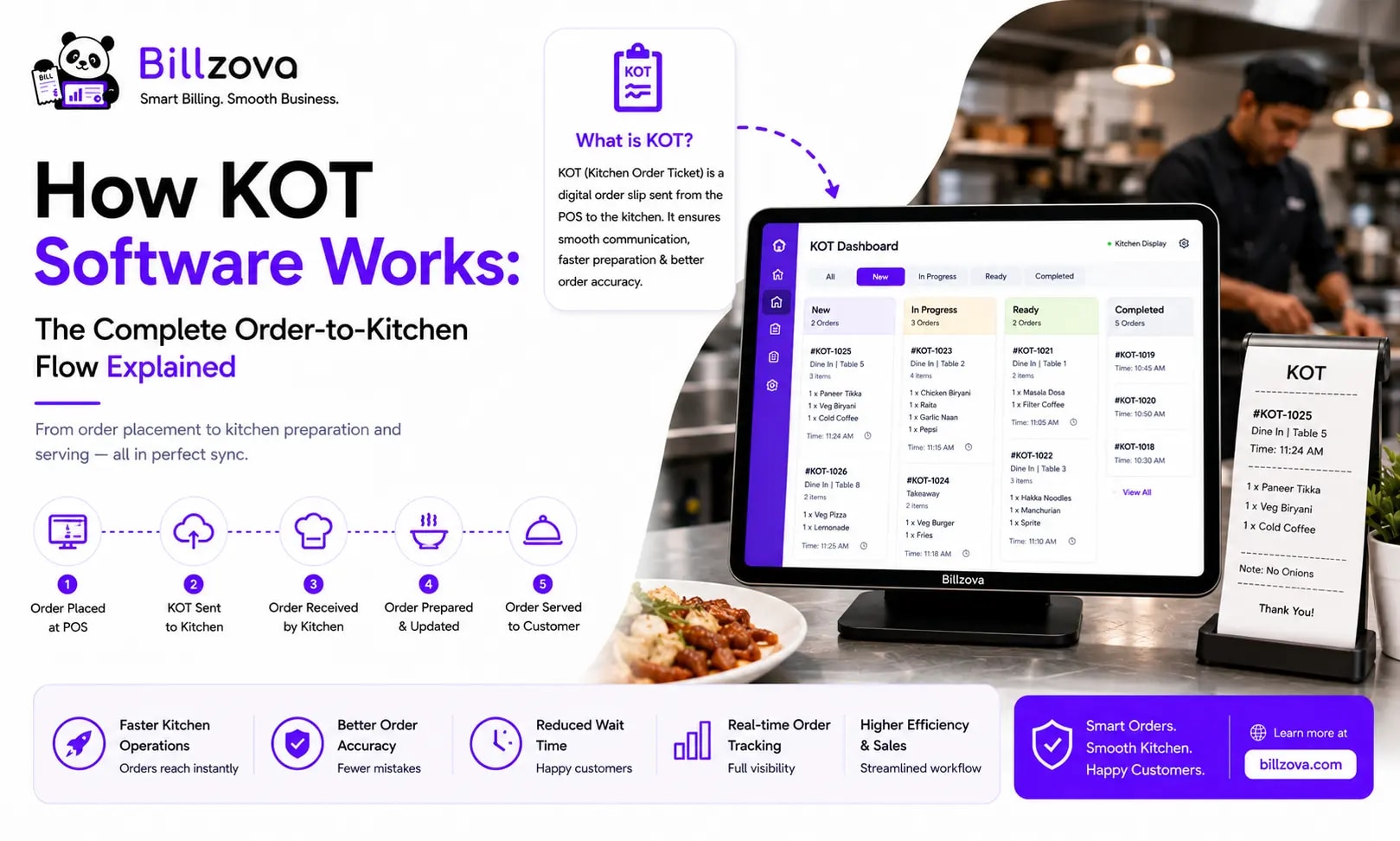
How KOT Software Works: The Complete Order-to-Kitchen Flow Explained
"KOT software" gets talked about as a single feature, but it's actually a small pipeline of steps happening in sequence, often within a second or two of an order being placed. Understanding exactly how that pipeline works — not just that it exists — helps you evaluate whether a system is actually built well, or just has a "KOT" checkbox ticked on a feature list.
This article walks through the mechanics step by step: what happens the moment an order is entered, how it reaches the kitchen, the difference between a printed ticket and a kitchen display system, and how the whole process connects back to billing and inventory.
Table of Contents
- What a KOT Actually Is
- The Complete Order-to-Kitchen Flow, Step by Step
- Printed KOTs vs Kitchen Display Systems
- How Station Routing Works
- Multi-Brand Routing for Cloud Kitchens
- How KOT Generation Connects to Inventory
- What Happens to KOT Printing Without Internet
- Common Mistakes in KOT Setup
- Best Practices for a Reliable KOT Flow
- Where KOT Technology Is Headed
- Frequently Asked Questions
- Conclusion
What a KOT Actually Is
A Kitchen Order Ticket (KOT) is the instruction set the kitchen receives for a specific order — which items, what quantities, any modifications, and which table or order number it belongs to. Historically this was a handwritten slip carried from the counter to the kitchen. In a software-driven system, it's generated automatically the moment an order is entered, removing the manual handoff entirely.
The "software" part isn't just digitising a piece of paper — it's the logic that decides what gets sent, to which station, in what format, and how that ticket's status (pending, in progress, complete) gets tracked afterward.
The Complete Order-to-Kitchen Flow, Step by Step
- Order entry. A staff member selects items on the billing screen — for a table, a takeaway counter, or a delivery order — and confirms the order.
- KOT generation. The system immediately compiles a ticket containing the ordered items, quantities, any special instructions, and the order's identifying reference (table number, order number, or delivery ID).
- Routing decision. The system checks which kitchen station each item belongs to — grill, dessert, beverage, and so on — and either splits the ticket into multiple station-specific tickets or routes the full ticket to wherever it's configured to go.
- Delivery to the kitchen. The ticket either prints on a thermal printer at the relevant station, appears on a kitchen display screen, or both, depending on how the kitchen is set up.
- Status tracking. As kitchen staff begin and complete preparation, the ticket's status updates — either manually marked complete on a display system, or implicitly assumed complete once printed (in printer-only setups).
- Completion and serving. Once all stations have completed their portion of the order, it's ready to serve, and the front-of-house staff are notified — directly through the system if using a display, or by walking to check if relying purely on printed tickets.
The entire sequence, from order entry to the kitchen receiving the ticket, should take a second or two in a properly built system — there's no reason for any meaningful delay between a staff member confirming an order and the kitchen seeing it.
Printed KOTs vs Kitchen Display Systems
There are two mechanisms for actually delivering the KOT to kitchen staff, and they work differently under the hood:
| Aspect | Printed KOT | Kitchen Display System (KDS) |
|---|---|---|
| Delivery mechanism | Physical ticket via thermal printer | Live order screen mounted in the kitchen |
| Status visibility | None — a printed ticket looks the same whether it's 1 minute or 15 minutes old | Live, often with urgency timers flagging aging orders |
| Risk of loss | Tickets can fall, get buried, or be misplaced | No physical ticket to lose |
| Hardware dependency | Requires a working thermal printer per station | Requires a screen, but no consumable paper or printer maintenance |
| Best suited for | Kitchens that want a physical, line-cook-friendly ticket to work from | Higher-volume kitchens needing aging visibility and multi-brand separation |
Many kitchens run both simultaneously — a live display for overall visibility and urgency tracking, plus a printed ticket at the station itself for the cook actually plating the dish. This isn't redundant; it serves two different practical needs at once.
How Station Routing Works
For kitchens with more than one preparation area — a grill station, a dessert station, a beverage station — the KOT system needs to know which menu items belong to which station. This is typically configured once, when the menu is set up: each item is tagged with its station, and the system uses that tag to decide where each part of an order goes.
When an order containing items from multiple stations comes in, a well-built system splits it automatically — the grill station sees only the grill items, the dessert station sees only the dessert items — rather than every station seeing a full ticket and having to mentally filter out what's relevant to them. This is the difference between routing actually working and a system that just prints everything everywhere.
Multi-Brand Routing for Cloud Kitchens
Cloud kitchens running multiple delivery-only brands from one physical kitchen face a version of the same routing problem, but across brands instead of stations. An order for "Brand A" and an order for "Brand B" both arriving at the same kitchen need clear visual or physical separation, or staff risk mixing up which order belongs to which brand — particularly damaging since each brand may have entirely different packaging and branding requirements for the same physical dish.
Properly built multi-brand routing tags each order with its source brand and displays or prints that distinction clearly, rather than treating every order as identical regardless of origin. See our cloud kitchen POS guide for more on how this connects to broader cloud kitchen operations.
How KOT Generation Connects to Inventory
In an integrated system, KOT generation and inventory deduction happen from the same order entry — not as two separate processes. The moment an order is confirmed and a KOT generates, the system also looks up the recipe for each item and deducts the corresponding raw material quantities from stock.
This matters because it means inventory accuracy depends entirely on whether orders go through the KOT system properly. If staff bypass the system for any reason — taking a verbal order directly to the kitchen without entering it — that sale won't deduct from inventory, creating a quiet but real accuracy gap over time. See our restaurant inventory software guide for more on how this integration works in practice.
What Happens to KOT Printing Without Internet
This is where architecture matters more than feature lists suggest. In a cloud-dependent system, KOT generation can stall entirely if the connection drops, because the order has to round-trip to a server before a ticket gets created. In a genuinely offline-first system, KOT generation happens locally on the device taking the order — no round-trip required — and only the eventual sync to the cloud (for reporting, multi-branch visibility, etc.) depends on connectivity.
The practical difference: in an offline-first system, a kitchen never notices an internet outage at all during service. In a cloud-dependent one, an outage means falling back to verbal orders or handwritten tickets until the connection returns.
Common Mistakes in KOT Setup
- Not configuring station tags for every menu item. Untagged items often default to printing everywhere, defeating the purpose of routing.
- Relying purely on printed tickets with no aging visibility. Without urgency timers or a display, slow orders are only caught if someone happens to notice.
- Skipping multi-brand tagging in cloud kitchens. Treating every order identically regardless of brand source increases the risk of packaging or branding mix-ups.
- Assuming offline behavior without testing it. Many owners discover their KOT system is cloud-dependent only during an actual outage, rather than confirming this beforehand.
Best Practices for a Reliable KOT Flow
- Tag every menu item with its correct kitchen station during setup, not as an afterthought after launch.
- If running multiple brands from one kitchen, confirm visual or physical separation is configured and tested before going live with real orders.
- Test offline KOT generation deliberately — disconnect the internet yourself and confirm tickets still print or display correctly.
- If using a kitchen display, train staff specifically on marking orders complete, since an unmarked but finished order can create false urgency flags later.
- Periodically review timing data from the KOT system to spot recurring bottlenecks at specific stations.
Where KOT Technology Is Headed
- More sophisticated urgency and prioritisation logic, factoring in order complexity rather than just elapsed time.
- Tighter multi-brand and multi-channel routing as cloud kitchens and hybrid dine-in/delivery models continue growing.
- Reduced reliance on physical printers in higher-volume kitchens, as display-based systems become more affordable and reliable.
Frequently Asked Questions
What does KOT stand for, and what does it actually do?
KOT stands for Kitchen Order Ticket. It's the instruction sent to the kitchen detailing what was ordered, in what quantity, and any special instructions — generated automatically the moment an order is entered.
How fast should a KOT reach the kitchen after an order is placed?
In a properly built system, within a second or two. Any noticeable delay usually points to a cloud round-trip dependency or a configuration issue.
What's the difference between a KOT printer and a kitchen display system?
A KOT printer produces a physical paper ticket per order. A kitchen display system shows live orders on a screen, with status tracking and often urgency timers — no physical ticket involved.
Can I use both a printer and a display system at the same time?
Yes, and many kitchens do — a screen for overall visibility and timing, plus a printed ticket at the station for the cook physically preparing the dish.
How does station routing work for kitchens with multiple sections?
Each menu item is tagged with its kitchen station during setup. When an order comes in, the system automatically routes each item to the correct station rather than sending the full ticket everywhere.
Does KOT software work without internet?
It depends on the architecture. Offline-first systems generate KOTs locally on the device, with no internet dependency. Cloud-dependent systems may stall or fail without a connection.
How does KOT generation connect to inventory tracking?
In an integrated system, the moment a KOT generates, inventory automatically deducts the recipe quantities for each ordered item — from the same order entry, not a separate manual step.
Can KOT software handle multiple delivery brands from one kitchen?
Yes, when properly built — each order is tagged with its source brand, and the kitchen sees clear separation between brands to avoid packaging or preparation mix-ups.
What happens if a staff member bypasses the KOT system and tells the kitchen verbally?
That order won't generate a digital ticket or deduct inventory automatically, creating a gap in both kitchen visibility and stock accuracy — which is why consistent use of the system matters operationally, not just for convenience.
Is a kitchen display system more reliable than a printer?
It removes printer-specific failure points (paper jams, running out of paper, hardware issues) but introduces its own dependency on a working screen — neither is universally more reliable; it depends on your specific setup and maintenance.
Does Billzova's KOT system support both printing and a live display?
Yes — Billzova supports printed KOTs, a live kitchen display, or both together, with automatic station and multi-brand routing included standard.
Conclusion
KOT software isn't a single feature so much as a small, fast pipeline — order entry, routing logic, delivery to the kitchen, and a connection back to inventory — that should happen within a second or two, every time, regardless of internet connectivity. Understanding that flow makes it much easier to spot the difference between a system that genuinely handles it well and one that's just checking a feature-list box.
Billzova's KOT system generates instantly from the same order entry as billing, supports both printed tickets and a live kitchen display, routes automatically by station and brand, and works fully offline. Start a free first month to see the flow on your own menu, or talk to our team about your specific kitchen layout.
Billzova Team
Restaurant POS & Billing Experts
We build Billzova — GST billing, KOT, offline mode, inventory and reports for Indian restaurants. This team writes from what we see helping real restaurants bill faster every day.
Run your restaurant on billzova
GST billing, KOT, offline mode, inventory & reports in one app. ₹399/month — first month free.